FINAL SET UP
18
15. SETTING OF COURTESY LIGHT TIME
The preset courtesy light time on the door opener is 3
minutes. This time can be changed by the following:
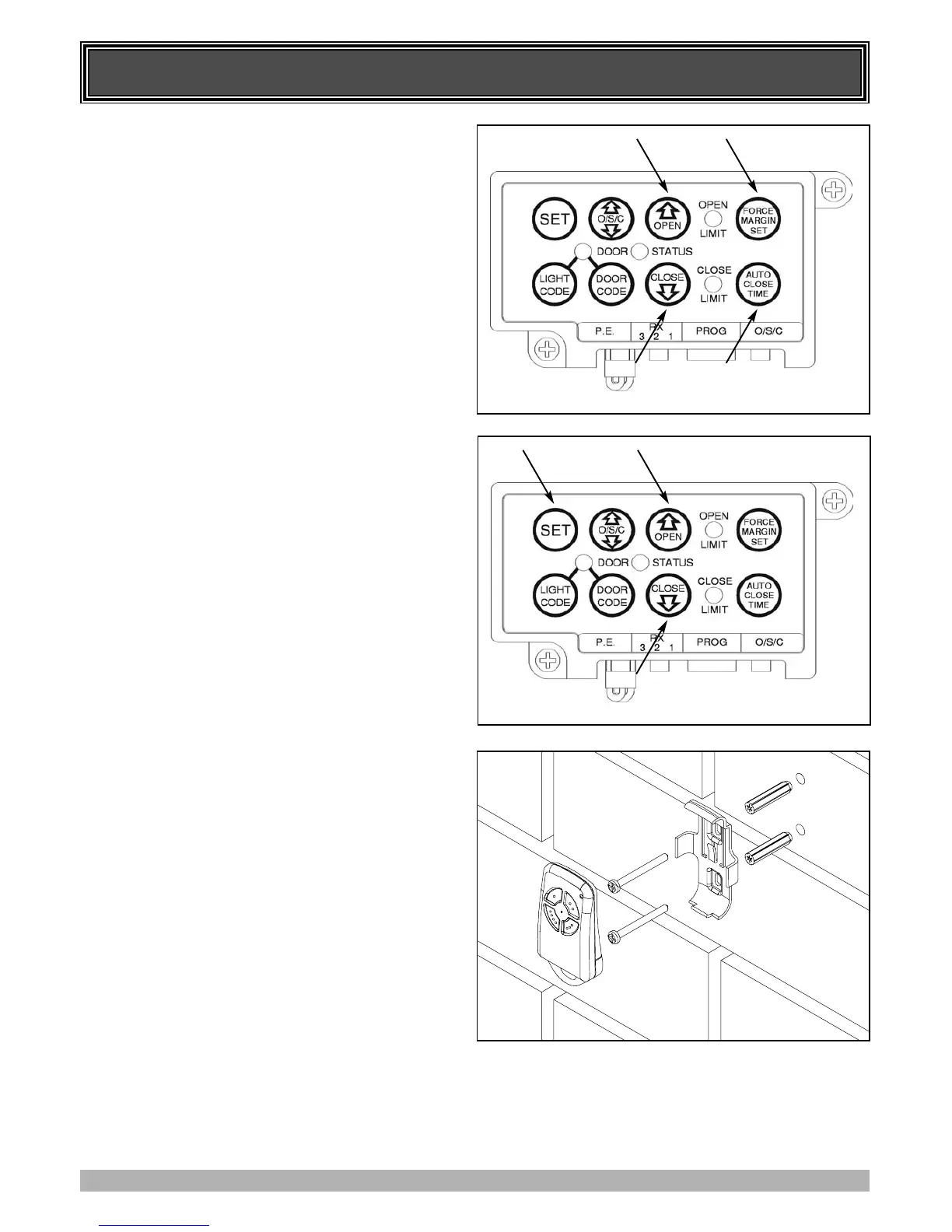
1. Press in and hold both the Auto Close Time button and Force
Margin Set button (Fig. 27).
2. While holding in the two buttons, press the Open button
(Fig. 27). Each press of the button will add 10 seconds to the
light time.
3. To decrease the time follow Step 1 and press the Close
button (Fig. 27). Each press will deduct 10 seconds from the
light time.
4. To recall the factory set default light time press in and hold
together the Auto Close Time button, the Force Margin Set
button and the Set button for about 2 seconds. Release all
buttons, the factory set default of 3 minutes will be recalled.
16. SETTING THE PET MODE DOOR
OPENING POSITION.
The default PET (Pedestrian) position is about 1/4 turn of the
door drum above the closed position. The PET mode status is
indicated by both the Open and Close Limit LED’s being
illuminated. The default position can be changed by the
following:
1. Make sure the door is in the closed position. Press and hold
the Open button for six (6) seconds (Fig. 28), you should
hear three beeps and the Open and Close LEDs will flash
rapidly.
2. Press the Open and Close buttons (Fig. 28) to move the door
to your required new pet open door position.
3. Press the Set button (Fig. 28) to record the new position.
The Pet mode is activated from a transmitter button coded to
that function. When activated the door drives to the preset
position from either above or below. If the Pet button is pressed
while the door is moving the door will be stopped. If the Pet
button is pressed when the door is in the Pet position, then the
door will be closed. No auto close is enabled.
17. INSTALLATION OF WALL MOUNTED
TRANSMITTER HOLDER
1. Mount the holder in a location out of reach of children (at
least 1.5m from the floor) and convenient to the customer.
(Fig. 29). Make sure the door is visible from this location.
2. The transmitter can be easily clipped in and removed from
the holder as required.
3. To set the transmitter codes refer to Step 9.
18. RE-INITIALISING THE OPENER
To re-initialise the opener press and hold the Set Button for two
(2) seconds, the beeper will sound once. The door will start to
move and re-calculate force margins. The door can move
between the open and close limit positions up to four (4) times
(depending on the position of the door and the power up
condition). A single beep will be heard once the initialisation is
complete. The door is now ready for use.
FIG. 27
FIG. 29
FIG. 28



 To Next Page