20
GDO-8V3 Shed Master Instruction Manual
6.12 Coding a Transmitter
6.12.1 Storing the Transmitter Code
The opener can only operated from remote control transmitters
that have been programmed into its memory. Up to 64 codes
can be stored in the memory.
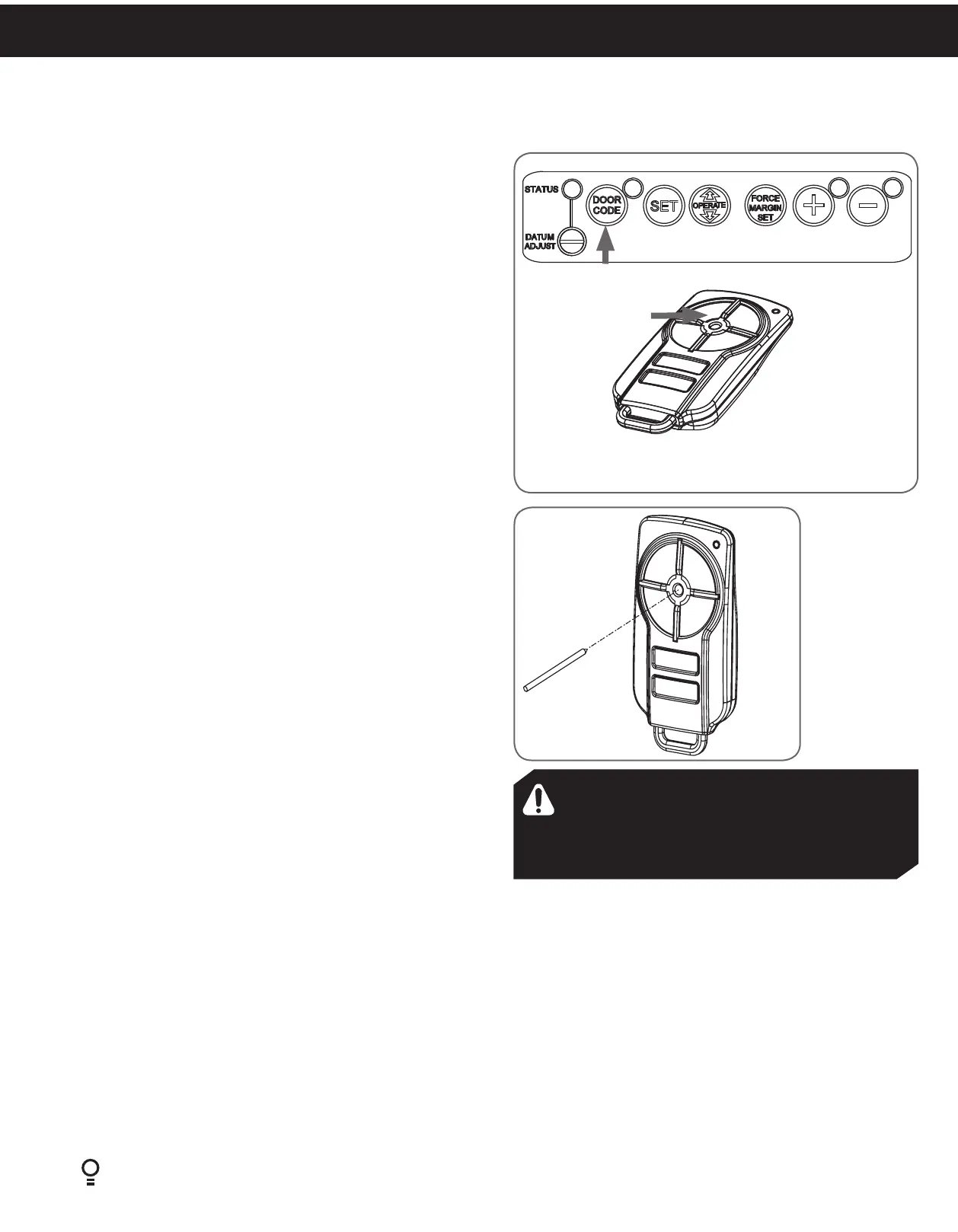
a. Press and hold the DOOR CODE button.
b. Press Button 1 on the transmitter for two seconds. Release
and pause for two seconds. Press the Button 1 again for two
seconds.
c. Release the DOOR CODE button. The transmitter button is
now coded, press to test.
6.12.2 Coding a Transmitter to Enable Vacation Mode
The opener can be programmed into a “Vacation Mode” where
the opener will not respond to any transmitter except the button
of the transmitter that was programmed for vacation mode.
a. Briefly press the DOOR CODE button once, then press it
again and hold (will beep two times on second press).
b. Press one of the four (4) buttons on the transmitter for two
(2) seconds, pause for two (2) seconds, then press the same
button again for two (2) seconds.
c. Release DOOR CODE button.
d. Press and hold the transmitter button for six (6) seconds to
set Vacation Mode. The door code LED will stay lit while
Vacation Mode is active.
e. To reset Vacation Mode, press the same button for two
seconds.
6.12.3 Remotely Coding Transmitters
Using this method transmitters can be coded without access to
the opener’s control panel as long as a pre-coded transmitter
is available.
a. Take any pre-coded transmitter. Press the button for the
function to be duplicated and release.
b. Using a small needle / pen, press and hold firmly for two
seconds the middle button, through the Coding Hole.
c. Within ten (10) seconds take the additional transmitter you
wish to code. Hold the new transmitter’s button for two
seconds, pause for two seconds, hold again for two seconds
and then release.
d. Wait for ten (10) seconds and then press the new transmitter’s
button to test.
6.12.4 Erasing a Stored Transmitter Code
a. Select the transmitter you want to delete.
b. Press and hold the DOOR CODE BUTTON.
c. Press the transmitter button you would like to delete for two
seconds, pause for two seconds, press again for two seconds
and then release.
d. Release the DOOR CODE BUTTON. The code should now
be deleted. Confirm this by pressing the transmitter button
- the function (e.g. door opening) should not respond.
Button 1
6.12.5 Erasing All Transmitter Codes
a. Turn off power to the opener.
b. While switched off, press and hold the DOOR CODE
BUTTON. Turn on power to the opener while holding this
button.
c. The OPEN LIMIT, CLOSE LIMIT and DOOR STATUS LEDs
will illuminate for about five seconds. These LED’s will turn
off and the CODING LED will illuminate.
d. Release the DOOR CODE BUTTON. All stored codes will
now be deleted. Confirm this pressing buttons on any
previously coded transmitters - the opener should not
respond.
Fig.6.20
Fig.6.19
WARNING! The manufacturer is not responsible
for any radio or TV interference caused by
unauthorized modifications to this equipment.
Such modifications could void the user’s
authority to operate the equipment.


 To Next Page