ATS Series Installation Manual13
14. Auto-Close & Accessories
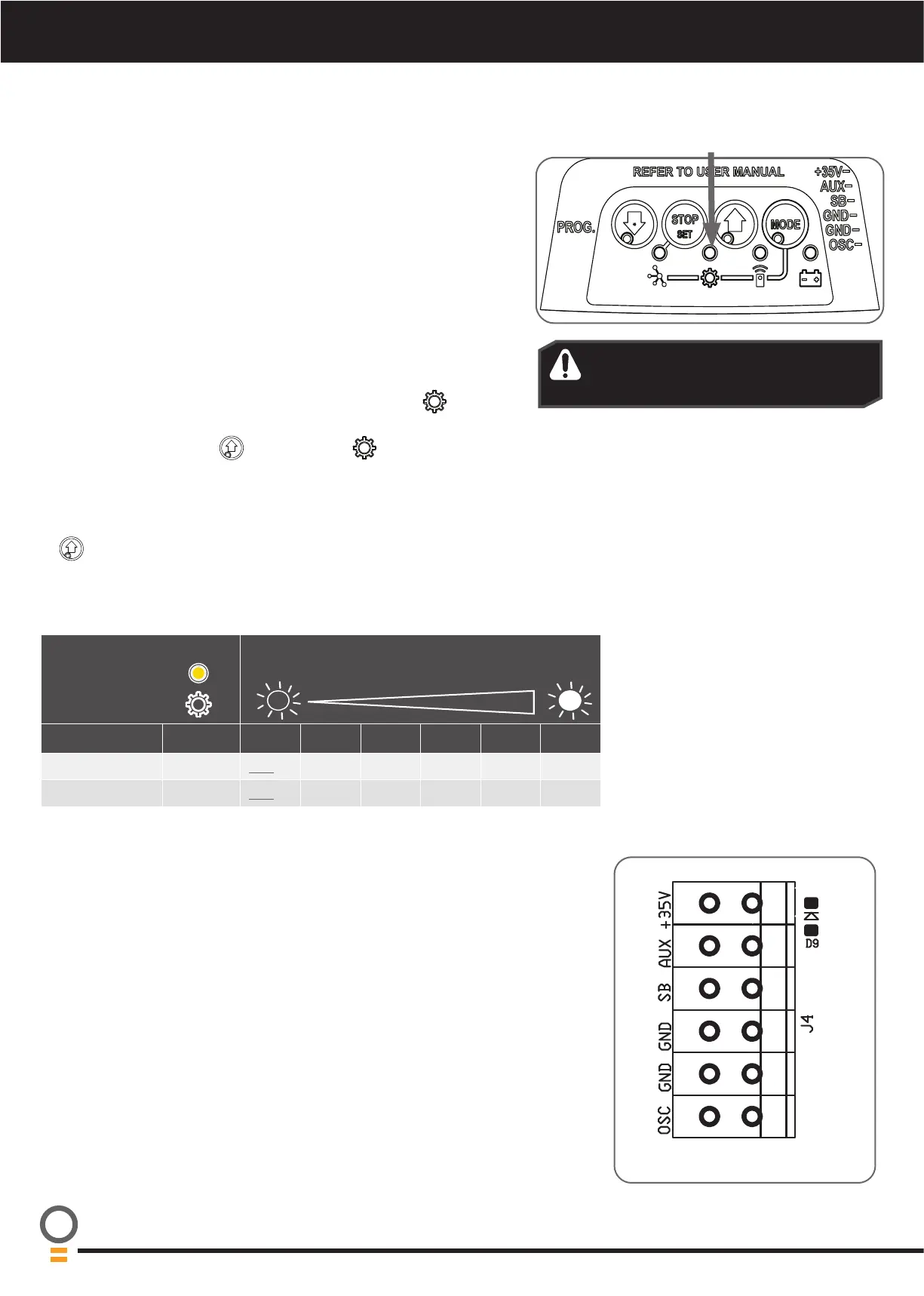
Parameter Value options = Indicated by brightness of
main light (DEFAULT parameter underlined)
Name Flashes 1 2 3 4 5 6
PE AUTO-CLOSE 2 OFF 15sec 30sec 60sec 90sec -
AUTO-CLOSE 3
OFF 15sec 30sec 60sec 90sec 120sec
WARNING! It is compulsory to have
Safety Beams installed when using
Auto-Close mode.
14.1 Auto-Close
Auto-Close mode is a function that automatically closes the door after
a pre-set time. Safety beams must be installed in order to run the Auto-
Close function. There are two types of Auto-Close available:
i. Standard auto-close - the door will Auto-Close after a programmed
time. In this mode the timer starts to countdown as soon as the
door is fully open. This function is useful in case the safety beam
does not get triggered.
ii. Safety Beam triggered auto-close - the door will auto-close after
a programmed time. In this mode the timer starts counting down
only when the safety beam is triggered. ie car leaving the garage.
To enable the Auto-Close function:
a. Press the MODE button repetitively until the GEAR
LED starts
flashing.
b. Press the OPEN button
until the GEAR LED flashes:
i. two (2) times to get to PE auto-close or
ii. three (3) times to get to standard auto-close.
c. Press STOP / SET button to enter parameter.
d. The default setting for Auto-Close is OFF. Press the OPEN button
to move through options and the light’s brightness will change
accordingly.
e. Press STOP / SET button to save the parameter’s new value or press
MODE to leave the value unchanged.
14.2 Terminal Block
Wired accessory items can be connected to the terminal block J4.
Terminal connections from top down are as follows:
a. +35V (Auxillary)
b. AUX (Auxillary)
c. SB (Safety Beam input, mandatory);
d. GND (Common ground for accessories and Safety Beam);
e. GND (Common ground)
f. OSC (Open/Stop/Close trigger)
14.3 Connecting or Disconnecting Accessories
When disconnecting or reconnecting accessory base station modules
(Wireless PE Beams) press the MODE button on the opener repetitively
until the GEAR LED is on, then press the STOP / SET button until the main
courtesy light stops flashing.




 To Next Page