DPM1 User Manual, 1st Edition
User Manual - DPM1 Series Panel Meters
7
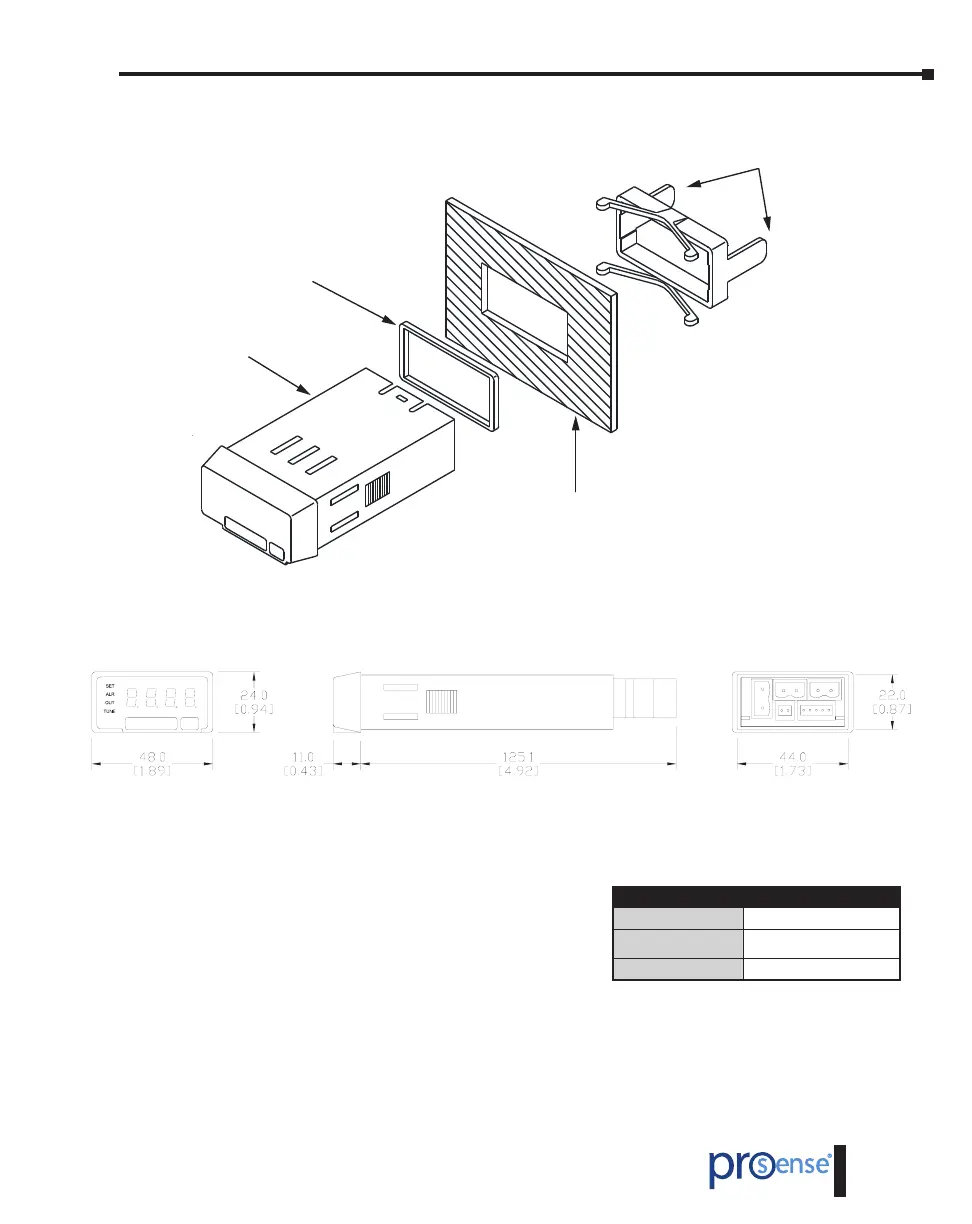
Dimensions and Mounting
Fixing clip
Sealing gasket
DPM1 Meter
Panel mounting surface
Installation
To install the instrument, prepare a 45mm x 22mm
panel cut-out and slide the unit inwards making sure
to place the sealing gasket between the front side panel
and the front bezel.
While holding the unit in place, put the fixing clip
around the case and slide it until it reaches the panel
at the rear side.
Press slightly to fasten the clips to the latching slots on the case and get the unit fully assembled
and close fitted to achieve a good seal.
To remove the instrument from the panel, pull the rear fixing clips latching tabs outwards until
they are disengaged, then slide the fixing clips back over the case.
Installation
Dimensions
48 x 24 x 125.1mm (1/32 DIN)
Panel Cutout
45 x 22mm
(Max. panel thickness 7mm)
Case Material
Polycarbonate UL 94 V-0


 To Next Page
 Loading...