Need help?
Do you have a question about the Autonics TZ4ST-24R and is the answer not in the manual?
Details key features like Dual PID auto tuning, high display accuracy, and multi-input functionality.
High-speed response PID control to minimize overshoot and achieve desired values quickly.
Information on the comprehensive device management program for parameter management and data monitoring.
Guide to selecting and configuring the controller model based on various options.
Covers input types (TC, RTD, Analog), display accuracy (±0.3%), method, and character size.
Details control outputs (Relay, SSR, Current), optional outputs (Event, PV transmission), and communication.
Lists optional communication converters: Wi-Fi, USB to RS485, and RS232C to RS485.
Details thermocouple types (K, J, R, etc.), decimal points, and temperature ranges (°C/°F).
Covers RTD types (Pt100, Pt1000) and Analog inputs (Voltage, Current) with their ranges.
Sets proportional band (P), integral time (I), and derivative time (D) for PID control.
Explains how auto-tuning detects thermal characteristics to optimize PID control.
Covers deviation, absolute value, sensor break, and loop break alarms with their settings.
Selects between high-speed (PIDdF) and low-speed (PIDd5) response modes for PID control.
Details RS485 interface, system organization, communication speed, and control ordering.
Provides steps for resolving common issues like input disconnection or load not operating.
Essential safety, wiring, noise prevention, and environmental precautions for proper operation.
The Autonics TZN/TZ Series is a range of dual PID control temperature controllers designed for precise and stable temperature management across various industrial applications. These controllers offer advanced features for accurate measurement, reliable control, and convenient operation, ensuring optimal performance in diverse environments.
The core functionality of the TZN/TZ Series revolves around its dual PID auto-tuning control. This innovative feature allows for both high-speed response and minimized overshoot. When a rapid change to the desired value is needed, the controller employs a high-speed PID response to reach the target quickly. Conversely, for stable control and to prevent temperature fluctuations beyond the setpoint, it utilizes a slower PID response to minimize overshoot, even if it takes a little longer to stabilize. This dual approach ensures both efficiency and accuracy in temperature regulation.
The controllers boast a high display accuracy of ±0.3% (by F.S. value of each input), providing reliable and precise readings of the process variable (PV) and set value (SV). This accuracy is crucial for applications requiring tight temperature tolerances.
A key feature is the multi-input capability, supporting 13 different kinds of inputs. This includes various temperature sensors (RTD and thermocouples) as well as voltage and current inputs, making the device highly versatile and adaptable to different measurement requirements. Users can select the appropriate input type based on their specific sensor and application.
The TZN/TZ Series also offers a variety of sub-output functions to enhance control and monitoring. These include Loop Break Alarm (LBA) and Sensor Break Alarm (SBA) for detecting system anomalies, along with seven types of alarm outputs and four alarm option functions for comprehensive fault detection and notification. For integration with other systems, the controllers provide PV transmission output (DC4-20mA) and RS485 communication output, enabling remote monitoring and control. The ability to display decimal points for analog inputs further refines the precision of readings.
The device supports various control methods, including ON/OFF, P, PI, PD, PIDF, and PIDS control, allowing users to select the most suitable algorithm for their specific process. Proportional band, integral time, and derivative time are all adjustable, providing fine-grained control over the PID parameters. Control periods are also configurable, ranging from 1 to 120 seconds, with a rapid sampling period of 0.5 seconds for quick response to changes.
Ramp setting functionality allows for controlled temperature rise and fall, with adjustable ramp up and ramp down times from 1 to 99 minutes. This is particularly useful in applications where sudden temperature changes could damage materials or processes.
The TZN/TZ Series is designed for user-friendly operation and configuration. Before initial power-up, internal switches must be configured according to the input type (thermocouple, RTD, voltage, or current). The front case can be easily detached to access these switches. After power-up, the input type can be further refined through the parameter group settings.
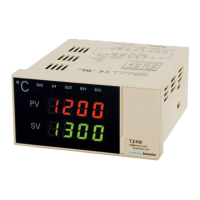
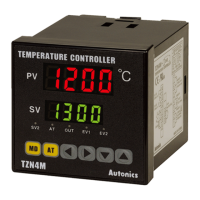
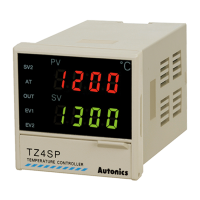
The front panel features a clear 7-segment LED display, with the Present Value (PV) shown in red and the Set Value (SV) in green. Dedicated indicators for SV2 operation, auto-tuning, control output, and event output provide immediate visual feedback on the controller's status.
Navigation and setting adjustments are intuitive, utilizing a Mode key to enter parameter groups, return to RUN mode, and save settings. An Auto-tuning key allows users to initiate auto-tuning by holding it for 3 seconds, or stop it by holding for 5 seconds. Setting keys enable entry into SV change mode, field switching, and value adjustment, with specific models (TZ4M and TZ4L) offering additional dotted-line key options for enhanced control.
The controllers support two auto-tuning modes: TUN1 (based on SV) and TUN2 (based on 70% of SV), allowing users to choose the most appropriate method for their application. Auto-tuning automatically calculates and sets optimal PID constants, improving control accuracy and response.
For applications requiring an additional temperature value, the SV2 temperature function allows for control within a desired range by connecting an external contact signal. This is useful for scenarios like rapidly raising temperature in an electric oven after the door has been opened.
The ramp function enables controlled temperature changes, preventing abrupt shifts that could affect the process. This function activates upon power reset or when the SV is changed during stable control, ensuring smooth transitions.
Communication capabilities are robust, with RS485 communication output available on supporting models. This allows for integration into larger control systems, enabling remote monitoring and control of PV, SV, and other parameters. Autonics provides communication converters (SCM-WF48, SCM-US481, SCM-381) to facilitate various communication setups, including Wi-Fi, USB, and RS232C.
Input correction (offset) can be applied to compensate for deviations from external devices or sensors, ensuring that the displayed temperature accurately reflects the actual process temperature. Manual reset functionality is available for proportional control (P control) to correct offsets that may occur due to varying heat capacities or heater characteristics.
The TZN/TZ Series incorporates several features and guidelines to ensure long-term reliability and ease of maintenance.
Error Display and Troubleshooting: The controller provides clear error messages on the PV display to indicate potential issues:
Control Output Troubleshooting: If the load (e.g., heater) does not operate, users should check the control output indicator on the front panel and verify parameter settings. If the indicator is working, the output wiring should be checked.
Memory Retention: The controllers feature non-volatile semiconductor memory, ensuring that settings are retained for approximately 10 years, even without power. This reduces the need for frequent re-configuration after power outages.
Safety and Installation Guidelines: The manual emphasizes several safety and installation precautions to prevent unexpected accidents and ensure optimal performance:
Alarm Functions: The comprehensive alarm system, including LBA and SBA, helps in diagnosing control loop issues and sensor disconnections. LBA monitors the control loop for abnormal temperature changes, while SBA detects sensor disconnections. These alarms provide critical information for timely intervention and maintenance.
By adhering to these guidelines and utilizing the built-in diagnostic features, users can ensure the reliable and long-lasting operation of their TZN/TZ Series temperature controllers.
 General
| Model | TZ4ST-24R |
|---|---|
| Output Type | Relay |
| Number of Display Digits | 4 |
| Storage Temperature | -20 to 60°C |
| Weight | Approx. 200g |
| Mounting | Panel mount |
| Terminal Type | Screw terminal |
| Number of Inputs | 1 |
| Control Method | PID control |
| Input Type | RTD |
| Power Supply | 100-240VAC 50/60Hz |
| Display Method | 7-segment |
| Control Output | Relay |
| Alarm Output | 1 alarm |
| Operating Ambient Temperature | 0 to 50°C |
| Protection Structure | IP50 (front panel) |
| Size | 48 x 48 mm |
| Output Rating | 250VAC 3A |
| Setting Range | Depends on sensor type |
| Setting Accuracy | Varies depending on the input type |
| Repeat Accuracy | ±0.1% of FS |
| Ambient Humidity | 35 to 85% RH |
| Vibration Resistance | 0.75 mm amplitude at frequency of 5 to 55 Hz |
| Shock Resistance | 100 m/s² |


 To Next Page