EasyManua.ls Logo

Autopilot Pool Pilot Digital Nano+ - User Manual

Autopilot Pool Pilot Digital Nano+
60 pages
Print Icon
To Next Page IconTo Next Page
Loading...
INSTALLER: THIS DOCUMENT IS PURCHASER’S PROPERTY AND IS TO REMAIN WITH THE EQUIPMENT OWNER
LTP0086 Rev4 05/11/2017
Pool Pilot
®
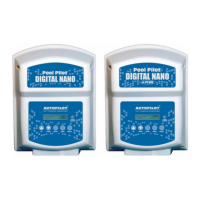
Digital Nano/Nano+
Digital Nano Models: 75041A, 75041A-xx
Manifolds: PPM1, PPM1M
Cell: PPC1
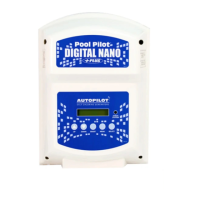
Digital Nano
+
Models: 75043A, 75043A-xx
Manifolds: PPM2, PPM2M
Cells: PPC1 or PPC2
Owner’s Manual: Installation / Operation
This manual covers the installation and operation of the Digital Nano/Nano+ Chlorine Generators
Important!
Read This Manual and Product Labels Before Installing or Operating This Equipment

Table of Contents

Questions and Answers

  • J
    joseph45Aug 16, 2025
    What to do if Autopilot Pool Pilot Digital Nano+ Lighting Equipment displays 'Warning! Add salt'?
    • Z
      Zachary SmithAug 16, 2025
      If your Autopilot Lighting Equipment displays the warning 'Add salt', it means the salt level is between 2,000-2,400 ppm (mg/L). Add salt as indicated on the Digital Nano/Nano+ display to bring the salt level up to 3,000 ppm (mg/L).
  • K
    kristindaughertyAug 18, 2025
    How to fix Autopilot Lighting Equipment 'Warning! Check/clean cell'?
    • D
      Dean GreerAug 18, 2025
      The 'Warning! Check/clean cell' message on your Autopilot Lighting Equipment indicates reduced water conductivity, typically due to low salt, cold water, or a scaled cell. Here's how to address it: 1. Check the salt level and adjust it to between 3,000-4,500 ppm (mg/L). 2. If the water temperature is below 65°F (18.3°C), increase the salt level to 3,500-4,500 ppm (mg/L). 3. Remove and inspect the cell for any white calcium scale buildup.
  • G
    gloriamcculloughAug 21, 2025
    What to do if Autopilot Pool Pilot Digital Nano+ Lighting Equipment shows 'Error purify off Check flow'?
    • J
      Jacob HigginsAug 21, 2025
      If your Autopilot Lighting Equipment displays 'Error purify off Check flow', it means there's insufficient water flow. Here’s how to resolve it: 1. Turn on the circulation pump. 2. Ensure control valves are correctly positioned to allow water flow through the manifold. 3. Check suction-type vacuum cleaners for blockages. 4. Clean the skimmer basket. 5. Clean the pump basket. 6. Clean or backwash the main circulation filter. 7. Clean the manifold screen of trash or debris. 8. Verify that the Tri-sensor cable is plugged in. 9. Clean the cell if clogged with debris or calcium scale. 10. Check for air in the bypass manifold by loosening the top union on the cell. 11. If the pump is a 2-speed pump, ensure it is on high speed.
  • E
    Erin DavisAug 25, 2025
    Why does my Autopilot Pool Pilot Digital Nano+ display 'Warning! Low Amps: Cell?'?
    • J
      jyoungAug 26, 2025
      The 'Warning! Low Amps: Cell?' message on your Autopilot Lighting Equipment can be caused by several issues: * The cell may be completely clogged with calcium scale. * The cell might be depleted. * The cell cord could be loose or damaged. To resolve this: 1. Inspect the cell for calcium scale buildup and clean as needed. 2. Check for visual wear on the edges of the terminal blades, which may indicate depletion. 3. Ensure the cell cord is tightly connected to both the cell and the power supply.
  • E
    Eric HernandezAug 28, 2025
    How to troubleshoot a blank display on Autopilot Pool Pilot Digital Nano+ Lighting Equipment?
    • X
      xperryAug 28, 2025
      If your Autopilot Lighting Equipment has a blank display: 1. If the display is in bright sunlight, shade it to improve readability. 2. Check that the external time clock hasn't turned off power to the Digital Nano/Nano+. 3. Ensure the local shut-off switch and/or main circuit breaker for the Digital Nano/Nano+ are turned on.
  • P
    Phillip WilliamsAug 30, 2025
    What does 'Warning! Bad temp sensor?' mean on Autopilot Lighting Equipment?
    • M
      Mary FisherAug 31, 2025
      If your Autopilot Lighting Equipment displays 'Warning! Bad temp sensor?', it indicates the temperature is out of range. First, check the Tri-sensor cable to ensure it's not disconnected or loose. If the temperature is confirmed to be okay, contact AquaCal AutoPilot, Inc. for assistance.
  • L
    lancethomasSep 3, 2025
    Why is my Autopilot Pool Pilot Digital Nano+ displaying 'Cooling'?
    • R
      Robin GrantSep 3, 2025
      The 'Cooling' message on your Autopilot Lighting Equipment indicates that the internal temperature of the unit has exceeded the 'Shutoff temp'. To resolve this, allow the unit to automatically cool down and resume normal operation. If the unit is too hot, move the Digital Nano/Nano+ to a shaded area.
  • G
    george56Sep 5, 2025
    What should I do when Autopilot Lighting Equipment shows a normal display, but chlorine is needed?
    • V
      vgilmoreSep 5, 2025
      If your Autopilot Lighting Equipment shows a normal display, but a temporary boost of chlorine is needed, consider the following: 1. Check pool chemistry parameters. 2. Consult your local pool service professional and test for high phosphate levels. 3. Hand dose additional chlorine if necessary. 4. Obtain an independent salt reading to check the Pool Pilot® reading.
  • J
    John MiddletonSep 8, 2025
    How to clear 'Cell inspect due' message on Autopilot Pool Pilot Digital Nano+ Lighting Equipment?
    • R
      Ruth MatthewsSep 9, 2025
      To clear the 'Cell inspect due' message on your Autopilot Lighting Equipment, press and hold the SELECT button.
  • E
    Elizabeth HallSep 12, 2025
    What does 'Cell is cleaning' mean on my Autopilot Pool Pilot Digital Nano+?
    • C
      Cindy DavisSep 12, 2025
      If your Autopilot Lighting Equipment displays 'Cell is cleaning', it indicates normal production will resume shortly.

Summary

Safety Information

General Safety Precautions

Essential safety instructions for installation, operation, and maintenance to prevent injury and equipment damage.

Owner Quick Start & Run

Owner;Operator Control Buttons

Explains control buttons like UP/DOWN, BOOST, MENU/SELECT.

Water Balance and Chemistry Recommendations

Provides recommended water chemistry parameters for pools and spas.

Maintenance

Tri-Sensor Maintenance

Covers tri-sensor removal, inspection, cleaning, and flow switch testing.

Cell Servicing

Covers cell removal, visual inspection, manual cleaning, and installation.

Programming

Control Panel Overview

Explains the control panel buttons and display overview.

Basic Operational Programming

Details basic operational programming for chlorine output, boost, and chlorine modes.

Test Pool Pilot (Diagnostic Menu)

Guides users through the diagnostic menu for testing system parameters.

Installation

Installation Planning

Covers planning steps before installing the Digital Nano/Nano+ unit.

Installation Steps Overview

Outlines the sequence of steps for installing the Digital Nano/Nano+ system.

Mounting the Digital Nano;Nano+

Provides detailed instructions for mounting the Digital Nano/Nano+ control unit.

Electrical Connections

Details AC input voltage, low voltage wiring, and cover switch connections.

Plumbing the System

Details how to plumb the manifold assembly into the pool system.

Pool Water Preparation

Outlines steps for water preparation, volume calculation, and salt addition.

Programming at Installation

Guides through initial programming steps during installation.

Autopilot Pool Pilot Digital Nano+ Specifications

General IconGeneral
BrandAutopilot
ModelPool Pilot Digital Nano+
CategoryLighting Equipment
LanguageEnglish

Related product manuals