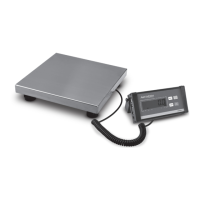
The Avaweigh Commercial Scales are digital portion scales designed for commercial environments, featuring an oversized platform for versatile weighing needs. These scales are available in multiple capacities, ranging from 10 lb. to 60 lb., making them suitable for various applications where precise measurement of ingredients or portions is crucial. The design emphasizes ease of use, durability, and accuracy, catering to the demands of busy commercial settings.
Function Description
The primary function of the Avaweigh Commercial Scales is to accurately measure weight in various units, including kilograms (kg), pounds (lb), grams (g), ounces (oz), and pounds:ounces (lb:oz). The scales are equipped with a backlit LCD display that shows the weight clearly, even in dimly lit environments. This display features 5 1/2-digit, 7-segment characters, ensuring readability.
The scales offer several key operational modes and features to enhance usability:
- Weighing Mode: This is the standard mode for measuring the weight of objects placed on the platform. The display shows the current weight and the selected unit of measurement.
- Zeroing Function: The scales can be easily zeroed at any time by pressing the ON/OFF/ZERO key. This sets the current reading as the new zero point, allowing for accurate measurements even if there's a slight residual weight on the platform or if the scale needs to be re-zeroed during operation. The ZERO indicator illuminates when the display is zeroed. This function is active only when the scale is in a steady weighing mode and also clears any recorded tare weight.
- Taring Function: The TARE/UNIT key enables the user to tare the scale. This feature is particularly useful when weighing ingredients in a container. By placing an empty container on the platform and pressing the TARE/UNIT key, the weight of the container is subtracted from the display, effectively setting the display back to zero. Subsequent items added to the container will then show only their net weight. The "NET" indicator lights up when the scale is tared. This allows for multiple ingredients to be added sequentially, with each new addition showing its individual weight. The tare range extends up to 100% of the scale's full capacity, providing significant flexibility.
- Unit Switching: Users can easily switch between different units of measurement (lb, kg, g, oz, lb:oz) by pressing and holding the TARE/UNIT key in normal weighing mode. This flexibility makes the scales adaptable to various recipes and measurement standards.
- Calibration: The scales support user calibration to maintain accuracy over time. This process involves using standard weights and following a sequence of key presses to adjust the scale's internal settings. The calibration mode allows for selecting the unit of standard weight (kg or lb) and guides the user through loading and removing weights. An error message, "CAL-E," will display if calibration is unsuccessful, prompting recalibration.
- Auto-Off and Backlight Setting: To conserve battery life, the scales feature an auto-off function, which can be configured to power off after a specified period of inactivity (1 to 9 minutes). Users can also disable the auto-off function entirely. Additionally, the backlight behavior can be adjusted: it can be set to always off, always on, or to turn on only when a button is pressed or the reading changes. These settings are accessed and adjusted through a combination of key presses.
Usage Features
The Avaweigh Commercial Scales are designed for straightforward and intuitive operation in a commercial environment.
- Leveling: Before use, the scale should be placed on a firm, level surface. A built-in leveling bubble, located on the front panel, helps users ensure the scale is perfectly level. Adjusting the leveling feet until the bubble is centered is crucial for accurate readings. This step should be repeated whenever the scale's location is changed.
- Power On/Off: The scale is powered on by a short press of the ON/OFF/ZERO key. Upon powering on, the scale performs a self-check, displays its version number and full capacity, and then settles at a zero reading. To power off, the ON/OFF/ZERO key is pressed and held.
- Warm-up Time: For optimal accuracy, it is recommended to allow the scale to warm up for up to 2 minutes after turning it on. This allows internal components to stabilize before weighing.
- Environmental Considerations: The scales are intended for use in dry environments. To ensure accurate and stable readings, it is important to avoid locations with rapid temperature changes, excessive dust, moisture, strong air currents, vibrations, electromagnetic fields, or direct sunlight. Operating the scales near devices that emit radio frequencies, such as cell phones or computers, should also be avoided as these can cause unstable readings.
- Load Placement: For the most accurate readings, weight should be recorded shortly after placing a load on the platform. Extended periods with a load on the platform may lead to less accurate readings due to potential load cell signal drift.
- Overload Protection: The scales are designed with a safe maximum overload capacity of 150% of their rated capacity, providing a margin of safety against accidental overloading. However, exceeding the allowable limits will result in an "E.FULL" error message, indicating that the load should be removed.
Maintenance Features
Maintaining the Avaweigh Commercial Scales involves simple practices to ensure longevity and consistent performance.
- Battery Management: The scales can be powered by four "AA" alkaline batteries or via an AC adapter. For initial use, the internal rechargeable battery should be fully charged for up to 12 hours. If the "Lo.bAt" indicator is shown, it signifies low battery, and the batteries should be replaced. The auto-off function helps conserve battery life.
- Power Connections: Users should regularly check power cord connections to ensure they are properly plugged in and that the power outlet is supplying electricity.
- Storage and Transport: If the scale needs to be stored or transported, it is advisable to save the original packaging material. This material is designed to provide the best possible protection for the scale, preventing damage during transit or storage.
- Troubleshooting: The manual provides a troubleshooting guide for common issues. For example, if the scale does not turn on, users are advised to check power cord connections, the power outlet, and battery levels. If the display cannot be zeroed or shows an unstable reading, potential causes include exceeding allowable load limits, an unstable load, or, in rare cases, load cell damage requiring service. Display symbols like "0-----" or "----0" indicate that the zero-point is outside the acceptable range, prompting users to ensure the platform is empty and stable before zeroing. "E.FULL" indicates an overload, while "CAL-E" signals a calibration error. "EEP.Er" suggests an EEPROM accessing error, and "Lo.bAt" indicates low battery voltage.
- Cleaning: While not explicitly detailed in the provided text, as a commercial scale, it is implied that the stainless steel pan and ABS housing are designed for easy cleaning, which is essential in food service and other commercial environments to maintain hygiene standards.
Overall, the Avaweigh Commercial Scales are robust, user-friendly, and accurate weighing instruments built to withstand the rigors of commercial use while offering essential features for precise portion control and measurement.

 Need help?
 General

 To Next Page