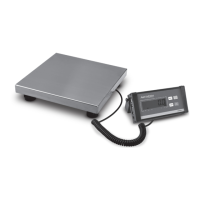
The Avaweigh Commercial Scales are a series of digital receiving scales designed for commercial environments, offering various capacities and features for weighing, counting, check weighing, and percent weighing applications. These scales are NTEP certified, making them suitable for Legal for Trade applications once certified and registered by an authorized Weights and Measures agent.
Function Description:
The primary function of these scales is to accurately measure weight. They support multiple application modes including weighing, counting, check weighing, and percent weighing. The indicator provides a clear LCD display with backlight, showing weight readings, unit of measure, and various status indicators. Key functions include zeroing the scale, taring (both weighed and pre-determined), accumulating values, and comparing weights against pre-set limits. The scales are equipped with RS232 and USB interfaces for data output and connectivity to other devices, such as UPS Worldship.
Important Technical Specifications:
The Avaweigh Commercial Scales come in three models: 334BS30, 334BS70, and 334BS150, with varying capacities and readabilities:
- 334BS30: Max Capacity: 30 lb. / 15 kg, Readability: 0.01 lb. / 0.005 kg, Min Weight: 0.2 lb. / 0.1 kg
- 334BS70: Max Capacity: 70 lb. / 30 kg, Readability: 0.02 lb. / 0.01 kg, Min Weight: 0.5 lb. / 0.2 kg
- 334BS150: Max Capacity: 150 lb. / 60 kg, Readability: 0.05 lb. / 0.02 kg, Min Weight: 1 lb. / 0.4 kg
Common specifications across all models include:
- Display: 6-digit, 7-segment, 25mm (1") LCD with backlight.
- Display Resolution: 1:3000.
- Platform Size: 12" x 14" (305mm x 355mm).
- Construction: Die-cast aluminum base, stainless steel platform.
- Weighing Units: kg / lb / lb:oz.
- Calibration Unit: kg.
- Zero Range: Programmable zero range.
- Tare Range: Full capacity.
- Stabilization Time: <3 seconds.
- Operating Temperature: 15 - 105°F (-10 - 40°C).
- Humidity Range: <90% relative humidity, non-condensing.
- Power Supply: 4 x "AA" size alkaline batteries or AC Adapter: 9Vdc/600mA (central positive).
- Interface: RS232 (COM1) and USB (COM2).
- Feet: 4 x fixed bolt design, adjustable height.
- Safe Max Overload: 150% of capacity.
- Optional Tower Height: 15.35" (390mm).
Usage Features:
The scales are designed for ease of use with a straightforward keypad and clear display characters.
- Normal Weighing Mode: Simple power-on, zeroing, and placement of objects on the platform to read weight. Objects should be placed at the center of the platform to prevent damage.
- Unit Change: The UNIT/DATA key allows changing the weight unit of measure.
- Data Output: The PRINT/FUNC key sends data to another device via the serial port.
- Zero Function: The ZERO/ON/OFF key sets a new zero point when the display doesn't show 0 with no object on the platform. The zero range is ±2% of full capacity.
- Tare Function:
- Weighed Tare: Place an empty container, press TARE/PRESET to zero the display, then add material. The display shows net weight. Remove all weight and press TARE/PRESET to exit.
- Pre-Determined Tare: Press and hold TARE/PRESET until "FE8-E" is displayed, then input the tare weight using the arrow keys and confirm with TARE/PRESET. The indicator saves one tare weight, which is lost upon power off.
- Check Weighing (Data Compare): Allows setting upper and lower weight limits. The display indicates HI (above upper limit), OK (within limits), or LO (below lower limit) with an audible beep for "OK" status. This mode is activated by pressing and holding UNIT/DATA for 4 seconds.
- Accumulation Mode: Stores weighed values and calculates their sum. Press ACC/TOTAL to add a displayed value to the total. Holding ACC/TOTAL displays accumulated times and sum total. The ZERO/ON/OFF key clears accumulated data when displayed. Only loads exceeding the minimum weight (default 10d) can be accumulated.
- Counting Mode & Check Counts: Disabled for Legal-for-Trade applications.
- UPS Worldship Compatibility: The scale port can be set to NCI3835 for integration with UPS Worldship.
Maintenance Features:
The manual provides troubleshooting guidance for common issues:
- Scale not turning on: Check AC adapter connection, replace batteries, or replace indicator.
- Display errors (e.g., "Ad8888", "088888"): Check cable connections, replace indicator, or return for repair if load cell cable is broken or damaged.
- Weight reading issues (exceeds/below Power On Zero limit): Ensure platform is empty, perform zero calibration, or reduce/add weight.
- Unstable weight readings in HOLD mode: Stabilize the object or set a larger HOLD parameter.
- Load exceeds allowable limits: Remove load.
- Cannot zero display: Wait for load to become stable, then press ZERO/ON/OFF.
- Invalid reference weight: Use a greater weight for the sample.
- Invalid functions or missing units: Reset CONFIG parameters or USER parameters.
- Incorrect counting/percent weighing result: Increase sampling quantity.
- Weighing not accurate: Remove objects stuck between load cell and base, perform Linearity calibration, or perform GEO calibration.
- Low battery: Replace batteries.
- Safety: Disconnect power before making cable connections. Use in dry environments only. The platform is heavy; use appropriate lift equipment. Install on a stable foundation. Do not operate in hazardous areas, heavy vibration, or heavy airflow conditions.
- Operation: Read and understand all instructions. Keep the manual for future reference. Record weight shortly after placing a load. Avoid extreme heat or cold; allow scale to acclimate to room temperature. Allow 2 minutes warm-up time. Avoid operating near devices emitting radio frequencies.
- FCC Compliance: The equipment complies with Class A digital device limits (Part 15 of FCC Rules) for commercial environments. Users in residential areas may need to correct interference at their own expense.



 To Next Page
 General