EasyManua.ls Logo

AVA WEIGH 334PCSP30 - User Manual

AVA WEIGH 334PCSP30
24 pages
Print Icon
To Next Page IconTo Next Page
Loading...
01/2022
334PCSP30
30 lb.
334PCSP60
60 lb.
334PCSP30T
30 lb. w/ Tower
334PCSP60T
60 lb. w/ Tower
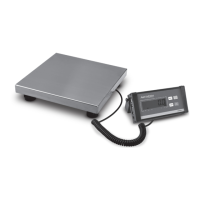
Digital WiFi Price Computing Scales
with Thermal Label Printer
USER MANUAL

Questions and Answers

  • J
    Justin LesterAug 20, 2025
    Why does my AVA WEIGH Scales print a blank label?
    • G
      Gerald BenderAug 20, 2025
      If your AVA WEIGH Scales is printing blank labels despite normal paper orientation, it may be due to a setting error. The label type setting might be incorrect. To fix this, on the scale, go to [SETTING] ? Enter the system setting ? Press hotkey [ L ] ? Enter the select label type (0: D0, 1: D1) ? Press [PRN/Enter].
  • J
    Jody CarrilloAug 22, 2025
    What to do if my AVA WEIGH Scales label prints fuzzy or not dark enough?
    • M
      Michael GreeneAug 22, 2025
      If the labels printed by your AVA WEIGH Scales are fuzzy or not dark enough, there are a few potential causes. First, ensure the printer head is securely fastened. Second, the thermal head might be dirty; gently wipe it with a soft cloth dipped in alcohol. Finally, the print density may be set too low; try increasing it.
  • A
    Amy JonesAug 25, 2025
    What to do if my AVA WEIGH Scales is weighing inaccurately?
    • S
      stephen77Aug 25, 2025
      If your AVA WEIGH Scales is providing inaccurate weight measurements, several factors could be responsible. Check that the rubber mat supporting the scale pan isn't touching the top cover and ensure the top cover is properly installed, then reinstall the load cell's support frame. It could also be due to dampness, module aging, or regional differences, in which case you should replace the mainboard, AD board, and load cell. Another cause could be a damaged load cell due to overloading, which requires replacing the load cell and support frame. Finally, ensure that the gravitational acceleration is properly adjusted.
  • M
    marcusnavarroAug 28, 2025
    How to fix AVA WEIGH Scales when it won't boot up?
    • A
      Andrew DelgadoAug 28, 2025
      If your AVA WEIGH Scales fails to boot up, several issues could be the cause. It could be due to a bad contact between the power plug and socket, a disconnected power cord, a blown fuse, a damaged power board, or a bad motherboard. Use millimeter to check them one by one, use method of exclusion to find the solution.
  • N
    Nicholas PerryAug 30, 2025
    What to do if my AVA WEIGH Scales keys are ringing but the display is normal?
    • K
      Kristie PierceAug 30, 2025
      If the keys on your AVA WEIGH Scales are ringing but the display is functioning normally, it could be due to a short circuit caused by a line piece on a key, in which case you should change the line piece of the key. Alternatively, the key might be blocked by a sharp object; remove the object.
  • B
    Brian ChristensenSep 1, 2025
    Why does my AVA WEIGH Scales have zero point instability?
    • J
      Jesse GonzalesSep 1, 2025
      Zero point instability in your AVA WEIGH Scales can be caused by several factors. Environmental impacts such as vibration, wind, or strong magnetic interference could be the cause; remove these interference factors. The weighing electric circuit may be damp, requiring replacement of the mainboard. Ensure the wind resistance function is enabled in the function settings. Finally, check that the leveling mat is level and adjust if necessary.
  • P
    Peter HopkinsSep 3, 2025
    What to do if my AVA WEIGH Scales keys do not ring?
    • J
      Jacob ReedSep 3, 2025
      If some keys on your AVA WEIGH Scales are not ringing, it could be because the ribbon cable connecting the keyboard to the motherboard is not plugged in; remove and re-insert it properly. Another possibility is that the Mylar button FPC ribbon cable is not plugged in; re-plug it in. If the issue persists, the key may be damaged and require replacement.
  • M
    Mark ParkSep 5, 2025
    Why does my AVA WEIGH Scales print a label with half clear and half fuzzy?
    • G
      gperrySep 5, 2025
      If your AVA WEIGH Scales prints labels that are half clear and half fuzzy, or even blank, it could be due to several reasons. The printer head might not be fastened well, or the thermal head could be dirty. Gently wipe the thermal head with a soft cloth dipped in alcohol. If these steps don't resolve the issue, the print head may be deformed, requiring a printer replacement handled by a trained professional. Other potential causes include motherboard failure, requiring replacement, or a poor/damaged head piece wiring harness, which should be re-plugged or replaced.
  • A
    Amy BowmanSep 7, 2025
    What to do if my AVA WEIGH Scales is unable to communicate?
    • M
      Mark RobertsSep 7, 2025
      If your AVA WEIGH Scales is unable to communicate, there are several potential causes. First, check that the communication ports are set up correctly and confirm the available communication ports. Also, verify that the serial number on the scale and the 334PCSP30T software match, and that the IP address on the scale is correct. Ensure the network cable is not damaged and is securely inserted into the network port. If the problem persists, the communication board or mainboard may be faulty, requiring replacement.
  • D
    davidgarciaSep 9, 2025
    Why does my AVA WEIGH Scales boot up without any sound, No display, backlight?
    • L
      Laura GrahamSep 9, 2025
      If your AVA WEIGH Scales boots up without sound, display, or backlight, it could be due to the spark that was generated by the power plug impacting the scale starting up. Replace the Motherboard, reset the number, and download all the files.

Summary

Specifications

Features Summary

Summary of key features and capabilities of the AvaWeigh scales.

Installation

Installing the Scale

Step-by-step instructions for assembling and setting up the scale unit.

Installing the Thermal Label Paper

Guide on how to load and install thermal label paper into the scale's printer.

Label Paper Specifications

Specifications and requirements for the thermal label paper used with the scale.

Keyboard Layout

334 PCSP30;30 T Keyboard

Layout and key mapping for the 334PCSP30 and 334PCSP30T models.

334 PCSP60;60 T Keyboard

Layout and key mapping for the 334PCSP60 and 334PCSP60T models.

Overall Appearance

Scale Components Identification

Diagram and list identifying the main parts and components of the scale.

Operations and Settings

Weighing and Pricing

Procedures for weighing items and calculating prices using different methods.

Tare Operation

Instructions for using the tare function for weighing packaged goods.

Discounts

How to apply discounts to pricing calculations on the scale.

Price Changing

Methods for permanently or temporarily changing item prices and hotkeys.

Choosing Unit of Weight

Steps to change the unit of weight (e.g., from lb to kg).

Charging by Piece

How to configure and use the 'charging by piece' function.

Price Tag Printing

Procedure for printing price tags for individual items.

Quick Copy

Function for rapid, continuous printing of the same label.

Advanced Operations

Automatic Fast Packaging

Using the scale for high-volume, automated label printing for similar products.

Common Uses for Operation Button

Explanation of various functions assigned to the scale's operation buttons.

Wireless Scale Settings

Network Connection Mode

Overview of the network connection options for the scale.

Router Setup

Steps to configure the scale to connect to a wireless router.

Label Scale Setting

Configuration steps for setting up Wi-Fi and IP addresses for the label scale.

Computer Software Settings

Instructions for connecting the scale to computer software for network testing.

Function Setting

Input Settings of Single Item

Guide to entering and editing details for individual items, including PLU and pricing.

System Setup

Set Menu Items

Details of various system settings and parameters that can be configured.

Lock Functions

Opening Locked Functions

Procedure to unlock and access functions like SETTING, PLU, DISCOUNT, PRICE, and TARE.

Restored Lock

How to restore the scale to its locked state or turn it off.

Troubleshooting

Scale Crash Issues

Diagnosing and resolving issues when the scale becomes unresponsive or crashes.

Print Related Issues

Troubleshooting common problems related to label printing and paper orientation.

Label Print Quality

Resolving issues with fuzzy, faint, or incomplete printing on labels.

Key Issues

Diagnosing and fixing issues with keys not ringing or responding correctly.

Weighing Problems

Identifying causes and solutions for inaccurate weight readings, zero point instability, or inability to weigh.

Communication Problems

Resolving issues preventing the scale from communicating with other devices or software.

Display Problems

Troubleshooting scenarios where the display is blank or shows garbled characters.

Error Codes and Printer Issues

Error Codes

List and explanation of error codes displayed by the scale.

Other Printer Problems

Resolving common problems with paper feeding, jams, and sounds during printing.

Acceleration of Gravity Data

Limited Warranty Information

Warranty Inquiries

Contact information and procedures for making warranty claims or inquiries.

Warranty Exclusions

Details of conditions and situations not covered by the AvaWeigh limited warranty.

AVA WEIGH 334PCSP30 Specifications

General IconGeneral
BrandAVA WEIGH
Model334PCSP30
CategoryScales
LanguageEnglish

Related product manuals