Button Functions
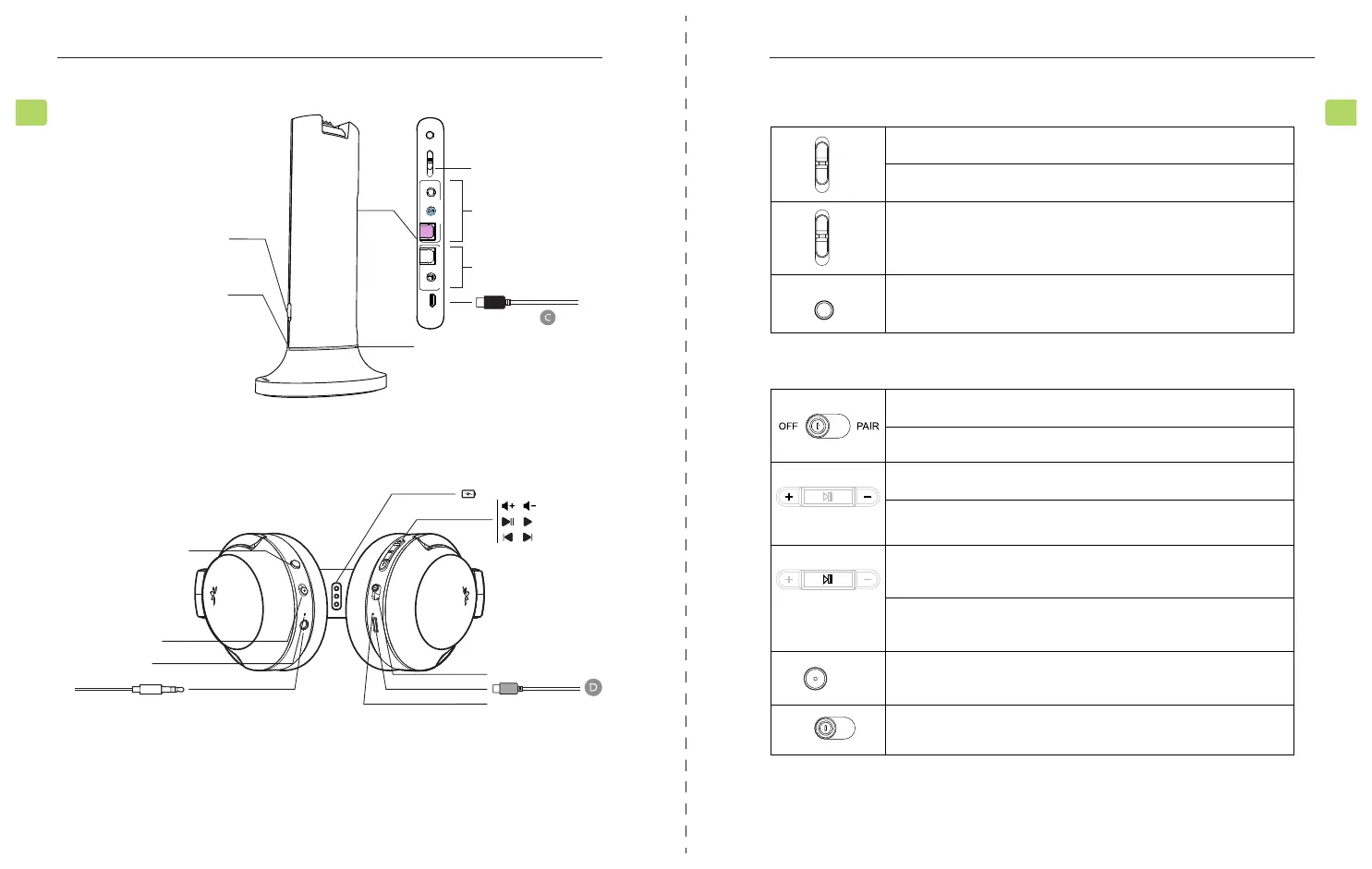
Transmitter
Headphones
Switch to "ON / OFF" position to turn the transmitter on / o
Hold in "PAIR" position for 5 seconds to enter pairing mode
Switch to the correct audio input you want to use
Press & hold for 10 seconds to lock your headphones' pairing to
the transmitter
Switch to "ON / OFF" position to turn the headphones on / o
Hold in "PAIR" position for 5 seconds to enter pairing mode
Press once to adjust volume
Press & hold for 2 seconds to skip / replay tracks
(when used separately with phone / tablet)
Press once to play / pause audio (when used separately with
phone / tablet)
If headphones fail to auto-connect to transmitter, press once to
activate reconnection
Press once to switch between clear voice and balanced sound mode
Switch to mute / unmute audio from the headphones
LOCK
MIC
OPT
AUX
OFF
PAIR
ON
OPERA
Quick Start Guide
5
EN
EQ
ON
unmute Mute
Product Overview
Blue = connected
Flashing red & blue = pairing mode
Red = headphones charging
Off = charging complete
Solid White=valid audio signal detected
Flashing=no valid audio signal detected; please
adjust TV audio settings
Orange=headphones muted;
Off=unmuted
Blue=connected
Flashing red & blue = pairing mode
Red=charging
Off=charging complete
OPERA
Quick Start Guide
4
EN
Back LED
OFF/ON/Pairing
Input format switch
(MIC / AUX / OPT)
Back View
LOCK
AUX
AUX
DC IN
OPT
OPT
MIC
AUX
OPT
MIC
Input From TV Bypass Output To Speaker
Front LED
ON
PAIR
OFF
Input from TV
Bypass output to speaker
Connection / charging
LED indicator
/ /
PAIROFF ON
/
/
PAIR
OFF
EQ
Mute
ON
Unmute
Speaker
Balanced / dialogue modes
Mute / unmute audio
LED mute indicator
/



 To Next Page