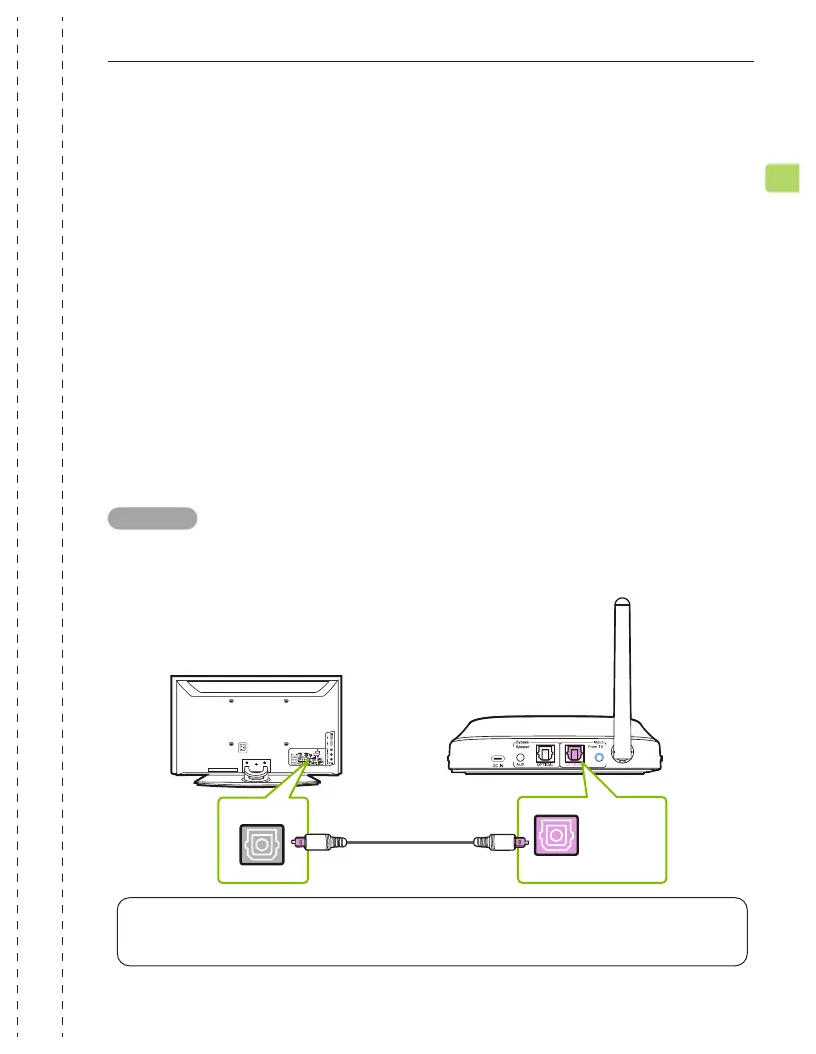
AUX
OPTICAL
OPT OUT
TV
The Shift comes with 2 transmitters: Transmitter 1 is set to the BLUE channel
by default, while Transmitter 2 is set to the GREEN channel by default. They
must both be connected to a power source via the provided power cables in
order to function.
Plug Transmitter 1 into either:
1. A TV’s USB power port (we recommend this so that they auto power ON /
OFF in tandem with your TV), OR
2. A nearby wall outlet - 5V/500mA-2A rated USB charger (any phone
charger should work. Please contact support@avantree.com if you’d like
us to send you a free adapter)
You can then connect the transmitter to your TV’s audio ports. You can choose
one of 3 dierent ways to do this:
Plug the provided optical audio cable into the TV’s optical OUT or OPT OUT
port, then plug the other end into the transmitter’s optical port in the “INPUT
FROM TV” section.
Input
From TV
Setup
Connecting Transmitter 1 to Your TV
OPTION 1 - Optical port (recommended)
NOTE: Most TVs support audio output through only one digital output port at a time,
so if your TV’s HDMI ARC port is in use, the optical port may be disabled. You can either
unplug the HDMI ARC, or try connecting the transmitter via RCA / AUX.
SHIFT
User Manual
9
EN


 To Next Page