SHIFT
User Manual
17
EN
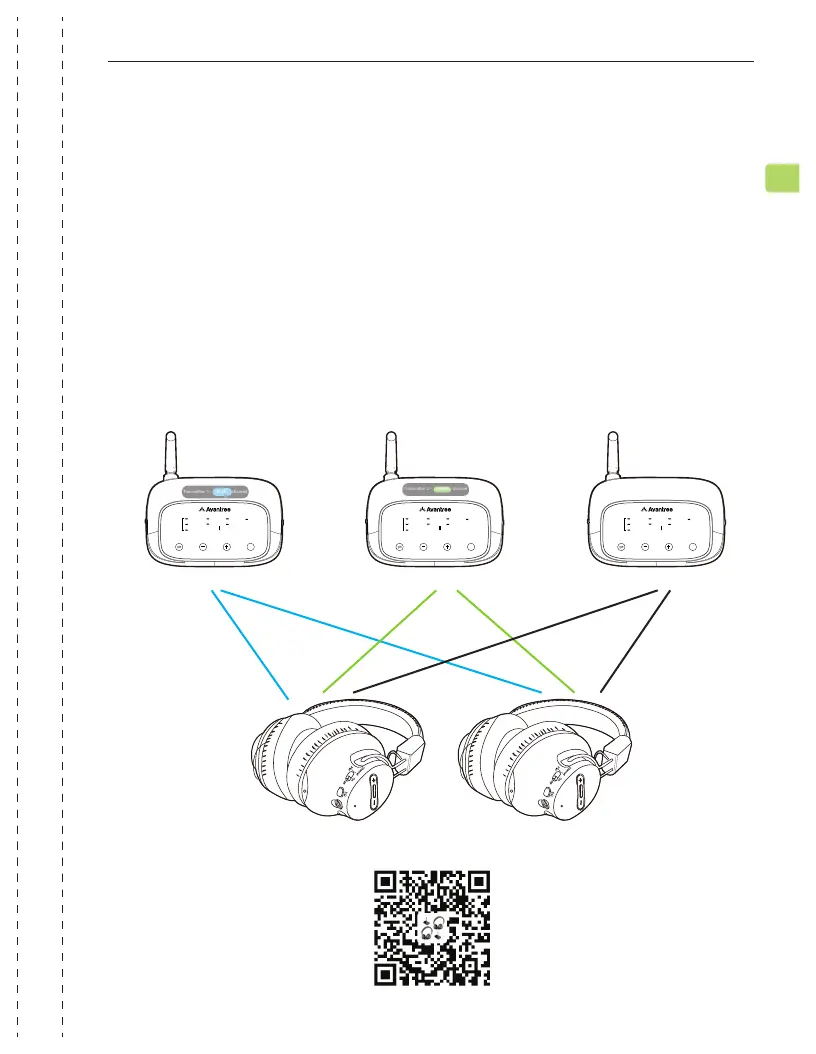
You can add a third Shift transmitter to your setup if you have an additional TV.
Please reference page 15.
STEPS 1-3
Switch the channel on both the third transmitter and the headphones to
the WHITE channel. They will automatically connect, and the channel
indicators on both the transmitter and headphones will turn solid WHITE.
Repeat the steps above to pair any other headphones to the third trans-
mitter.
To purchase a third transmitter, scan the QR code below.
STEP 4
ADD
DEVICE
2.4G WIRELESS
OPT
AUX
CHANNEL SELECT
CHANNEL
ADD
BOOST
NORMAL
VOLUME
ADD
DEVICE
2.4G WIRELESS
OPT
AUX
CHANNEL SELECT
CHANNEL
ADD
BOOST
NORMAL
VOLUME
ADD
DEVICE
2.4G WIRELESS
OPT
AUX
CHANNEL SELECT
CHANNEL
ADD
BOOST
NORMAL
VOLUME
Transmitter 1–BLUE channel Transmitter 2–GREEN channel Transmitter 2–WHITE channel
Adding a Third Transmitter


 To Next Page