SHIFT
User Manual
11
EN
ON OFF
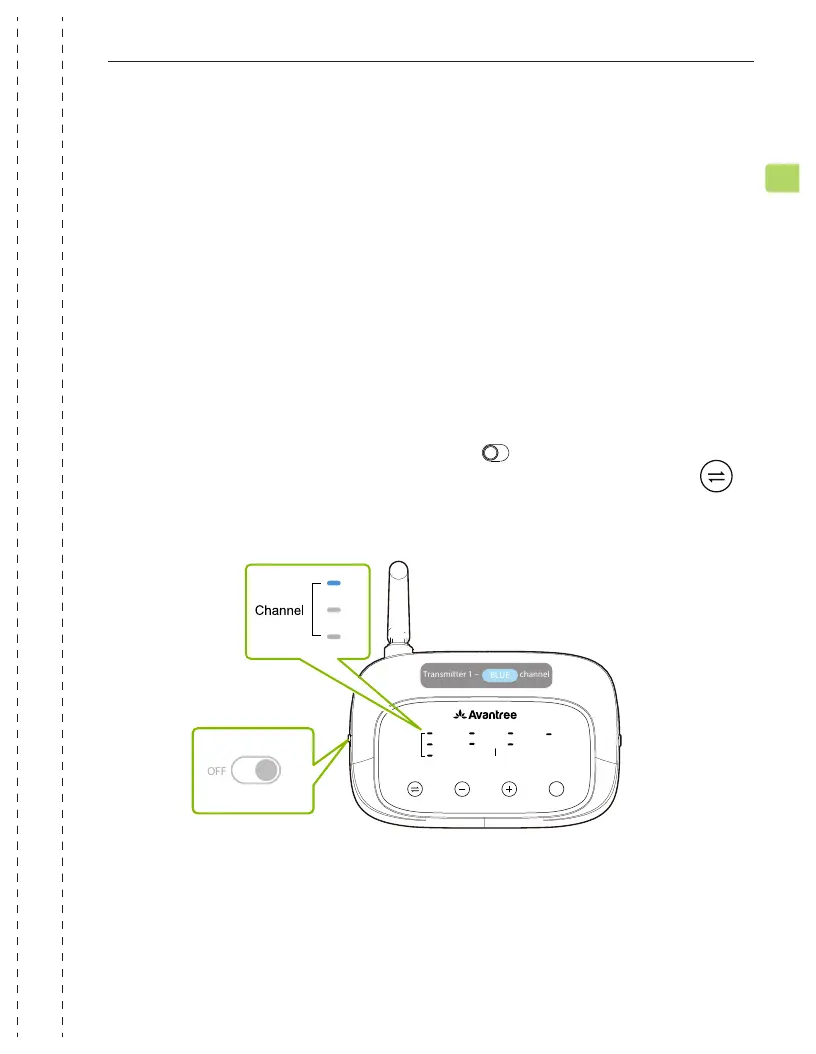
Shift headphones and transmitters connect via 3 dierent channels (blue /
green / white -- the white channel will only activate after pairing to a third
Shift transmitter). Swap the headphones’ channel to match the transmitter’s
channel in order for them to connect.
If using both transmitters in the same room, we recommend swapping the
transmitters to two dierent channels to avoid any interference (Transmitter 1
defaults to the BLUE channel, Transmitter 2 defaults to the GREEN channel).
Power Transmitter 1 on by sliding the switch to the ON
position. The channel indicator should light up BLUE. If not, tap the
button to switch to the blue channel.
Connecting the Headphones to Transmitters
STEP 1
ADD
DEVICE
2.4G WIRELESS
OPT
AUX
CHANNEL SELECT
CHANNEL
ADD
BOOST
NORMAL
VOLUME
NO
Repeat the steps above to connect Transmitter 2 to another TV.
Connecting Transmitter 2 to Your TV


 To Next Page