SHIFT
User Manual
15
EN
You can add up to 100 Shift-Extra headphones to your setup.
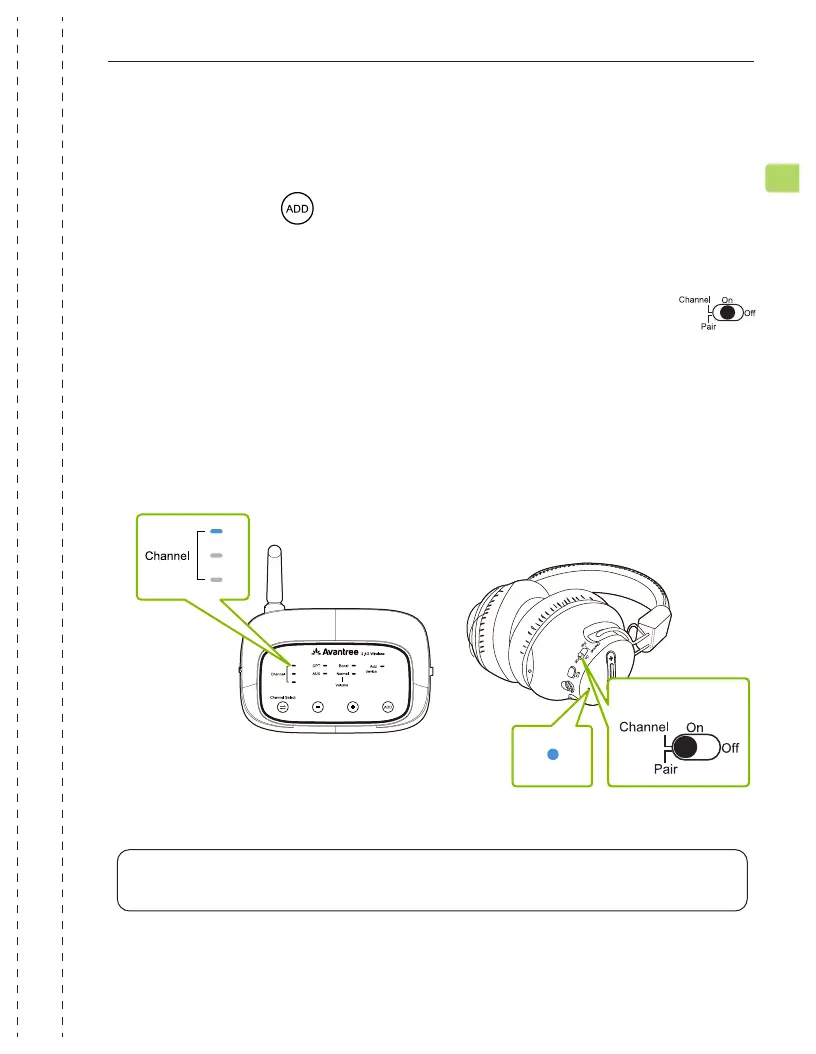
Press & hold the button on your transmitter for 5 seconds. The “ADD
DEVICE” LED indicator will ash BLUE.
STEP 1
Turn on your pair of Shift-Extra headphones, then slide & hold the
switch to the “PAIR” position for 5 seconds. The LED indicator will quickly
ash BLUE.
Keep them close and wait for 2 seconds. Once connected, the channel
indicators on both the transmitter and the headphones will turn solid
BLUE.
STEP 2
NOTE: Any new Shift-Extra headphones should be paired and connected via the BLUE
channel. Once connected to the system, they can freely swap to other channels.
Hold for 5s
Adding More Headphones


 To Next Page