LEVEL OWNER’S MANUAL
3
WHAT’S ON THE DISPLAY
While you are riding, you can use the display to monitor your
speed, the amount of pedal assist, battery life remaining, and
other data.
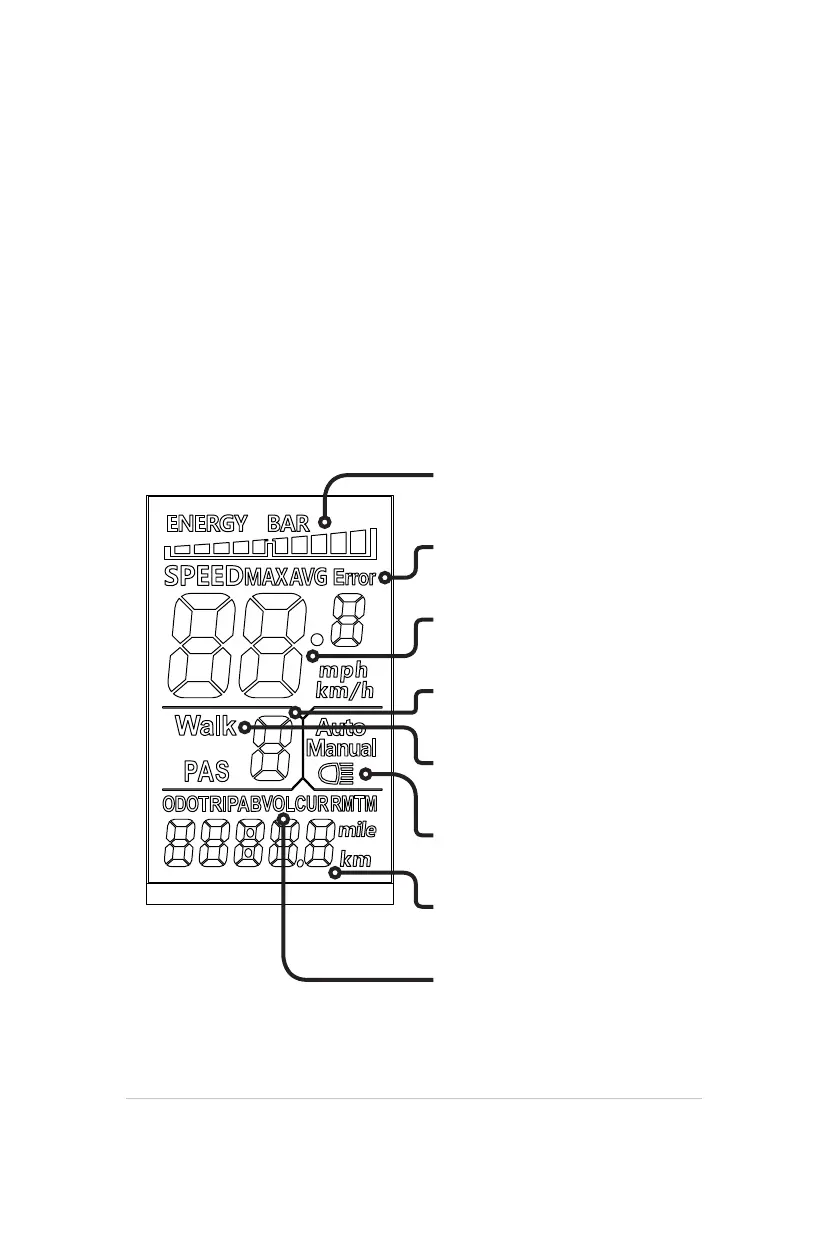
As shown below, your Level uses a LCD display screen that looks
like this:
SPEED INDICATOR
(Current / Max / Average)
5 LEVELS OF ASSIST
(0: No Assist. 5: Max Assist)
WALK MODE
(On / O)
DISTANCE INDICATOR
(Current Trip / System Mileage)
ERROR CODE INDICATOR
(In the Event of a Problem)
BACKLIGHT INDICATOR
(On / O)
BATTERY LEVEL INDICATOR
(Displays Battery Charge Level)
VOLTAGE OUTPUT INDICATOR
(Real-Time)


 To Next Page