LEVEL OWNER’S MANUAL
4
USING THE CONTROLS
To turn on your bike, press and hold the “M” button for 3 seconds.
To turn o, press and hold the “M” button for 3 seconds. The
display and battery have an energy-saving feature, if there is no
activity for 10 minutes, they will turn o automatically to preserve
battery life.
Tap the “U” or “D” arrows to change the level of pedal assist.
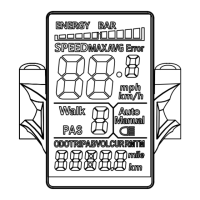
Hold “U” and “M” for 3 seconds to switch between showing real-
time speed, average speed, and max speed.
Tap “M” to toggle between the display of the Odometer, Trip
Distance, Voltage, and Elapsed Time.
Press and hold “U” for 3 seconds to enable the backlight on the
display. Press and hold “U” again for 4 seconds to turn it o.
To enable walk mode, first come to a complete stop and stand
next to the bike. Press and hold “D” for 3 seconds. The bike will
slowly move forward at 3.5 MPH / 6 KPH as long as you hold the
“D” button. This feature is useful for pushing the bike up a hill or
walking through a crowd, where you cannot safely ride.
To use the walk mode, set the pedal assist to level 1 - 5. Walk
Mode will not engage at pedal assist level 0.


 To Next Page