13
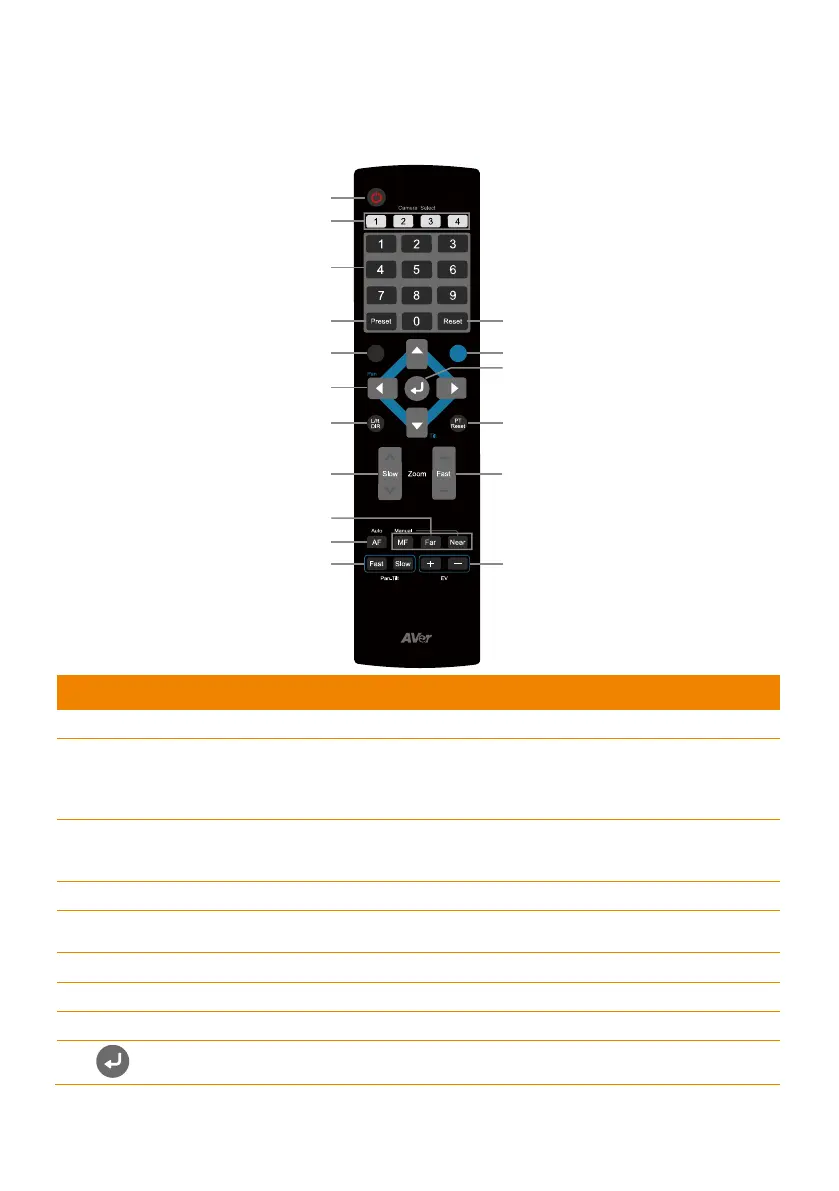
Remote Control
The remote control requires two (2) “AAA” size batteries; make sure batteries are installed properly
before use.
(1)
(2)
(3)
(4)
(6) (7)
(5)
(9)
(1
1)
(17)
(8)
(10)
(12)
(14)
(15)
(16)
(13)
BLC
Menu
Name Function
(1) Power
Turn on/off the unit on/standby.
(2) Camera Select
Set the camera ID in OSD menu: System > Camera Selector, ex:
camera ID is set to 1. Then, press the “camera select” button “1” to
control the camera.
(3) Numeric Pad
Use for setting the preset position 0~9.
Press number button (0~9) to move the camera to pre-configure
preset position 0~9.
(4) Preset
Press “Preset” + “Number button (0~9)” to set the preset position.
(5) Reset
Press “Reset” + “Number button (0~9)” to cancel the pre-configure
preset position.
(6) BLC
Turn on/off backlight compensation.
(7) Menu
Open and exit the OSD menu.
(8)
Pan and tilt the camera lens.
(9)
- Confirm the selection or make a selection in OSD menu.
- One push focus.



 To Next Page