27
NDI Function
[Note] When using NDI mode, the camera cannot support other output source.
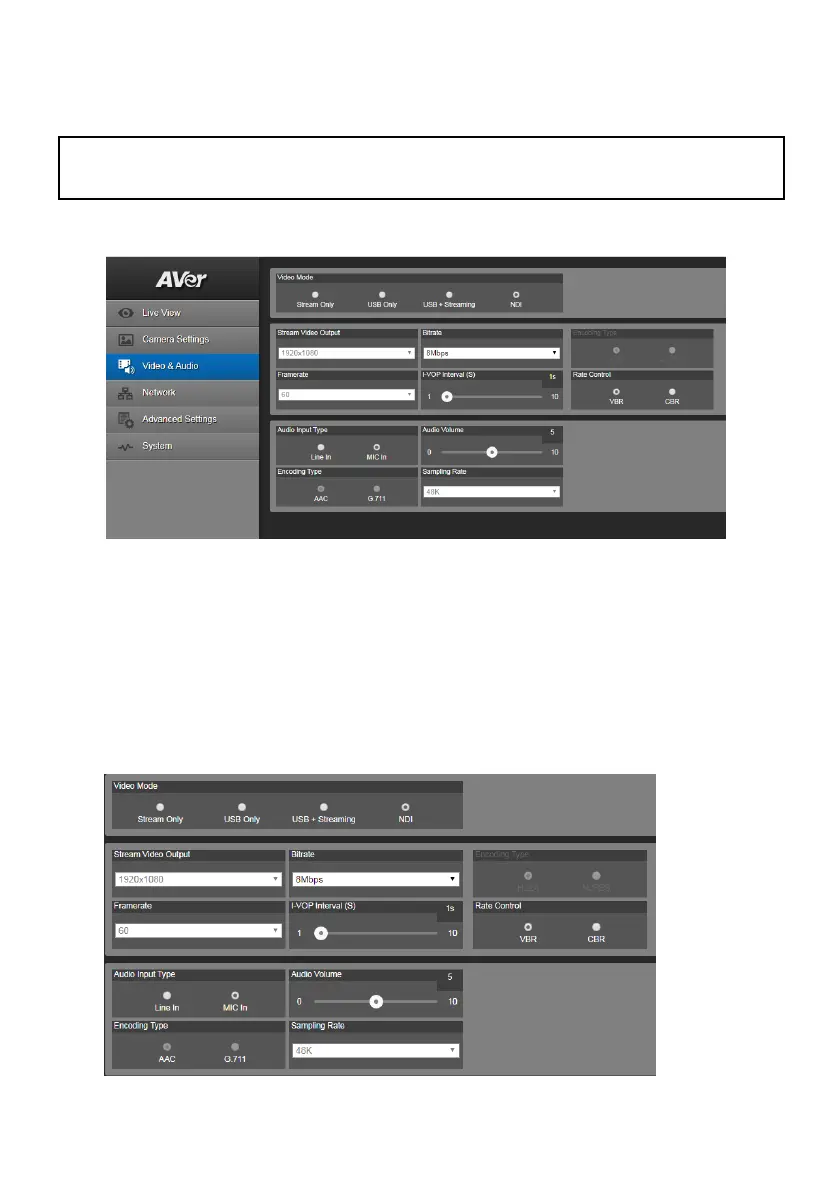
1. Select Video & Audio. Select the “NDI” to enable NDI function. To disable the NDI function, select
other mode. Also, you can go to OSD menu, select System > NDI > off.
2. Stream Video Output, Framerate, Encoding type, and Sampling Rate sections are only for
viewing; the settings cannot be changed.
3. User can setup the following functions:
Audio Input Type: selects audio input type – Line In or MIC In.
Bitrate: selects bitrate value – 521kbps, 1Mbps, 2Mbps, 4Mbps, 8Mbps, 16Mbps, or
32Mbps.
I-VOP Interval (S): moves scroll bar to set the value – 1s to 10s.
Audio Volume: moves scroll bar to set the volume value – 0 to 10.
Rate Control: selects the rate control type – VBR or CBR.
The PTZ310N and PTZ330N both support “NDI function”. Please refer to the following description to
setup NDI function. The NDI function is enabled in default.



 To Next Page