33
System
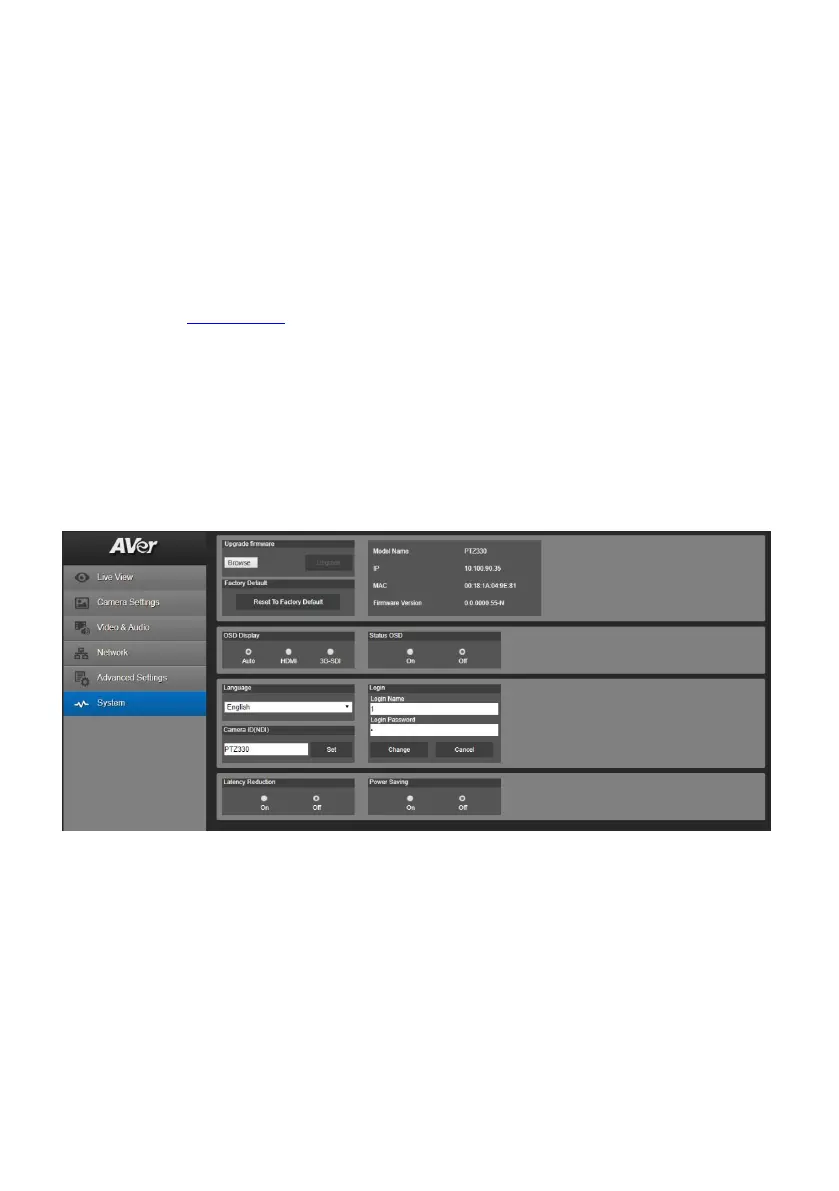
The system information of camera is displayed in this page, including Model name, IP address, MAC
address, and firmware version.
Factory Default: reset the camera back to factory default value.
OSD Display: select the OSD display output source – Auto, HDMI or 3G-SDI.
Status OSD: enables/disables Preset status (Save Preset, Call Preset, Cancel Preset) display on
the screen.
Language: changes the Web UI language.
Camera ID (NDI): sets the camera ID as identification for NDI function. To setup NDI function,
please refer to NDI Function
section.
Login in: the default login of name and password are admin/admin.
Latency Reduction: increases the smoothness of live images and will automatically disable 3
items – Digital zoom, Noise reduction and 720P resolution. The camera will reboot when enabling
or disabling function of latency reduction.
Power saving
ON: PTZ can be shoot down. Boot up only through IR remote, RS232 and WOL.
OFF: PTZ set to standby, PTZ can be boot up through IR remote, RS232 and VISCA-over-I P.



 To Next Page