User’s Manual
7
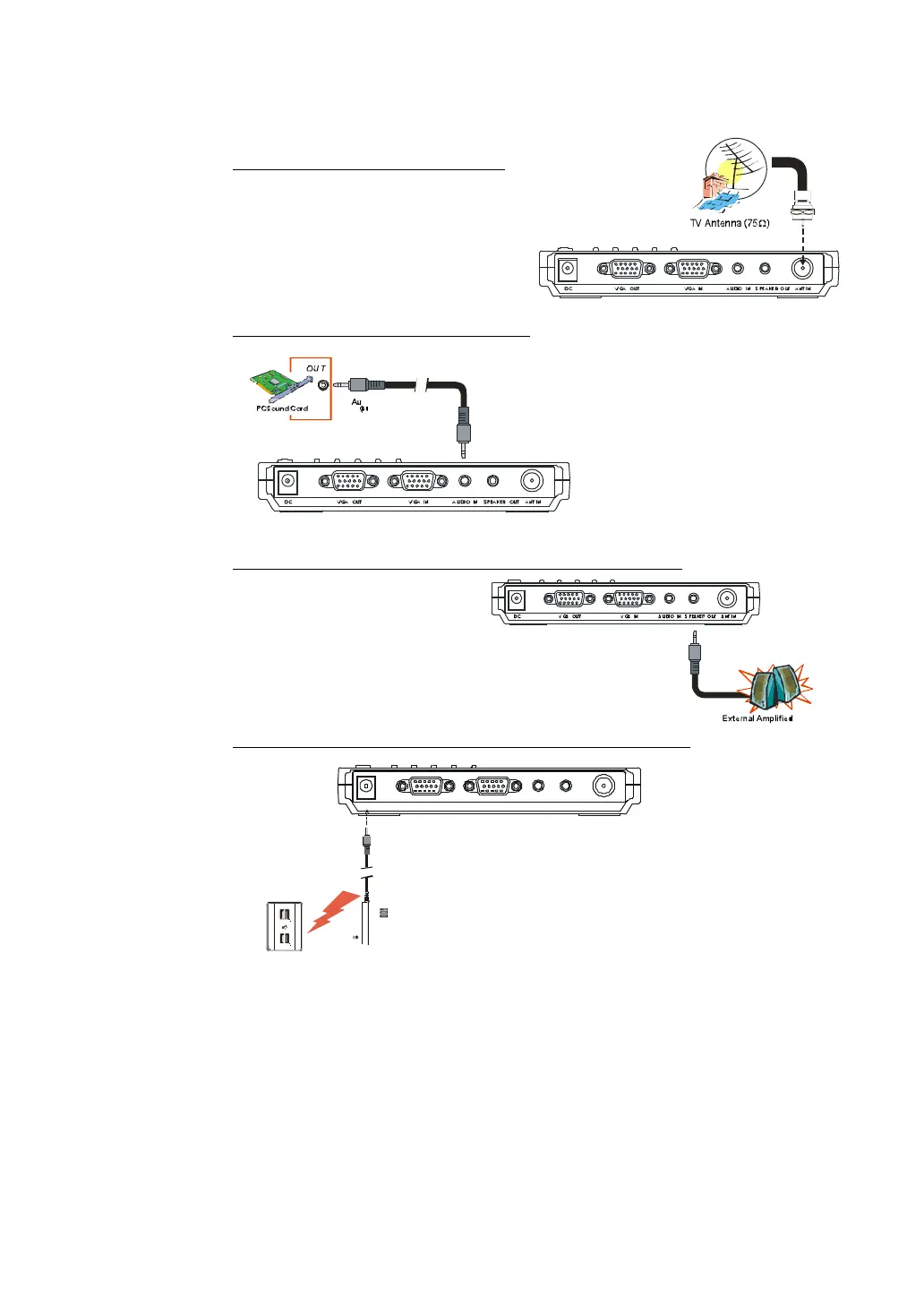
Connecting the Antenna
Attach the antenna or cable TV to the
ANT IN port of the AVerTV Box5 Live.
Connecting an Audio Cable
Plug one end of the supplied audio cable to your sound
card LINE OUT (SPEAKER) port and the
other end to the AUDIO IN port of the
AVerTV Box5 Live. This connection
allows you to have audio at all times and to
adjust the volume from the
AVerTV Box5 Live.
Connecting the External Amplified Speaker
Connect the external
amplified speaker to
the AVerTV Box5 Live
SPEAKER OUT port.
.
Connecting the Power Adapter
Connect the supplied power
adapter to the DC port of the AVerTV Box5 Live
then plug it into a standard AC power outlet.
Wall
Outlet
Power
Adapter
DC VGA INVGA OUT
ANT IN


 To Next Page
 Loading...