AVerMedia AVerTV BoxW7 Plus / AVerMedia AVerTV BoxW9 Plus
ENG-8
Chapter 4 OSD Menu Settings
4.1 Calling Up a Menu Display
Press the MENU button on the remote control to call up and exit the main menu or submenu display. Then, you can use
the CH▲ or CH▼ buttons to select the items in the menu list; and the Vol◄ or Vol►/OK buttons to adjust or to
make a selection. The table below lists the different functions you will find in the menu. The text appeared in red is the
currently selected setting.
4.2 Menu
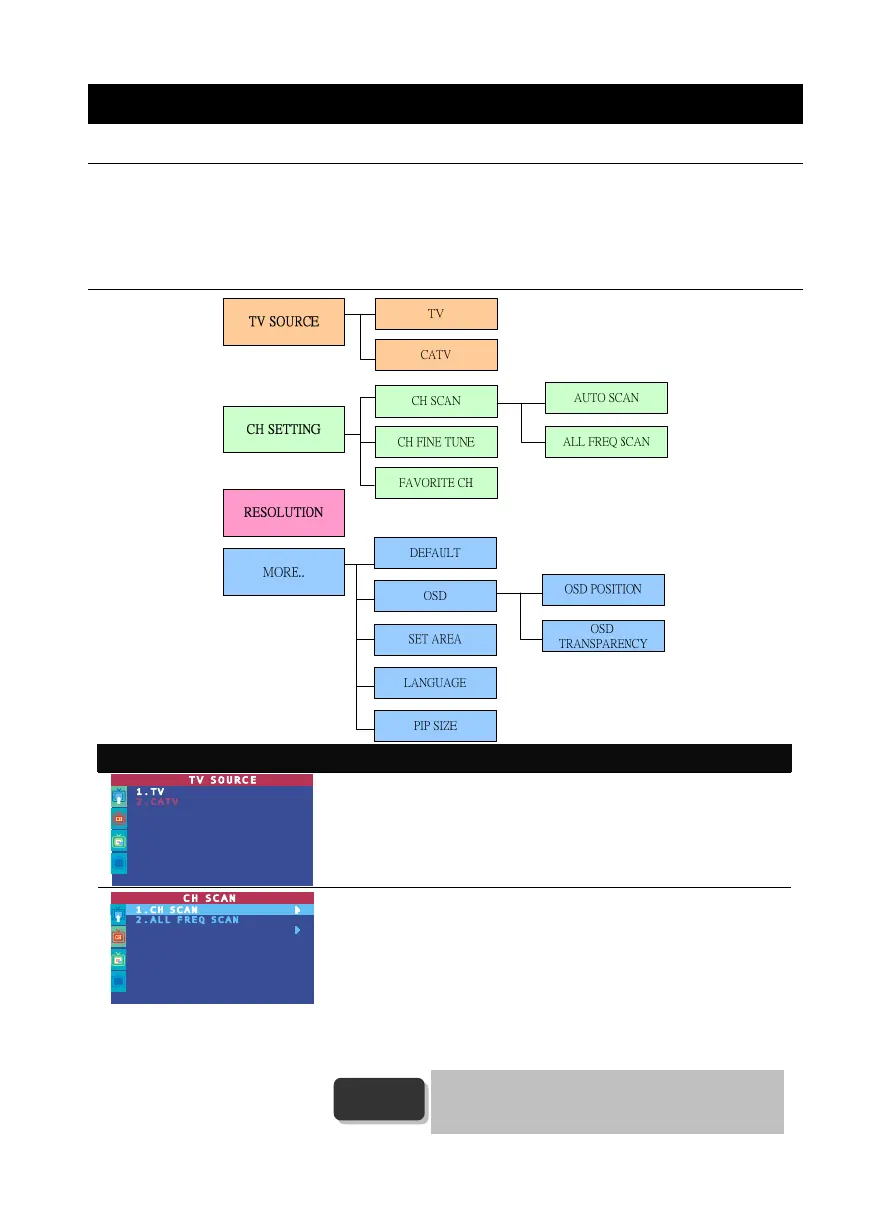
On Screen Display Usage
TV SOURCE
Use the CH▲ or CH▼ buttons to select between antenna TV or cable
TV source, then press Vol►/OK button to make the selection.
CH SCAN
Use CH▲ or CH▼ buttons to select between CH SCAN or All FREQ
SCAN. Press Vol►/OK button to make the selection. If you want to
interrupt or cancel the scanning process, press any button, but this will
only memorize the scanned channel.
These two types of channel-preset functions enable you to memorize all
active channels in your area.
Use the CH SCAN function first. If there are channels missing after
you perform CH SCAN, use ALL FREQ SCAN function and repeat the
searching process.
ALL FREQ SCAN is a very time consuming process. If
the default frequency table already includes all active TV
channels in your area, then avoid using the ALL FREQ
SCAN.
NOTE



 To Next Page