Model 6700 Family User’s Manual
21
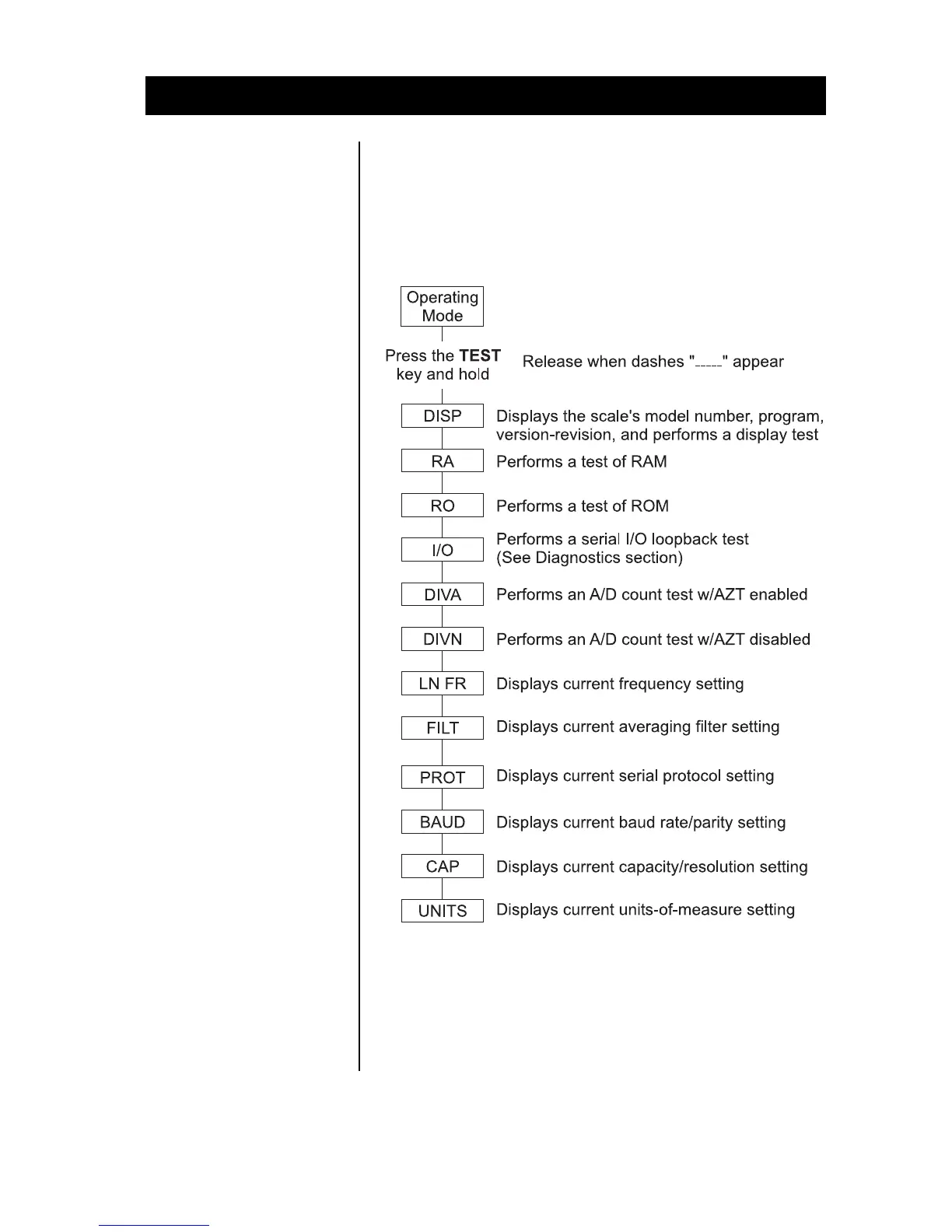
The TEST key located on the front panel lets
you perform some basic system diagnostics, as
well as review the current system settings
without having to access switches inside the
scale.
Review/Test Scale Settings
IMPORTANT: If you
press and release the
TEST key, the display
will show the scales
model number,
version-revision, and
performs a display
test.
To review the current
system settings, press
and hold the TEST
until the display shows
dashes
“_ _ _ _.” Release the
TEST key and the
display will prompt
DISP and
the scale is now in the
Review/Test Mode.
Press the ZERO key to
move to the next item
in the menu
Press the TEST key to
select the displayed
item to run or view.
When finished running tests or viewing the
settings, press the ZERO key until DONE is
displayed. Then press the TEST key to return to
normal (i.e., weighing) mode of operation.
IMPORTANT: Internal
rocker switches will be
ignored until you exit
this special mode or
power reset the scale.







 To Next Page