XR Series Installation Instructions 11
3.1 Installing the XR 4500, XR 4500TL or XR 6500
3 Installation
3.1 Installing the XR 4500, XR 4500TL or XR 6500
3.1.1 Pre-installation (Receiving Inspection)
It is always good practice to verify that the unit is complete and undamaged upon
receipt.
l Check over packaging for any signs of damage.
l Remove the XR from its protective packaging and check for damage.
l Verify that the shipment includes:
m Correct XR remote display (complete and intact, with power cord).
m Installation and Technical Instructions.
l Displays ordered with the wireless option should include:
m Radio module
m External antenna
m Internal antenna cable
m Base station kit
m FCC/IC sticker
3.1.2 Opening an Enclosure
1. Make sure the unit is disconnected from power.
2. Remove the Phillips head screws from each side of the enclosure.
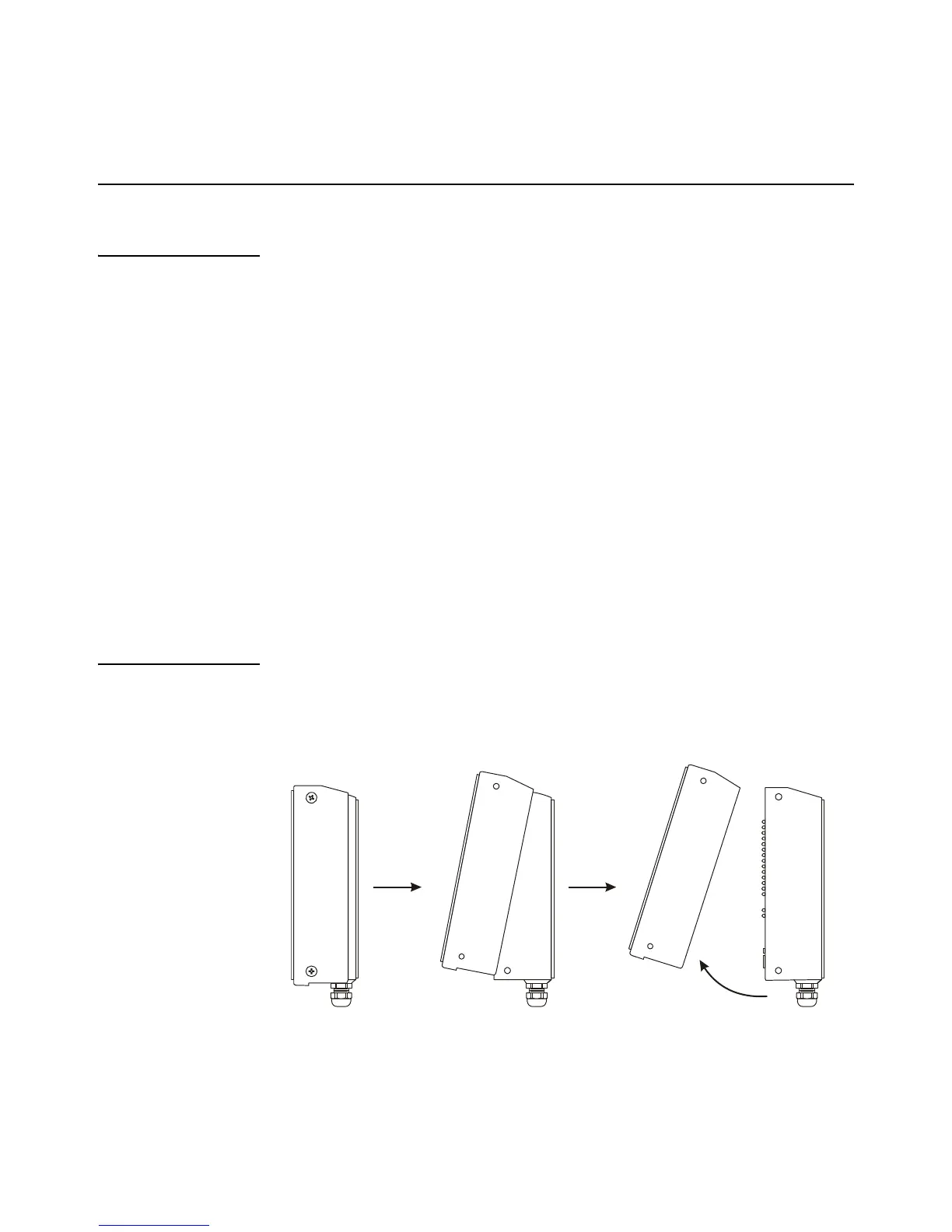
3. Slowly, guide the front cover off of the main enclosure. See Figure 3.1.
Figure 3.1 Opening the XR 4500 / 4500TL / 6500 (side view)


 To Next Page
 Loading...