9
Instruction Book
Setting the Alarm
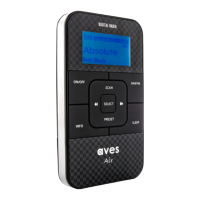
Press and hold the ALARM 1 button to enter into “alarm menu”.
Use the or button to scroll through the options and press the SELECT button to confirm your
chosen setting.
Press the ALARM 1 button to exit the “alarm menu” or to view the settings.
The alarm will keep sounding until it is turned off manually. The alarm will automatically turn itself off
after one hour.
2 ALARM 2 button
You can select either “DAB”, “FM” or “BEEP” as your alarm sound, use the or button to choose between
the three above options. Press the SELECT button to confirm.
If you want to choose a preset DAB/FM station as your alarm sound, you can do so by selecting “DAB/FM preset 1-10"
by using the or button to scroll through the options and then press the SELECT button to confirm the
chosen station.
You can set the alarm function to “Off”, “Once”, “Daily”, “Weekday” or “Weekend”. Press the SELECT button to confirm
selection. The alarm will sound at the set time and continue unless you manually switch the alarm function “off”
by following the above steps.
To set “alarm “ follow the above procedure using the .



 To Next Page