4
Getting Started
Instruction Book
Plug the power cable into the DC 5V socket on
the right hand side of your DAB/DAB+/FM Radio.
Plug the other end of the cable into a standard
three pin wall socket and switch on the power at
the wall.
Scanning for Stations
If you wish to find new DAB stations or you move
your radio to a new location, you can search using
the SCAN key.
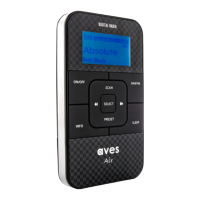
Extend the wire antenna on the back of your radio.
Press the ON/OFF button to switch on your radio. A brief
“Welcome” message will appear and automatically
tune into all available DAB stations.
You can switch between DAB and FM using the
DAB/FM button.
You may need to reposition the antenna for
optimum reception. The best position is dependent
on the station and the strength of the signal.
To view the signal strength, press the INFO button
repeatedly until the display shows the signal bar
at the bottom of the screen.
Antenna Positioning
The display will advise you of all available DAB
stations found. If there are no DAB stations
available in your area the display will show:
“No Service” and with scrolling text showing:
“No DAB signal available”.
All available stations will be saved for future use.



 To Next Page