EN
D - CONFIGURATION
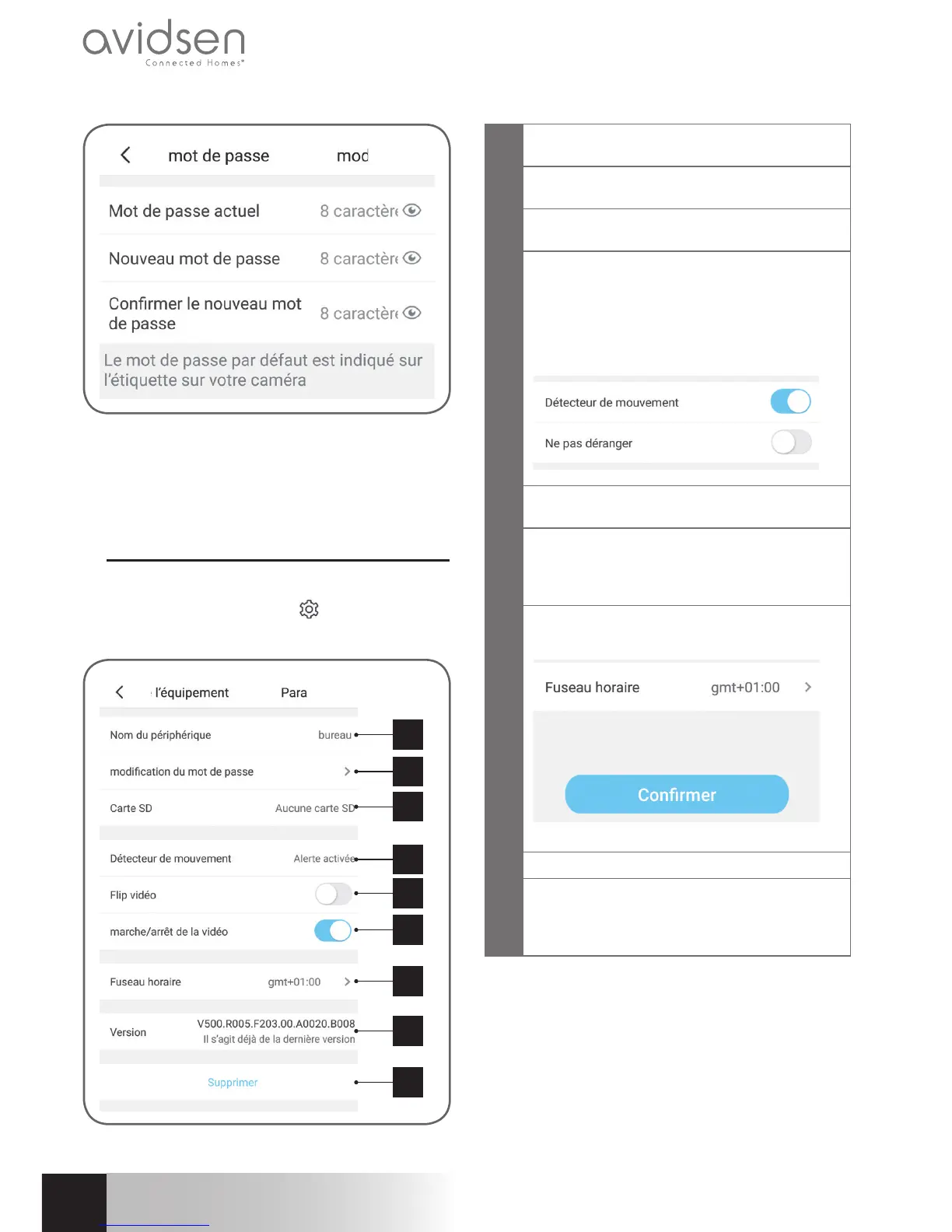
The default password is an 8-letter code indicated
on the camera marking at the side of the QRCode.
The new password must be a combination of 8
characters consisting of letters and numbers.
2.1 - CONFIGURATION
After clicking on the image of your camera from the
camera list, click on the icon
to access the full
configuration of your camera:
1
2
3
4
5
6
7
8
9
1
It is easier if you rename your camera here
after pairing
2
Change of camera access password, which
changes when the camera is started up
3
(not included) and formatting
4
Movement detection management: starting/
stopping the recording on the microSD
card when a movement is detected in the
camera field and activation/de-activation of
notifications via the app for increased peace
of mind
5
Vertical inversion of the image for ceiling
mounting
6
Privacy mode: enables the image and sound
from the camera to be de-activated from the
app (stops all recording and notification at
the same time)
7
Time zone setting to set the time inset in the
videos taken by the camera
8
Current version of the camera firmware
9
Deletion of the camera: removes the camera
from the list of cameras recognized by the
app (but does not change the personalised
connection password)



 To Next Page