EN
8
720P WIFI IP OUTDOOR CAMERA
d - CONFigurATiON
1 - ACCESS TO CAMERA CONFIGURATION
The IPCam Search software on the CD provided
(whichcanalsobedownloadedfromourwebsite,
www.avidsen.com) allows you to detect the IP
camerasonthenetwork.InstallandlaunchIPCam
Search:
This will detect your camera on the network and
showitsIPaddress.
Double-click on its name to open the camera
congurationinyourwebbrowser.
Enterthe usernameand password for connecting
toyourcamera.Bydefault,theusernameisadmin
and the password is admin as well. At the rst
connection, the camera will immediately ask you
toreplacethe default username and password to
improvesecurity.
When you have nished changing the username
andpassword,youwillbeaskedtologbackin.
Your browser will need an additional module to
displaytheimagefromyourcameracorrectlyand
will ask you if you want to install it. Accept the
requesttoallowyourbrowsertodisplaytheimage:
Notes:
• If you do not wish to install the module, the
congurationofyourcamerawillstillbeaccessible,
only the direct view on your computer will be
affected.
• Dependingonwhichbrowseryouareusing,the
proceduremay
differbuttheprincipleremainsthesame:youmust
permanentlyallow
themoduletorunifyouwantyour
cameratoworkproperly
inyourbrowser.
2 - ACCESS TO ALL THE SETTINGS
2.1 - LIVE VIDEO
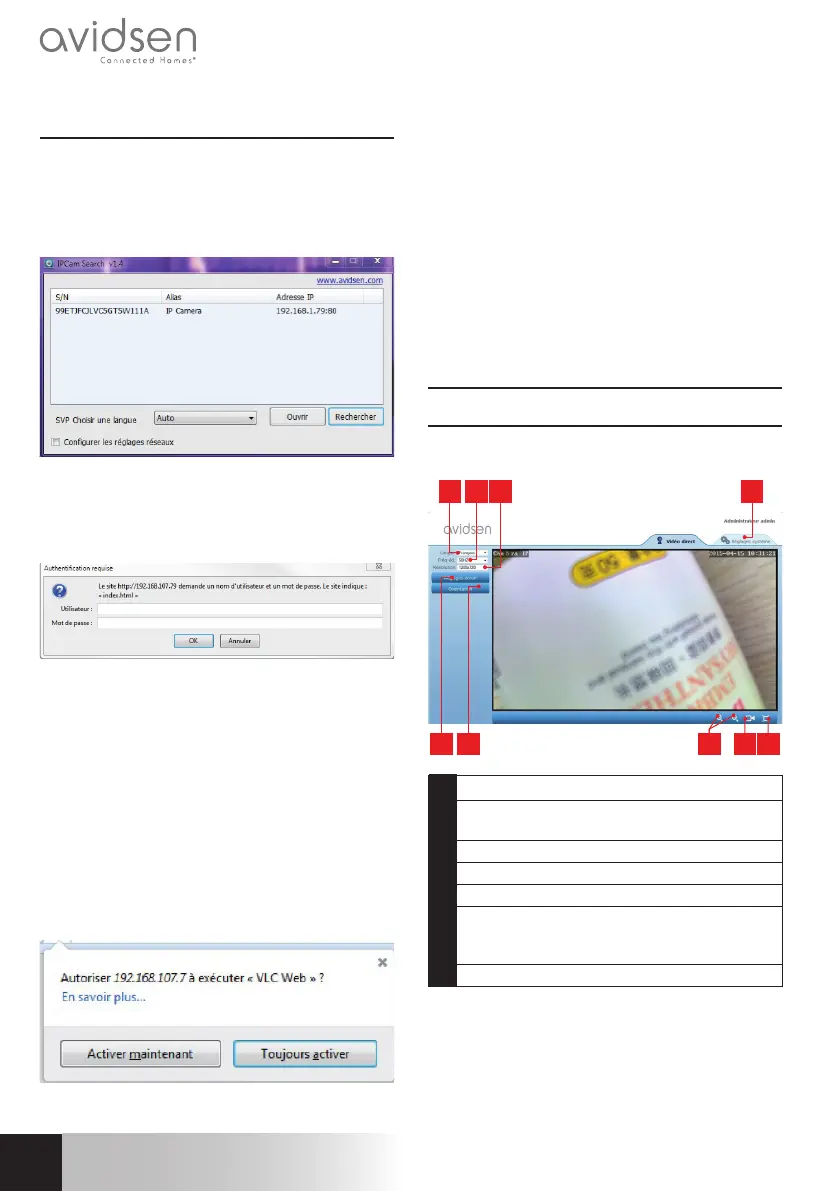
Onceyouhaveloggedinwithyournewusername
andpassword,thecamerafeedwillbedisplayed:
5 6 7 8 9
1 32 4
1 Languageselection
2 Anti-icker:Iftheimagelightingisarticial,
select50Hz.
3 Imageresolution
4 Accesstocameracongurationtab
5 Brightness,contrast,andcoloursettings
6 Orientationsettings:allowyouto,for
example,iptheimageifyourcamerais
installedupside-down
7 Digitalzoomcontrols


 To Next Page
 Loading...