14
WIRELESS ALARM KIT
EN
E - OPERATION
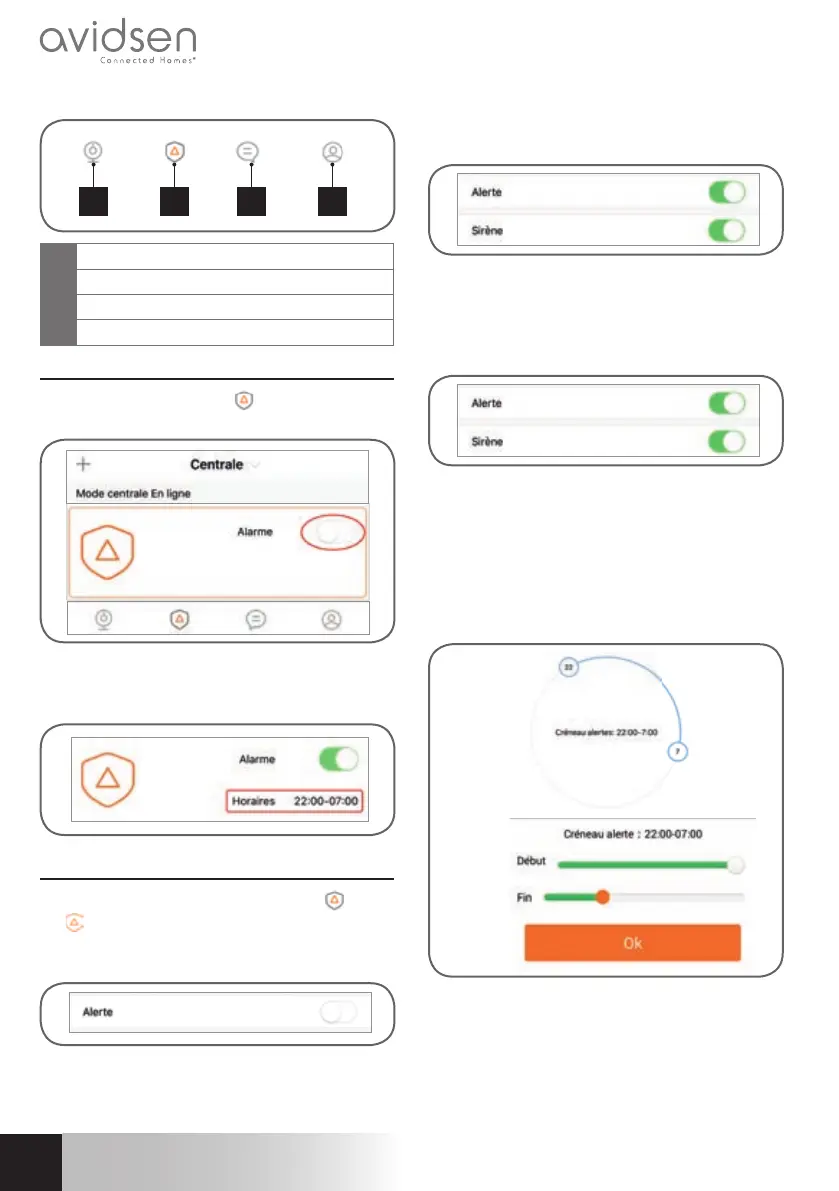
1 2 3 4
1
Camera list menu
2
Alarm unit menu
3
Alerts/messages menu
4
Profi les menu and local recording
1 - USING THE CENTRAL UNIT
From the central unit menu
, press the slider on
the right side of Alarm to turn your alarm on or off.
Once it switches to green, you can choose the
operating time slot by pressing
“Horaires” [times].
2 - ADVANCED CONFIGURATION
From the “Centrale” [central unit] menu
, press
the
icon to display the confi guration menu: Then
press “Alerte” [alert] to access the alarm options.
There are three different ways to use your alarm.
• Alert slider to the left (grey): your central unit is off,
even if you pass in front of your detectors, there
is no trigger.
• Alert slider to the right (green) and Siren slider
to the right (green): if one of your detectors is
triggered, the central unit will activate* the siren
and you will receive a push notifi cation in the Avi-
cam IP application**.
• Alert slider to the right (green) and Siren slider to
the left (grey): if one of your detectors is triggered,
the alarm will be triggered* but the siren will remain
silent and you will receive a push notifi cation in the
Avi-cam IP application** (silent alarm function).
* The alarm will only activate if the sensor trigger
occurs during the previously confi gured time slot.
Android
iOS
** Push notifi cations require the alarm’s internet
connection to be turned on during the trigger
and your smartphone to have suffi cient network
coverage to receive the information as well as the
correct settings allowing push notifi cation receipt.


 To Next Page
 Loading...