15
ENEN
WIRELESS ALARM KIT
E - OPERATION
3 - ALERT HISTORY
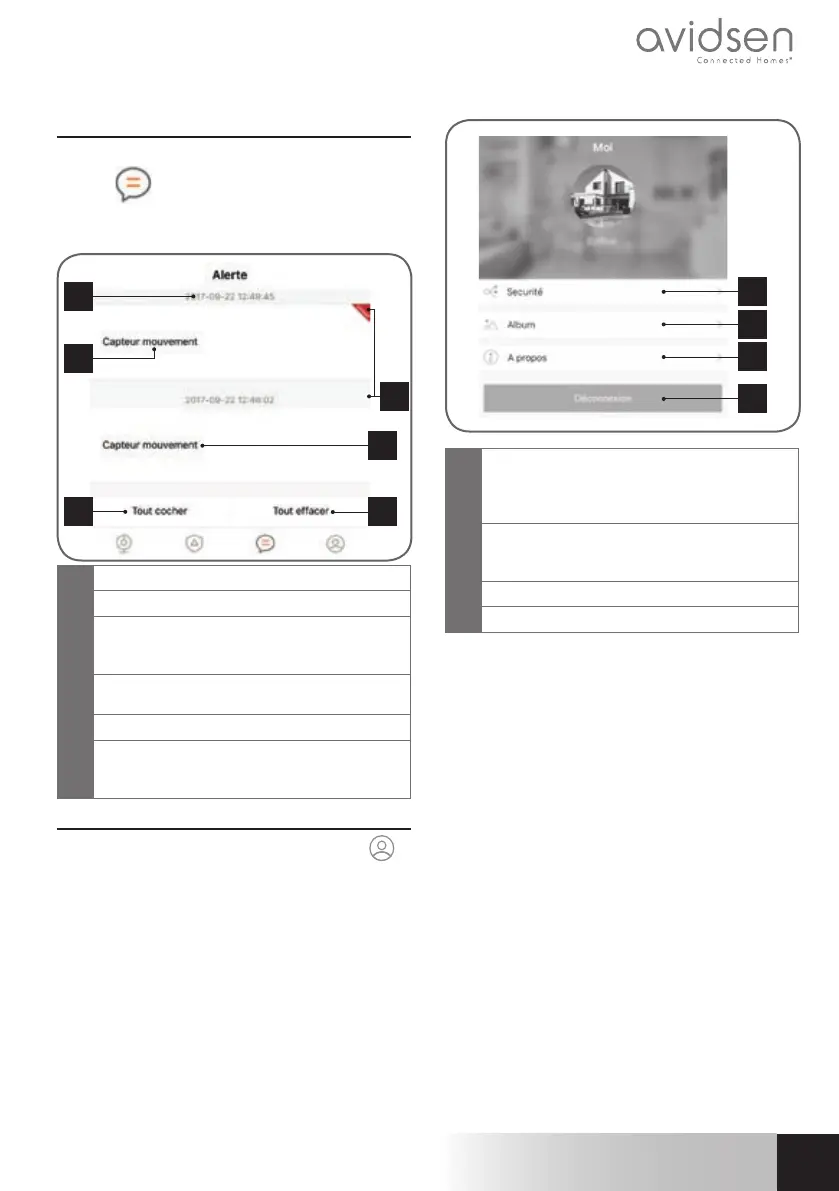
Press the “Alerte” [alert] menu at the bottom of the
interface
.
This menu will display the various alerts sent by your
Alarm.
3
4
6
1
5
2
1
Displaying the date and time of alert
2
Name of the sensor that raised the alert
3
New message indicator:
UNREAD = alert not viewed
No red triangle = alert already viewed
4
Press the sensor name to change the
message to viewed
5
Change all messages to viewed
6
Clears all messages present, and resets the
number of triggers identified by the detectors
in the “Centrale” [central unit] menu
4 - ACCOUNT
Press the “Mon compte” [My account] menu
at
the bottom of the interface.
This menu displays your account management:
password and recovery options, access to videos
and photos stored in the avi-cam IP app, as well
as information about the app version.
1
2
3
4
1
Changing your password and configuring
password recovery options in case of
forgotten password (security question,
emergency e-mail)
2
Album containing your manually taken
photos and videos while playing back a
camera
3
Information on the application
4
Logs out of your account


 To Next Page
 Loading...