WEAT C2N – V1 - EN 14
Learn mode
Press the P1/SET button for three seconds.
Learn mode is activated when the green SET LED lights up and with the start up of the motor.
1) The unit performs a pre-opening operation for approx. three seconds.
a) if the gate closes instead of opens, cut the power to the unit and reverse the motor wires.
b) repeat the learn procedure from the start.
2) The unit closes the gate until it comes to a stop and is fully closed.
3) The unit opens the gate completely to learn how long the operation takes and when exactly it should start
slowing down (90% into the operation). Opening ends when the stop is reached by the obstacle check.
4) After a three-second pause, the unit closes the gate completely and exits learn mode.
Changing the settings
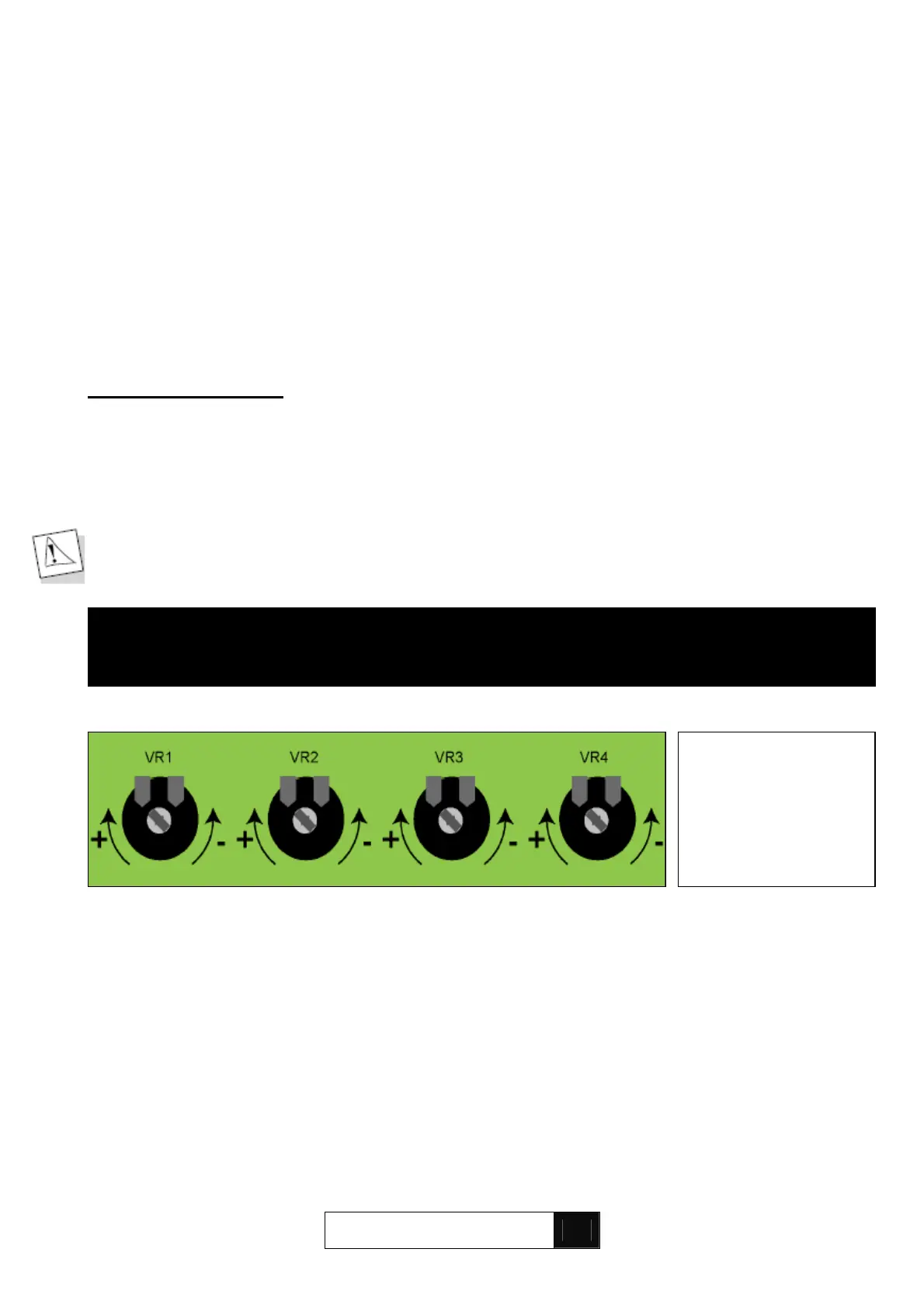
If need be, after performing the initial gate test, adjust the following board settings using the trimmers on the
board:
- motor force (trimmer VR 1)
- pause time (trimmer VR 2)
- obstacle response time (trimmer VR 3)
- sensitivity (trimmer VR4)
Warning: for reasons of safety, you should be able to stop the gate using your hand
(15 kilograms pressure on the edge of the door).
The pause time trimmer can also be used to select automatic or jog mode. Turning the trimmer to the end of
the scale will activate automatic mode with a variable pause time of between 0 and 90 seconds. Turning the
trimmer all the way to the bottom of the scale (jog mode) will inhibit automatic mode
ELECTRONIC BOARD SETTINGS
FORCE PAUSE TIME OBSTACLE RESPONSE SENSITIVITY
TIME
‘+’ maximum
jog
‘-’ pause time in
automatic mode
‘-’ lower motor
force
‘+’ stronger
motor force
‘-’ lower
response time
‘+’ higher
response time
‘-’ more sensitive
‘+’ less sensitive
To activate the new
settings, repeat the
learn procedure in
full
(page 13).


 To Next Page