1-6 System Overview
ARMED VS ENGAGED MODE INDICATIONS
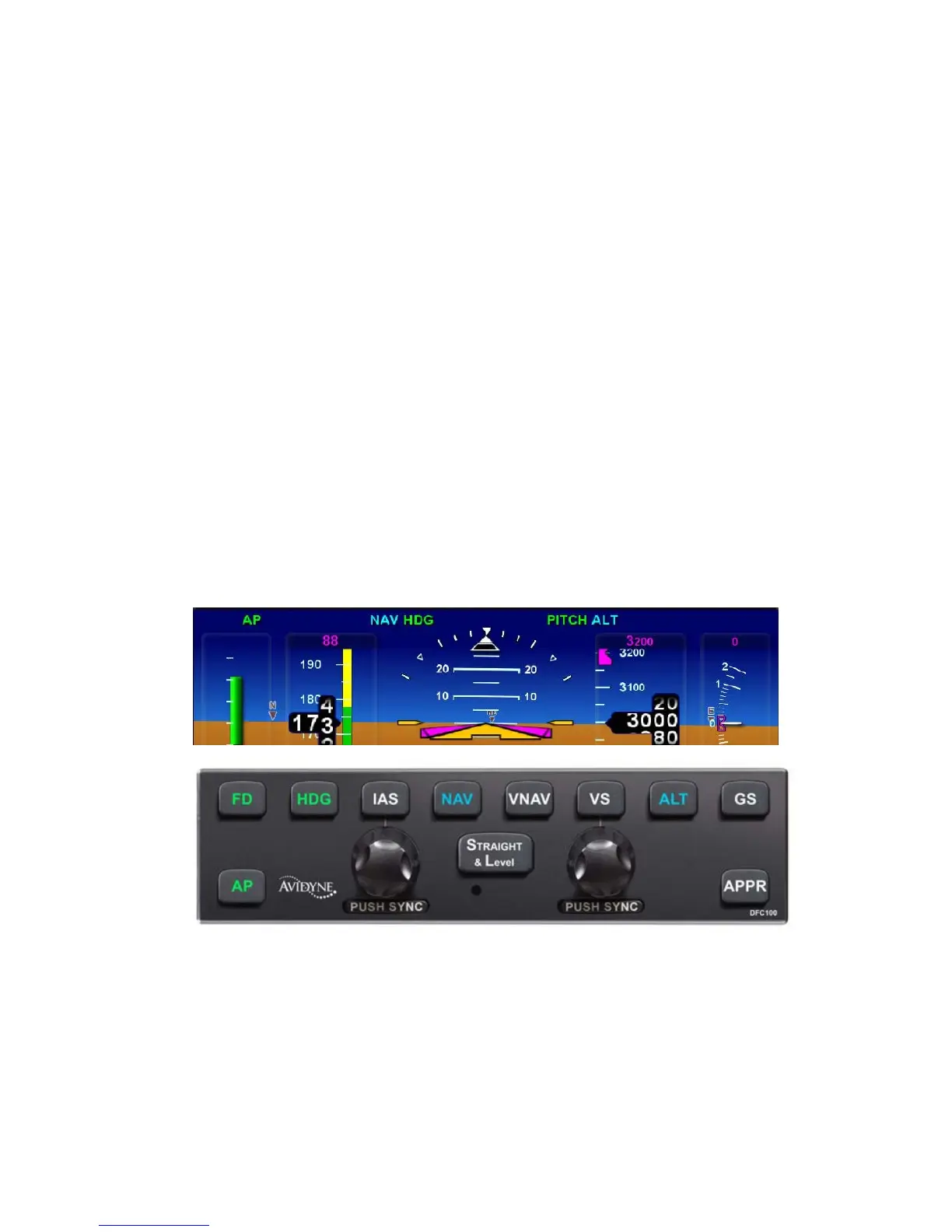
The DFC100 autopilot has more readily distinguishable armed vs.
engaged modes in order to provide the user higher awareness of
the current autopilot state and upcoming state transitions.
An armed mode is defined as a state that will be captured when
and if the airplane crosses that target. Armed modes are
indicated by a cyan (blue) color on both the autopilot control
panel and on the PFD mode annunciator strip.
An engaged mode is defined as a state that the autopilot is
holding. Engaged modes are indicated by a green color on both
the autopilot control panel and on the PFD mode annunciator
strip. One exception is that when AP is on, both “FD” and “AP”
are not lit on the PFD mode annunciator strip – FD is always on
with AP.
The images below demonstrate the armed and engaged coloring
on both the display and the autopilot control head. In this
example, Heading (HDG) and Pitch modes are engaged and Nav
mode and Alt are armed.
MODE TRANSITION INDICATION
Automatic transition from armed (cyan) to engaged (green) states
is indicated by the cyan armed button on the autopilot control


 To Next Page