19
Creating Your Filing Profile
To store your scanned image to the network folders, you need to first set up a
few network folders including FTP or CIFS to store the images.
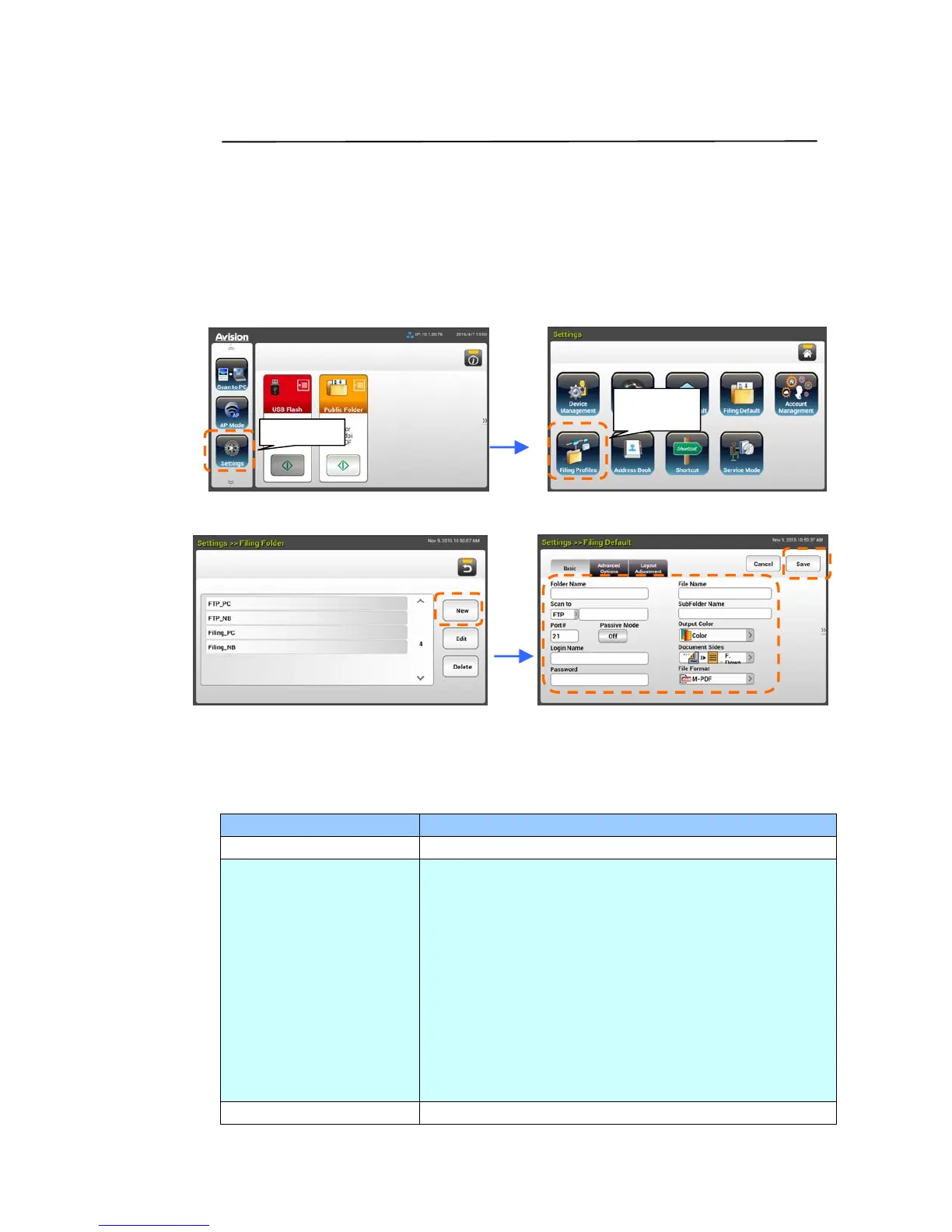
1. On the Home Screen of the LCD Touch Panel, tap [Settings]>[Filing
Profiles]>[New] in succession.
2. Refer to the following table to create your filing profile. Tap [Save] after
the settings have been made satisfactory.
Item Description
Folder Name Enter your folder name.
Scan to Choose your [Scan to] destination:
Choice includes *FTP, CIFS, USB, Public Folder.
FTP/CIFS: If FTP or CIFS is selected, enter the URL
address in the right field. You can either enter a
domain name or an IP address with the directory
path.
USB: Store the scanned image to an inserted USB
flash drive.
Public Folder: Store the scanned image to the
memory of the product and then access the image via
the product’s embedded web page.
Port # Enter the port number for the [Scan to] server.
Settings
Filing
Profiles


 To Next Page