13
Connecting Avtex Television
It is recommended wherever possible to use an ethernet cable to connect the
AMR985 to your television to fully optimise connectivity.
Below is connection method for wireless connection, both connection
methods are also included in your television's instruction manual.
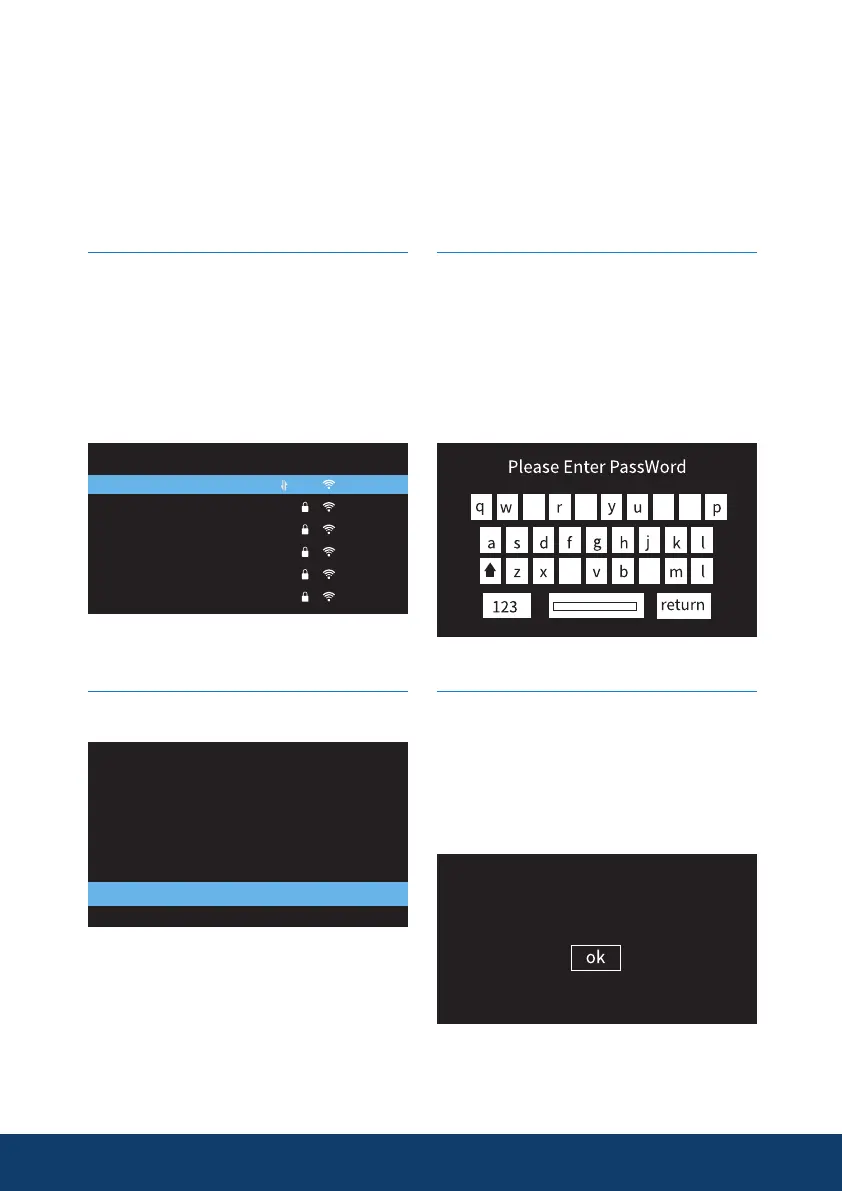
Step 1
Perform a standard Base station
scan within the Network
configuration Option on your
Avtex Connected TV, look for
Avtex_AMR_**** highlight and
press OK.
Avtex_AMR_260E
360360360
959-X1
STAR
TP-Z24G
123
Base Station
Step 2
Select Password and press OK.
551D AN VPN
Security WPA2
WEP Type Character 5
WEP Key 0
Password
Connection
Step 3
Input the password from the front
of the AMR_985 and press Return
(upper/lowercase sensitive), you
can use the numerical keys on
the remote control to direct
enter numbers.
Step 4
Wait for the “Success” message,
press OK on the remote control
and your Avtex Connected Series
television will now have network
connection.


 To Next Page