The Avtex AMR985 is a mobile internet solution designed for on-the-go connectivity, enabling users to stream, browse, and share. It functions as a router that provides internet access via a mobile network (LTE) or by connecting to a local Wi-Fi network, creating a local access point for multiple devices.
Function Description
The AMR985 acts as a mobile internet router, allowing up to 100 separate devices to connect simultaneously. It utilizes a SIM card (or two SIM cards for redundancy, though only one is required for full functionality and must be in SIM 1 slot) to access mobile data networks (4G LTE). Additionally, it can connect to existing local Wi-Fi networks and then re-broadcast that signal, effectively extending Wi-Fi coverage or providing internet access when mobile data is not preferred or available. The device is managed through a web interface accessible via a connected PC/laptop, tablet, or smartphone, allowing users to monitor signal strength, connected devices, and data usage.
Important Technical Specifications
- Mobile Module: 4G (LTE) – Cat 4, offering speeds up to 150 Mbps download and 42 Mbps upload. It also supports 3G with speeds up to 236.8 kbps.
- Status Indicators: Provides signal strength (SINR, RSRP, RSRQ) and bytes sent/received information.
- Bridge: Supports direct connection (bridge) between mobile ISP and device on LAN.
- SMS: Features SMS status, SMS configuration, send/read SMS via HTTP POST/GET, email to SMS, SMS to email, SMS to HTTP, SMS to SMS, scheduled SMS, SMS autoreply, and SMPP.
- Wireless Mode: IEEE 802.11b/g/n, functions as an Access Point (AP) or Station (STA).
- WiFi Security: WPA2-Enterprise (with external/internal Radius server), WPA2-PSK, WPA-PSK, WEP, MAC Filter. WPA2-Enterprise supports PEAP, TLS, TTLS, AES-CCMP, TKIP, Auto Cipher modes, and client separation.
- SSID: Supports SSID stealth mode and access control based on MAC address.
- WiFi Users: Can accommodate up to 100 simultaneous connections.
- Wireless Hotspot: Captive portal (Hotspot), internal/external Radius server, built-in customizable landing page.
- Connector: 4-pin industrial DC power socket.
- Input Voltage Range: 9 – 30 VDC (4-pin industrial socket), with reverse polarity protection and surge protection >31 VDC 10us max.
- PoE (passive): Passive PoE over spare pairs, with the possibility to power up through LAN port, not compatible with IEEE802.3af and 802.3at standards.
- Power Consumption: < 2 W idle, < 7 W max.
- Dimensions: 100 x 110 x 50 mm (L x W x H).
- Weight: 280g.
- Antenna: The antenna does not require a ground plane and can be fitted on metal or plastic roof panels. It has a minimum clearance recommendation of 30cm (12") from other equipment. The mounting hole diameter is 19mm (or 25mm with extension bolt).
- Cables: Flame retardant RG174 cable, 2.8mm, 300mm long, 2 positions. Cellular cables are SMA plug termination, labeled CELL A/CELL B, with yellow labels with black text.
Usage Features
- SIM Card Installation: Supports standard SIM cards. SIM 1 is mandatory for operation. If using two SIM cards, SIM 2 is installed similarly.
- Antenna Connection: The device requires external antennas for mobile (main and AUX) and Wi-Fi connectivity. Care must be taken with center pins during insertion.
- Mounting: Features 4 mounting holes on the rear for secure installation within a vehicle.
- Power-up: Requires 2-3 minutes for full boot-up, with power and signal indicator lights needing to be illuminated for service acquisition.
- WiFi SSID and Password: The unique WiFi SSID and password are provided on the device itself, along with the default IP address (192.168.1.1) and user/password (admin/123456789) for web interface access.
- Smart Device Connectivity: Users can connect by scanning a QR code using their smart device's camera or by manually selecting the network and entering the password.
- Windows Machine Connectivity: Standard Wi-Fi scan and password input for connection.
- Avtex Television Connectivity: Can connect wirelessly to Avtex Connected TVs by scanning for the Avtex_AMR_**** network and inputting the password. Ethernet cable connection is recommended for optimal performance.
- Web Interface Access: Accessible via a web browser at 192.168.1.1 with the password 123456789. Provides an overview of LTE signal strength, connected devices, and allows for LTE/WiFi toggling and channel selection.
- LTE / WiFi Toggle: Allows switching between mobile data (LTE) and connecting to a local Wi-Fi network. When switching to Wi-Fi, the device scans for available networks, and users can select and join a protected network by entering its password. The device can only remember the last Wi-Fi access point.
- Data Usage Control: Users can set custom mobile data limits for SIM cards via the advanced setup menu (password 987654321) under Network > Mobile > Mobile Data Limit. Once the limit is reached, the mobile connection will cease until the period ends or the limit is reset.
- Re-boot / Factory Reset: A reset button (accessed with a SIM pin) offers two functions:
- Reboot: Press for up to 4 seconds to restart the device, indicated by flashing of 5 signal strength LEDs with a green connection status LED.
- Factory Reset: Press for at least 5 seconds to perform a factory reset, restoring SSID and passwords to original values. Signal strength LEDs indicate elapsed time while holding the button.
Maintenance Features
- Antenna Installation: The manual provides detailed steps for antenna installation, including masking the panel area, drilling, cleaning, and securing the antenna with an adhesive pad and slotted/split nut. It emphasizes testing the system before installation and recommends professional installation.
- Cleaning: The router is designed to be maintenance-free, and the antenna cover only needs to be gently washed occasionally to maintain optimum signal reception. Users are warned against removing the antenna cover, using solvents, or using pressure washing devices directly on the cover, as these actions can void the warranty.
- Warranty: Covered by a limited 1-year parts and workmanship warranty. It is recommended to register the product within 28 days of purchase. The warranty does not cover issues related to SIM cards, data usage, or signal reception, which should be directed to the SIM provider.
- Permanent Installation: The antenna is designed for permanent installation and should not be removed once installed under normal circumstances. If removal is necessary for a warranty claim, it should be done by a professional installer.

 Need help?
 General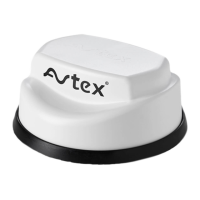

 To Next Page