*
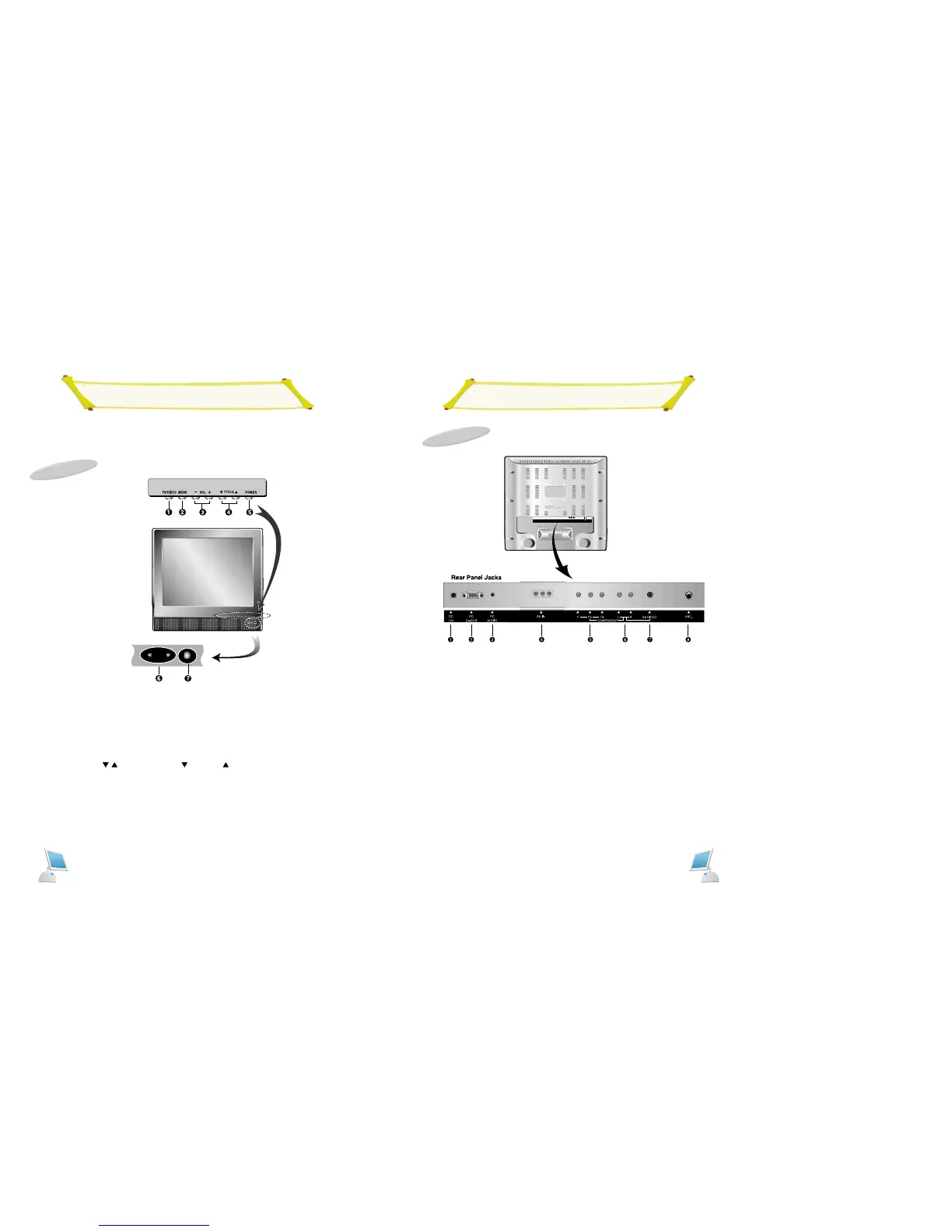
Rear Panel
1. DC 12V To input DC power from power outlet.
2. PC D-SUB Use to connect a video signal from a personal computer
3. PC AUDIO Connects to the sound-output port of a personal computer.
4. AV IN Video/Audio signals from VCR or similar divice.
5. HDTV INPUT Video signals from HDTV player.
6. AUDIO IN Audio signal from an VCR or similar device.
(Audio input of COMPONENT IN is used commonly with S-VIDEO)
7. S-VIDEO S-Video signal from an S-VHS VCR or laserdisc player
8. ANTENNA JACK Connect to an antenna or a cable TV system
.
Rear
+
Front Panel
Front
1. TV/VIDEO Display a menu of the available input sources.
2. MENU Display the main on-screen menu. Exit from sub-menu.
3. VOL(-/+) Press the increase or decrease the volume. Also used to increase
or reduce the value of a menu option.
4.PROG(
/ ) Press PROG[ ] or PROG [ ] to change channels. Also used to
highlight selections on the on-screen menus.
5. POWER Sub power switch
6. STAND BY ON: The green LED is on.
OFF:The red LED is on.
7. Remote Control Sensor



 To Next Page