EN - 11
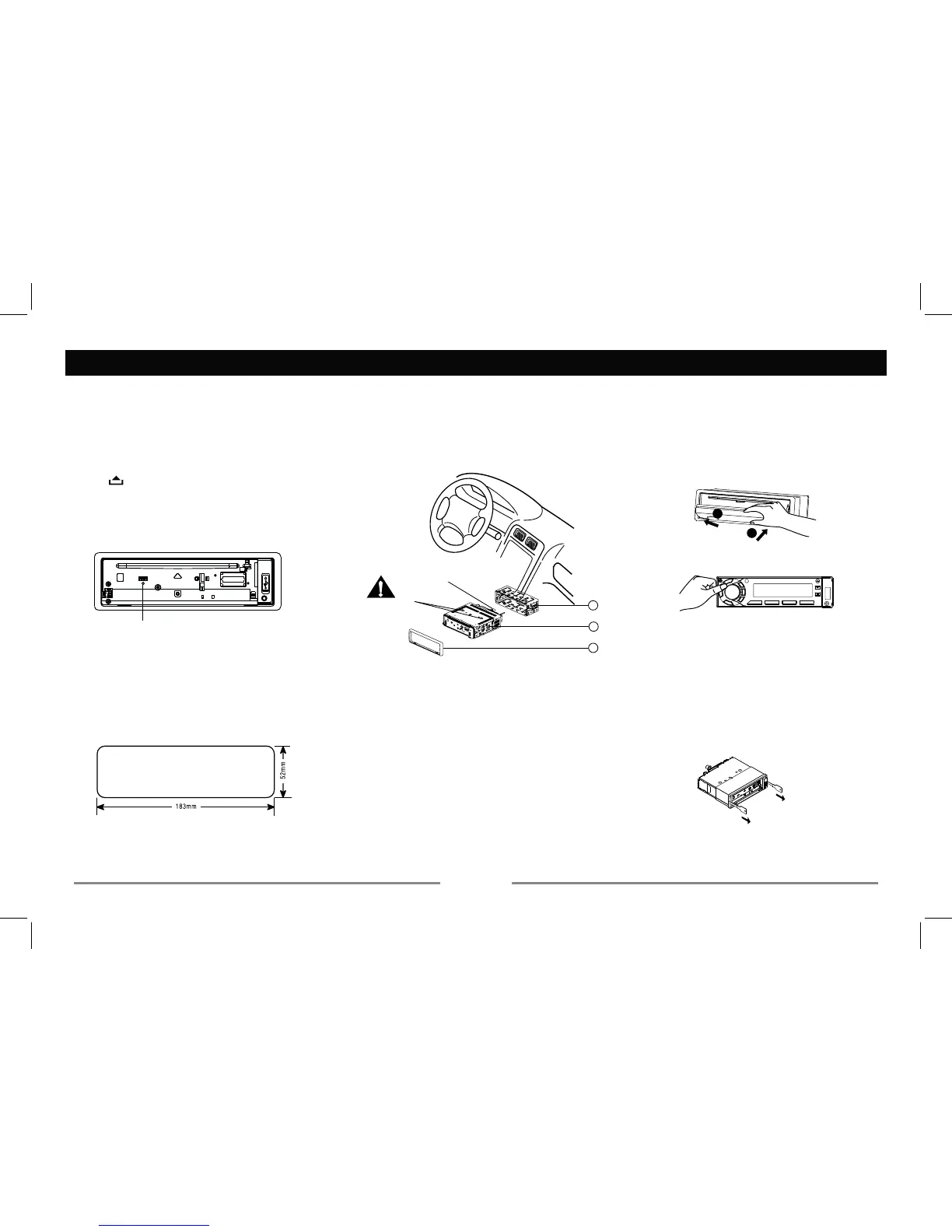
Mounting bolt
rubber cushion.
1
2
3
Remove the
two screws.
Installation Guide
Installation Procedures
First complete the electrical connections, and
check for correctness.
— — — — — — — — — — — — — — — — — — — —
Reset
Press
to reset the unit to the IDFWRU\VHWWLQJV.
LQJ
WLPH and stored stations.
Install the unit
Remove the two WUDQVLWscrews on the top of the
XQLWbefore installation.
Installing the panel
LVRSHQ
6et one side of WKHSDQHOLQWKHSDQHOEUDFNHW
Press the RWKHUVLGHRIWKHSDQHOXQWLOLWORFNV
— — — — — — — — — — — — — — — — — — — —
Installation Opening
This unit can be installed in any dashboard
having an opening as shown below. The
dashboard should be 4.75mm - 5.56mm thick
in order to be able to support the unit.
and bend the mounting tabs out with a
screwdriver.
After fixing mounting bolt and power
body by WKHrubber cushion.
3. Insert trim plate.
Mounting bolt
Rubber cushion
— — — — — — — — — — — — — — — — — — — —
Removing the unit
of the set until they lock.
3. 6OLGH out the unit.
1
2
Reset


 To Next Page