10
Create some shortcut keys on the touchscreen to directly unlock a door, call the intercom or pull
up an intercom camera feed.
Unlock the Door
The following steps are performed in the web GUI of the 2N D7A Phone
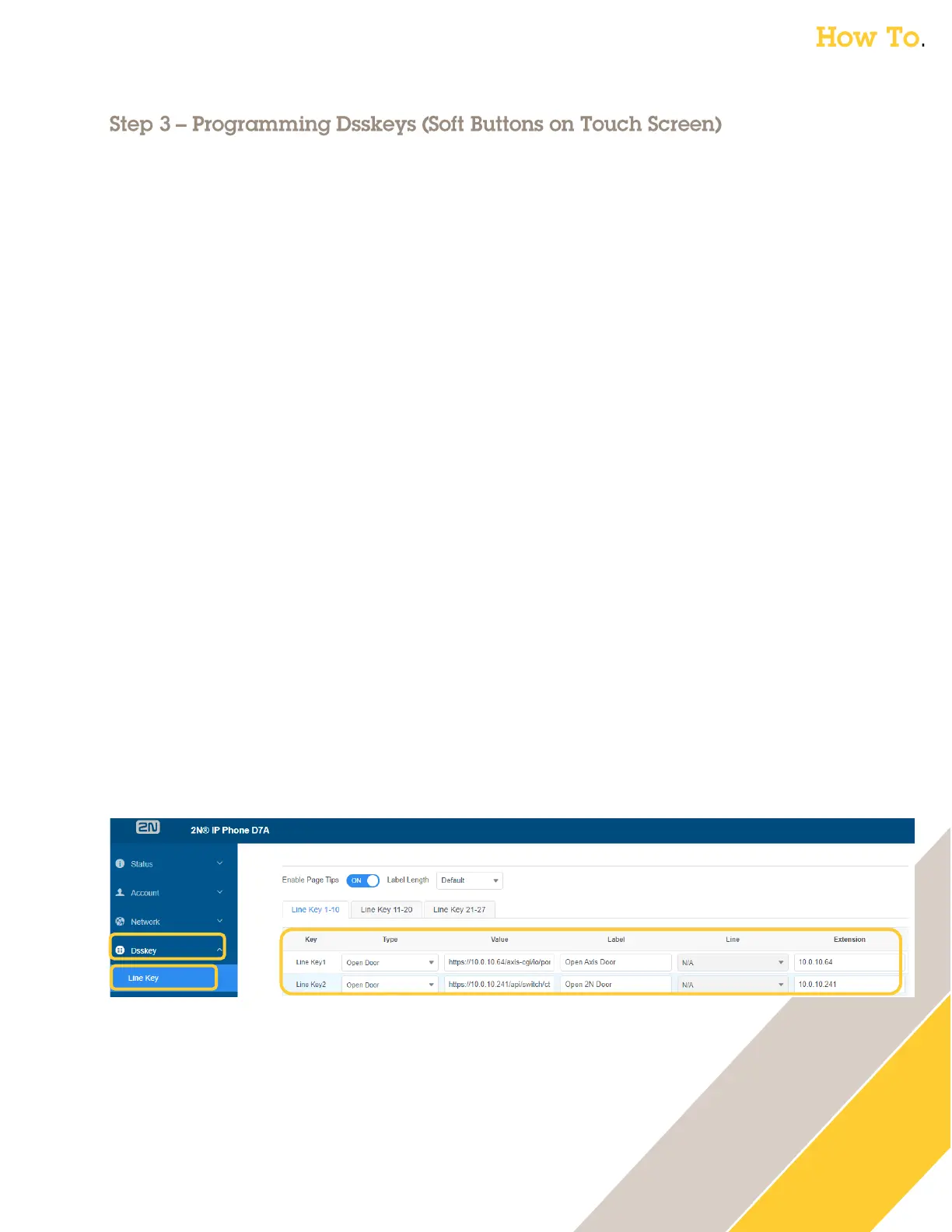
1. Click on Dsskey then Line Key
2. Set the key type
o Type = Open Door
3. The value is the trigger/command we will send to the (Axis or 2N) intercom
o Axis Intercom:
Value = https://<IP_of_Axis_Intercom>/axis-cgi/io/port.cgi?action=4%3A%2F5000%5C
The above action triggers relay 1 (port 4) for 5000 milliseconds (5 seconds) on the I8016-
LVE. If you have a different model Axis Intercom, you can verify the Relay 1 port number
under System → Accessories in the Axis GUI (firmware 11.x).
o 2N Intercom:
Value = https://<IP_of_2N_Intercom>/api/switch/ctrl?switch=1&action=trigger
The above action triggers Switch 1 (the default Door Lock switch). It is triggered for the
duration specified in the 2N Intercom GUI under Hardware then Switches for Switch 1.
4. Create a descriptive label
o Example: Label = Unlock Front Door
5. Set the Extension / IP address of the intercom
o Extension = <IP_of_Intercom>
6. Click Confirm



 To Next Page