22 USER MANUAL
__________________________________________________________________________________________________________________
15.5 Percent function (PErCEnt)
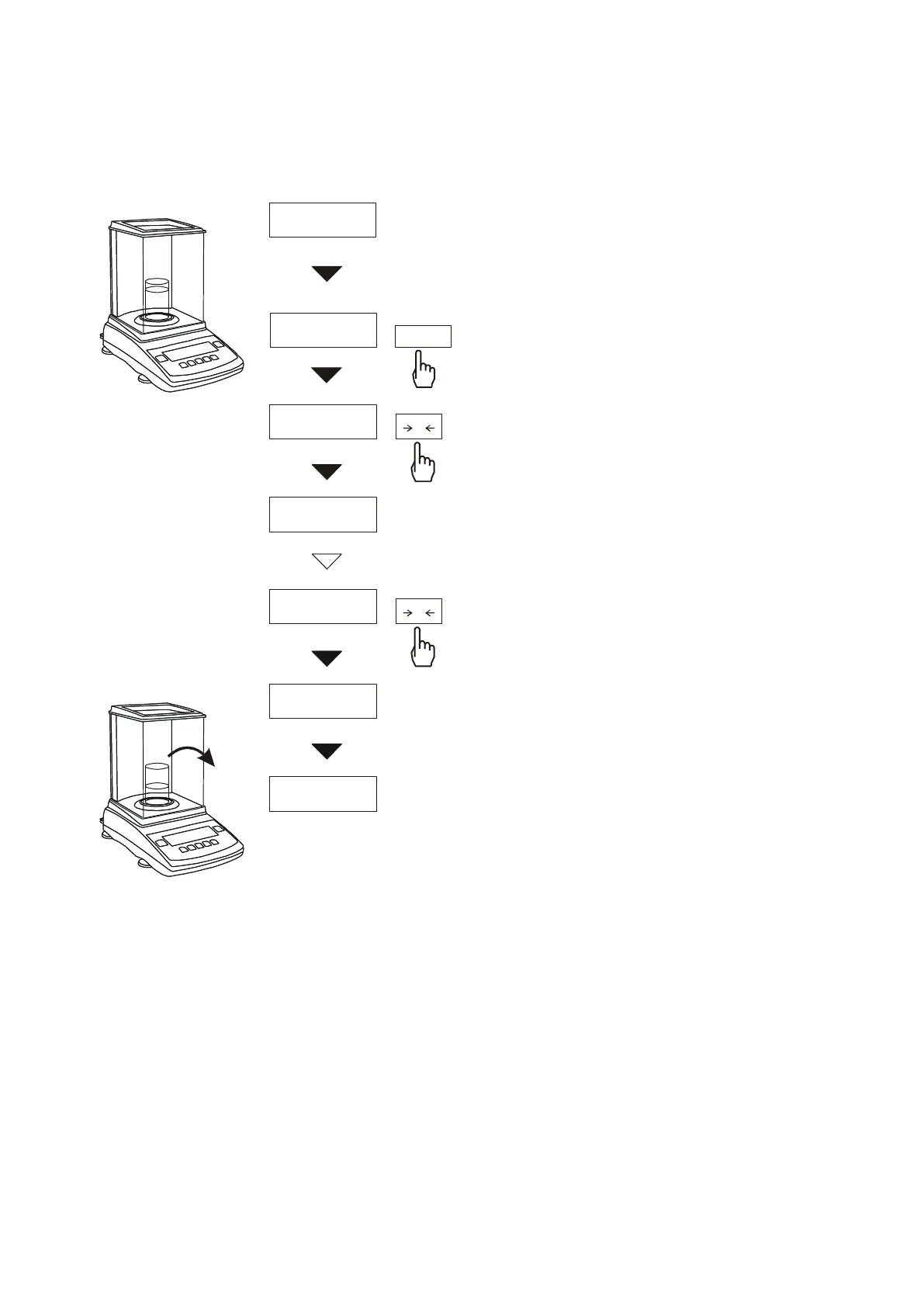
The function allows displaying
weighing result in percents.
Measurement is performed in two
phases:
-first phase – weighing reference
mass (mass referenced to 100% )
-second phase – weighing sample
mass as a percent of reference mass
Weighing result is displayed in
various formats, depending on
reference mass value. For reference
mass values between 0÷3,5% of
balance capacity, format of weighing
result is 100.0, for values between
3,5÷35% it is 100.00 and above 35%
- 100.000.
The function has the following
options:
- PEr oFF – deactivate the function,
- PEr on – save current indication as
100%, start weighing in percents,
- out – exit without changes.
In order to go back to indication in
mass units use key. Using this
key once more will cause return to
displaying in %.
Caution:
1. PEr Err message informs that
reference mass is less than
0,5Min or was not defined.
2. When the balance shows weighing
result in percents,
T
key
works as usual.
0.0000g
19.07 g
PErCEnt
PEr oFF
PEr on
100.00%
50.00%
100%
50%
MENU
T
T


 To Next Page