USER MANUAL 37
_________________________________________________________________________________________________________________
15.16 Date and time setting (dAtE)
This function enables to set current
date and time of internal balance
clock and enable/disable date and
time on weighing result printouts.
Options:
- dAt oFF – deactivate date printout,
- dAt on – activate date printout
(using key),
- dAt SEt – change date and time.
- dAt PIn – inserting safety code to
avoid changing the date by
unwanted personnel. Insert the code
using , ,
T
and MENU
(look chapter 6 ) keys. After code
confirmation, before each entering
into dAtE function, the user will be
asked to inscribe the code. To
cancel the pin, enter dAt Pin option
and write code: 0.
- dAt For – selection of date and time
format,
- out.
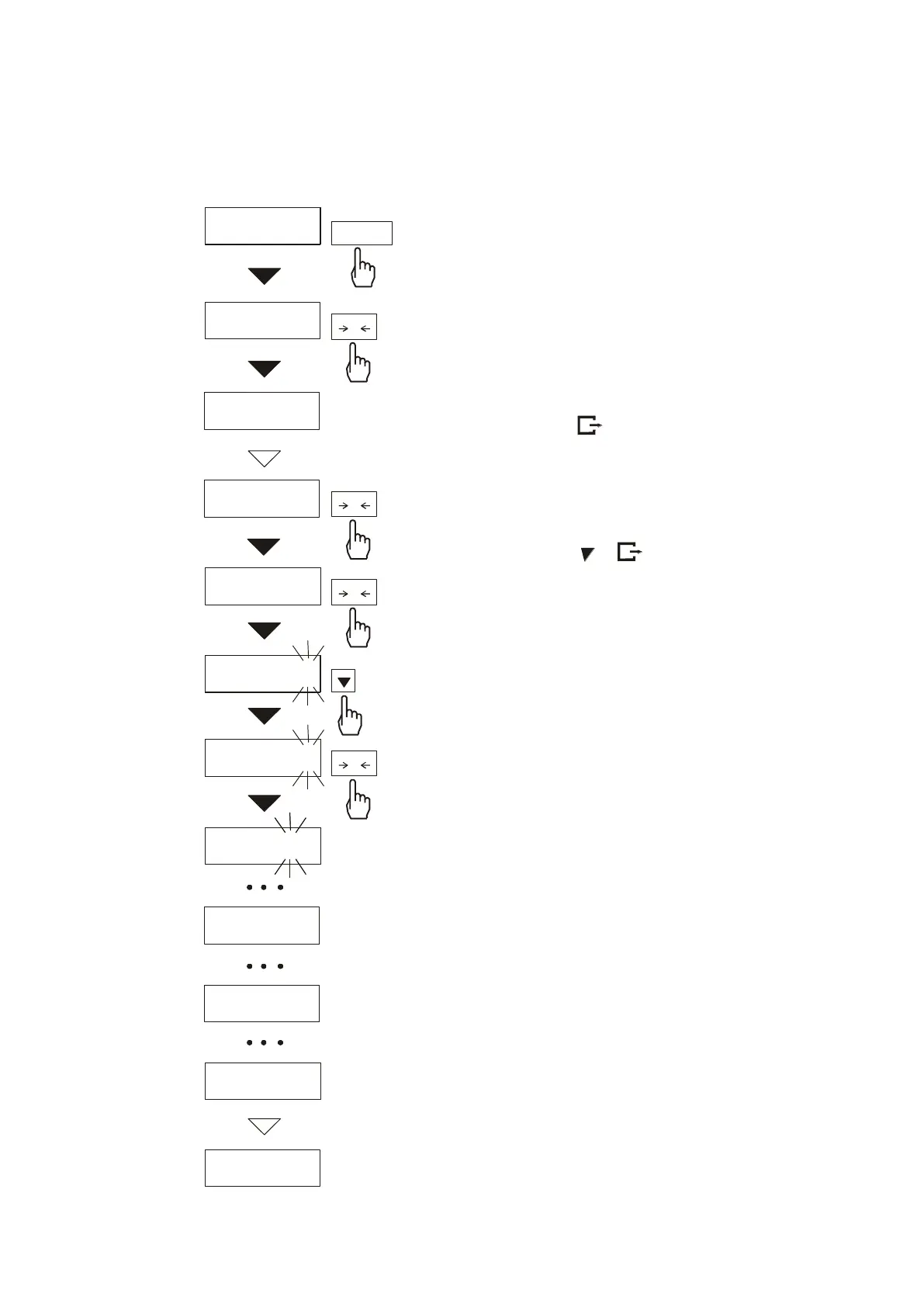
The example on the left presents how
to set current date and time.
0.00g
dAtE
dAt SEt
dAt oFF
h13 - 18
h13 - 1
8
h13 - 1
9
h13 -
1
9
0.00g
d04 - 05
r - 06
- -
MENU
T
T
T
T


 To Next Page