2
53mm
182mm
3
2
182mm
53mm
1
2
1
3
4
Release screw and
bracket
Bend these
claws, if necessary
INSTALLATION
PRECAUTIONS
• Carefully choose the mounting location so normal driving is not affected.
• Avoid installing the unit where it would be subject to high temperatures (direct sunlight or hot air
from the heater) or where it would be subject to dust, dirt or excessive vibration.
• Only use the mounting hardware supplied to ensure a safe and secure installation.
• Remove the front panel before installing the unit.
Mounting angle adjustment
Adjust the mounting angle to less than 20°.
MOUNTING EXAMPLE
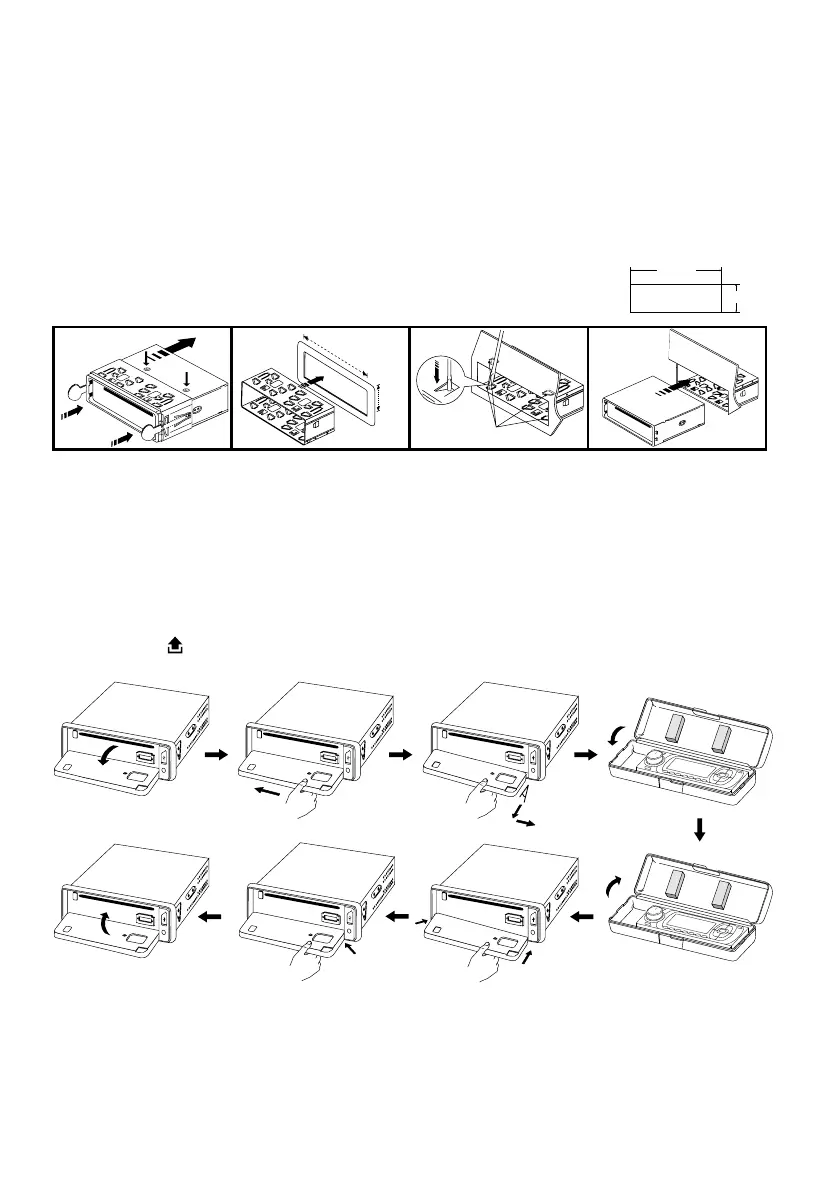
Installation in the dashboard
Note: Keep the release keys in the safe place as you may need them in future to remove the unit.
Detaching and attaching the front panel
The front panel of this unit can be detached in order to prevent theft.
FOLDING DOWN AND DETACHING/ATTACHING THE FRONT PANEL
Before detaching the front panel, be sure to press the PWR button (1) OFF rst.
Then press the button (16), to fully open the front panel. Detach the panel by pulling it towards
you as illustrated.
Notes:
• Do not exert unnecessary pressure on the front panel when attaching it.
• Please use the supplied case when the front panel is removed.
not exceed 10°



 To Next Page