5
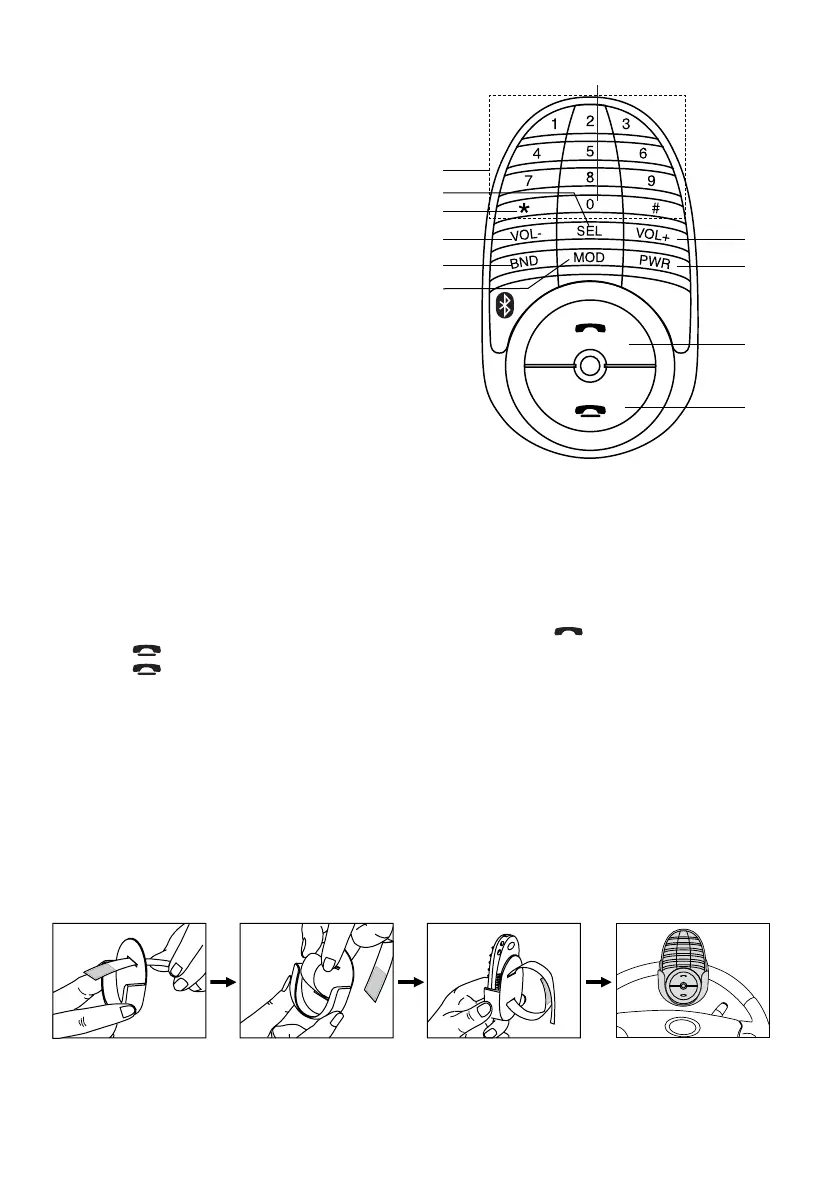
POSITION OF CONTROLS (DIAL KEYPAD)
1. POWER ON / OFF
2. ANSWER A CALL
3. VOLUME +
4. END A CALL
5. BAND
6. SELECT MENU FUNCTION
7. VOLUME -
8. MODE
9. PHONE NUMBER /
BUTTON 1-6: STATION PRESETS
10. STEREO / MONO
11. SCAN STATIONS
INSTALLATION OF DIAL KEY PAD
Use double sided adhesive tape (optional) to stick the remote on the dashboard or another convenient
place.
To Install on Steering Wheel:
Note: To use the remote, detach it rst from the remote holder and point directly to the head unit.
CAUTION:
Do not install the remote close to or in front of any SRS (airbag).
1
3
4
2
7
6
9
5
8
10
11
SWITCHING TO TELEPHONE MODE
1. During any operating mode, press and hold “*” to activate TELEPHONE mode. Press and hold
it again to return to previous mode.
MAKING CALLS USING THE REMOTE CONTROL
Calls can be made directly from the remote control. Before making a call, make sure that the devices
are properly paired and connected.
1. Press and hold “*” on remote control. Unit will switch to phone mode.
2. Enter the phone number via the remote control keypad and press
button to dial out.
Press
button to make corrections when entering numbers.
3. Press
button to end call.
SCAN RADIO STATION
SCAN function scans all stored frequencies and plays each for 5 seconds.
1. In Tuner mode, press ‘* ’ to start SCAN function. Press again to end.
2. When a channel is found, press and hold a memory preset key (1-6) to store in memory.



 To Next Page