EasyManua.ls Logo

Axis AX-902 - To Support the Unit; Wire Connection

Axis AX-902
16 pages
Print Icon
To Next Page IconTo Next Page
To Previous Page IconTo Previous Page
Loading...
3
10
7
1
2
3
4
4
4
5
5
6
6
8
9
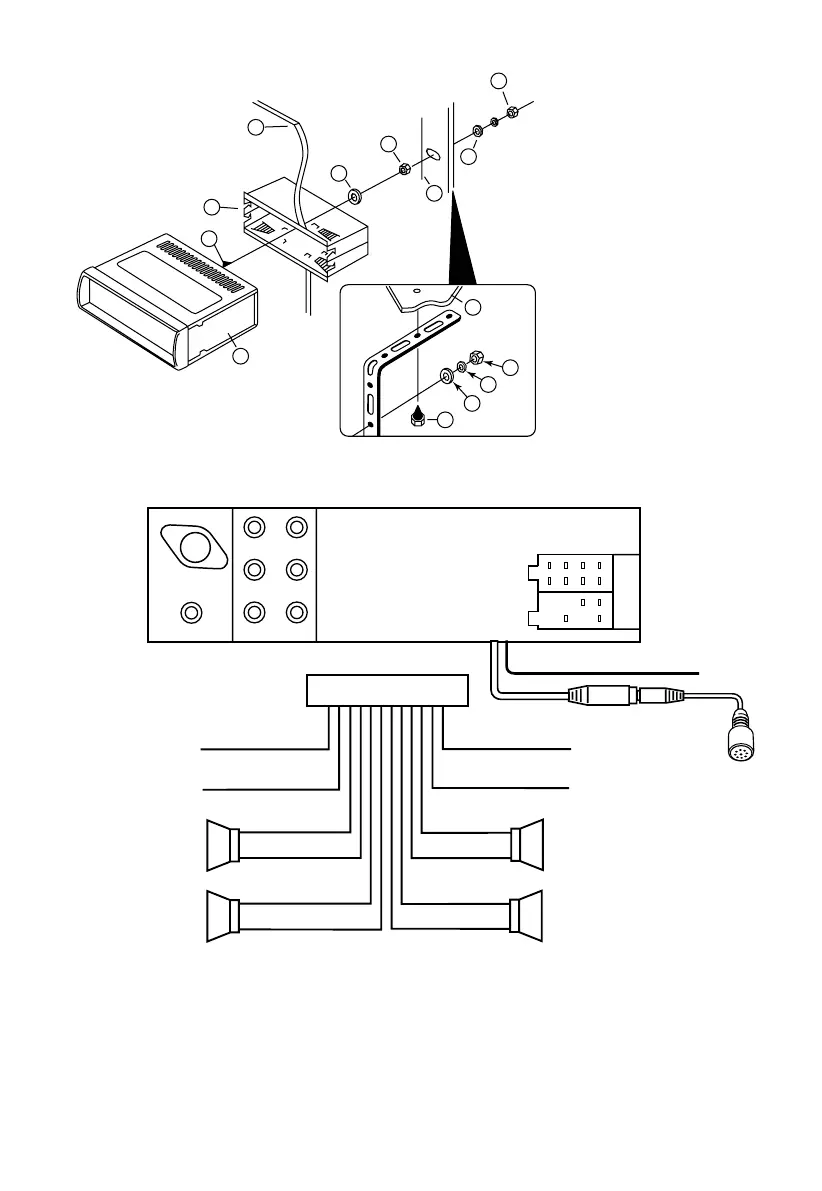
1. UNIT
2. RELEASE CASE
3. DASH
4. HEX NUT
5. LOCK WASHER
6. PLAIN WASHER
7. CAR BODY
8. REAR SUPPORT STRAP
9. TAPPING SCREW
10. M5 X 15 HEX BOLT
TO SUPPORT THE UNIT
WIRE CONNECTION
Maintenance
FUSE REPLACEMENT
If a fuse blows, check all power connections and replace the fuse. If the fuse blows again there may be
an electronic or wiring fault. In this case, consult your nearest service centre.
Warning
Use the specied amperage fuse for each lead. Use of a higher amperage fuse may cause serious
damage and void the warranty.
Dashboard
SUB WOOFER
L (WHITE) R (RED)
ANTENNA
CONNECTOR
ISO CONNECTOR
L (WHITE) R (RED)
L (WHITE) R (RED)
B
A
GREY +
GREY/BLACK –
FRONT
RIGHT
SPEAKER
VIOLET +
VIOLET/BLACK –
REAR
RIGHT
SPEAKER
FRONT
LEFT
SPEAKER
REAR
LEFT
SPEAKER
+ WHITE
– WHITE/BLACK
+ GREEN
– GREEN/BLACK
ISO A/B PLUG
POWER
ANTENNA
BLUE
IGNITION SWITCH (B+)
RED
MEMORY
YELLOW
BACK UP
BLACK
GROUND (–)
LINE IN
LINE OUT
(REAR)
LINE OUT
(FRONT)
BLUETOOTH ANTENNA
CONNECT TO
EXTERNAL MICROPHONE

Related product manuals