10
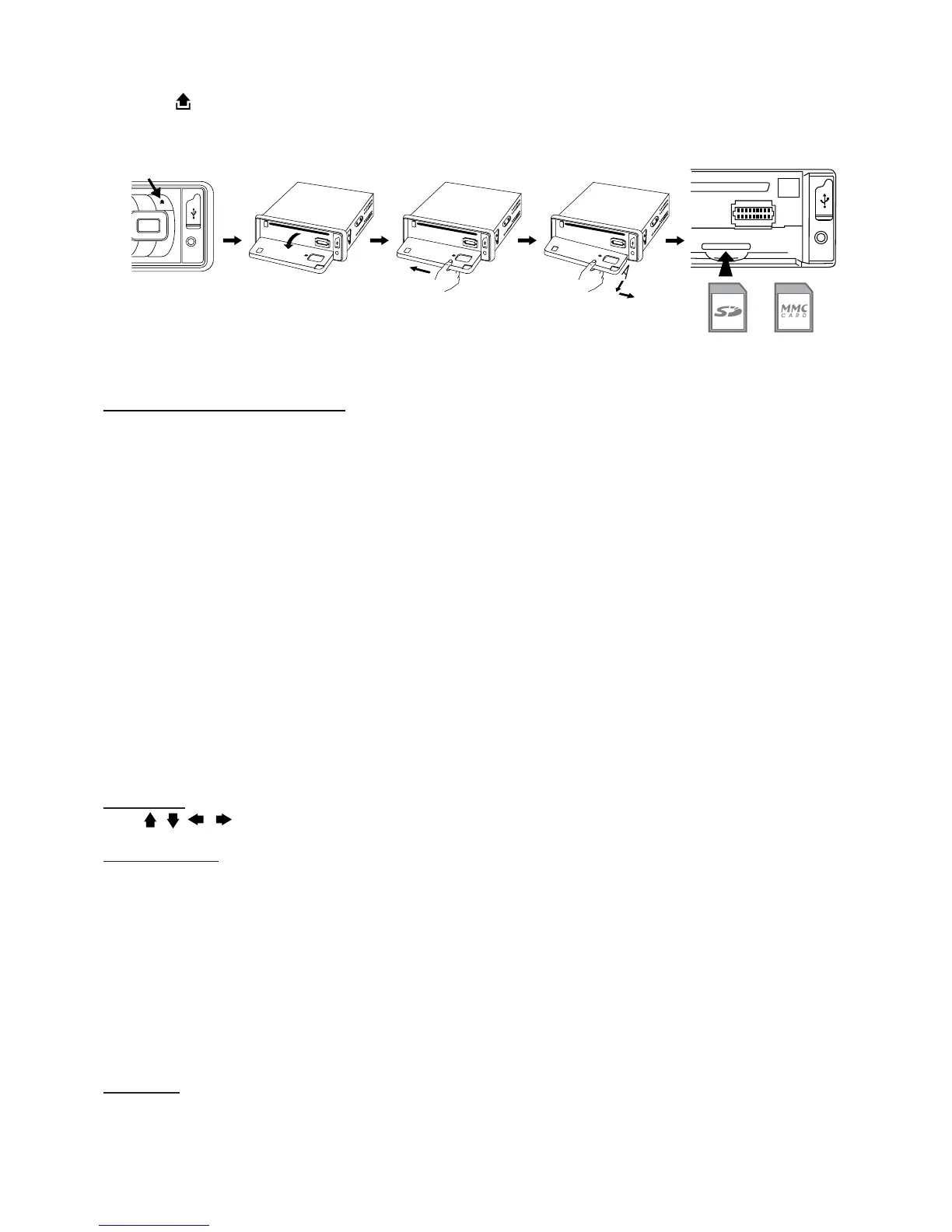
SD/MMC Card Input
Support MP3/WMA ID3 format music only.
1. Press
REL button and the the front panel will open.
2. Detach the panel by pulling it towards you.
3. Carefully insert the SD/MMC card into the slot. Close the front face panel. Unit automatically starts play
-
back.
Front USB Port
Using USB cable to connect Your Portable MP3 Player.
* IMPORTANT INFORMATION:
BECAUSE OF THE GREAT VARIETY OF PRODUCTS WITH USB, SD AND MMC CARD PORTS AND THEIR
SOMETIMES QUITE MANUFACTURER-SPECIFIC FUNCTIONS WE CAN NEITHER GUARANTEE THAT
ALL DEVICES WILL BE RECOGNIZED NOR THAT ALL OPERATING OPTIONS THAT ARE POSSIBLE IN
THEORY WILL ACTUALLY WORK
Front Aux In
The front “AUX IN” input jack allows easy connection of Portable Media and other digital MP3 Players.
PLAYING DVD/VIDEO CD/MP4
Playback
1. Insert a disc. When the disc offers a menu, that menu is displayed. When a disc is already inserted, press
MODE to switch to disc mode.
2. On DVDs and video CDs with playback control (PBC), menu screens may appear automatically. If this
happens, perform the operation described below to start playback.
CAUTION: Make sure that the Video TV system setting (PAL/NTSC etc) corresponds to the disc being
played. When unsure, set to “Auto”. Improper setup of the TV system may cause the video to stop/skip/pause
playing although audio might seem unaffected. TV settings can be adjusted using the SETUP feature of the
remote control. Refer to “SETTING UP THE DVD PLAYER” section.
DVD menu
Press , , , to select the desired item, then press Enter.
Video CD menu
Use the preset keys (“0” to “9”) to select the desired number, then press Enter. The menu screen does not
appear when the PBC function is turned off. In this case, press and hold button to turn on PBC feature
Turning PBC ON/OFF (VCD only)
PBC (Playback Control) is a feature found on VCD 2.0 and SVCD 1.0. PBC allows control of the playback
and the possibility of interaction with the user through the remote control or some other input device available.
When ON, the player will not auto start after inserting a disc because time is required to select program etc. If
OFF, the player will auto play the program on disc.
1. To turn ON PBC function, press PBC on the remote control. To turn OFF, press the button again.
Note: Not all VCD/SVCD discs have PBC functions.
Repeat Playback
FOR VCD
1. Press RPT on the remote control during playback.
2. Every time this button is pressed, the unit switches to the following settings:



 To Next Page