AXISF44DualAudioInput
Howtoinstalltheproduct
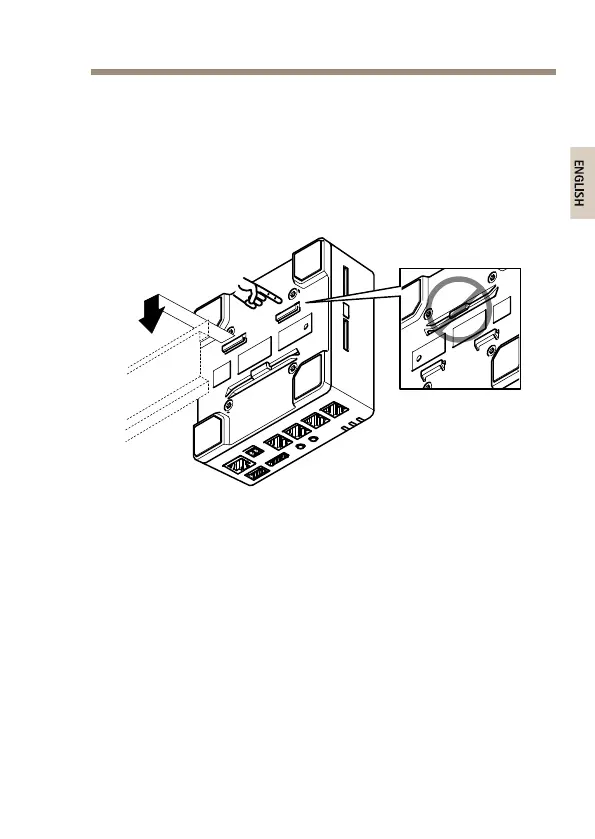
ThemainunitcanbeplacedonatabledesktopormountedonaDIN
rail.Tofacilitateroutingthecablesfromthetoporsideremovethe4
screws(TorxT20)andsuitablyrealignthebottomplateundertheunit(see
Hardwareoverviewonpage6).Seewww.axis.comforoptionalaccessories.
1.Ifrequired,presstoreleasethedummySDcardandinsertan
SDmemorycardintheSDmemorycardslot.
2.Attachthenetworkcabletoconnectthemainunittothe
network.
3.ConnectthesensorunittothemainunitwiththeRJ12cable.
4.Ifrequired,connectanAC/DCpowersupplytothepower
connector.
5.Ifrequired,attachtheI/Ocableusingthe6–pinI/Oconnector
blocktoconnectexternalinput/outputdevices.
6.Ifrequired,attachtheaudiocablestoconnectanactive
speaker/externalmicrophone.
7



 To Next Page