AXISM3203NetworkCamera
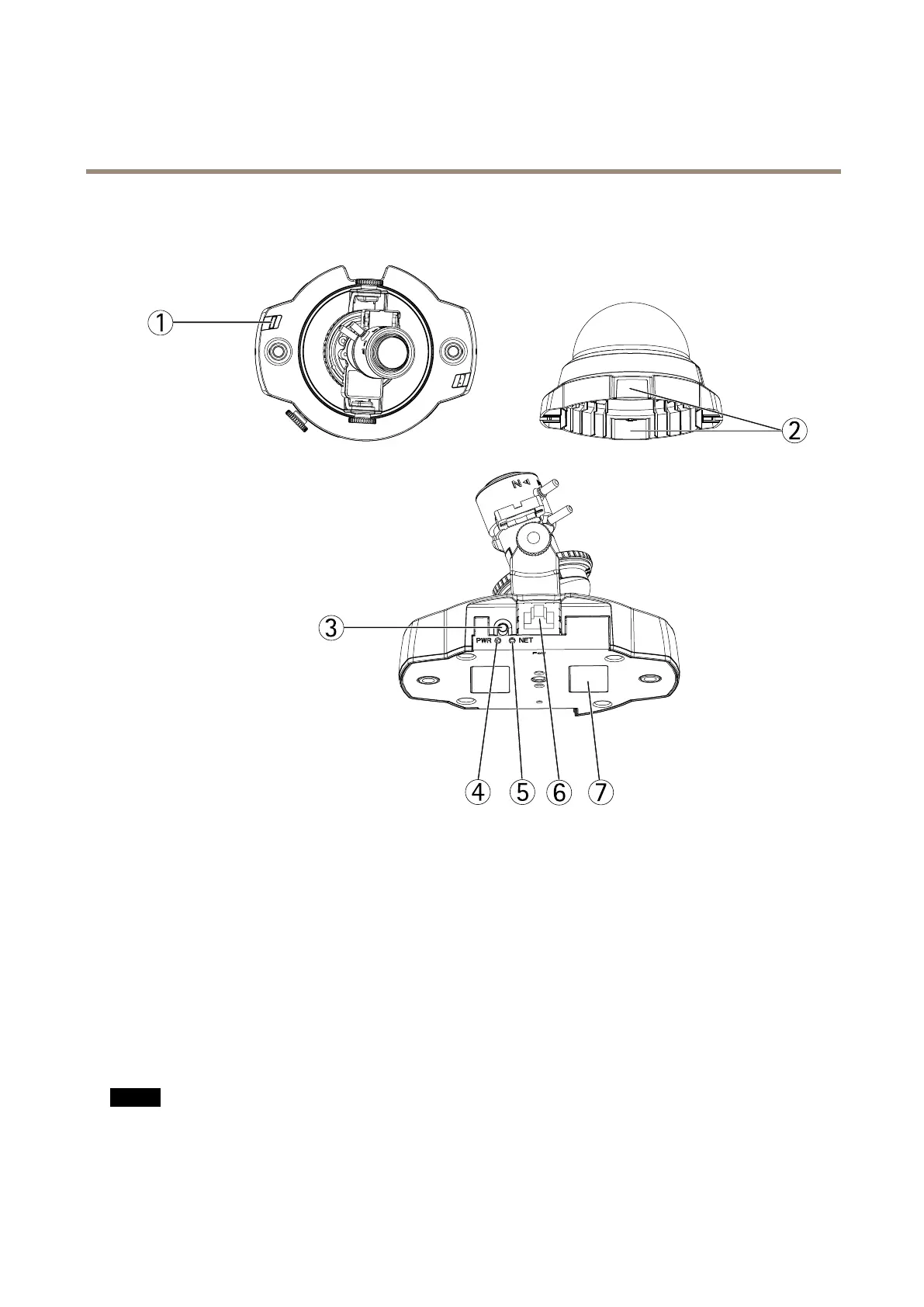
HardwareOverview
HardwareOverview
1
StatusindicatorLED
2
Coverplates
3
Controlbutton
4
PowerindicatorLED
5
NetworkindicatorLED
6
Networkconnector
7
ProductIDandSerialnumber(S/N)
ConnectorsandButtons
Fortechnicalspecications,seepage51.
NetworkConnector
RJ45EthernetconnectorwithPoweroverEthernet(PoE).
NO NO
NO
TICE TICE
TICE
Theproductshallbeconnectedusingashieldednetworkcable(STP).Allcablesconnectingtheproducttothenetworkshall
beintendedfortheirspecicuse.Makesurethatthenetworkdevicesareinstalledinaccordancewiththemanufacturer’s
instructions.Forinformationaboutregulatoryrequirements,seeElectromagneticCompatibility(EMC)onpage2.
5



 To Next Page