AXISM7010VideoEncoder
AccessingtheProduct
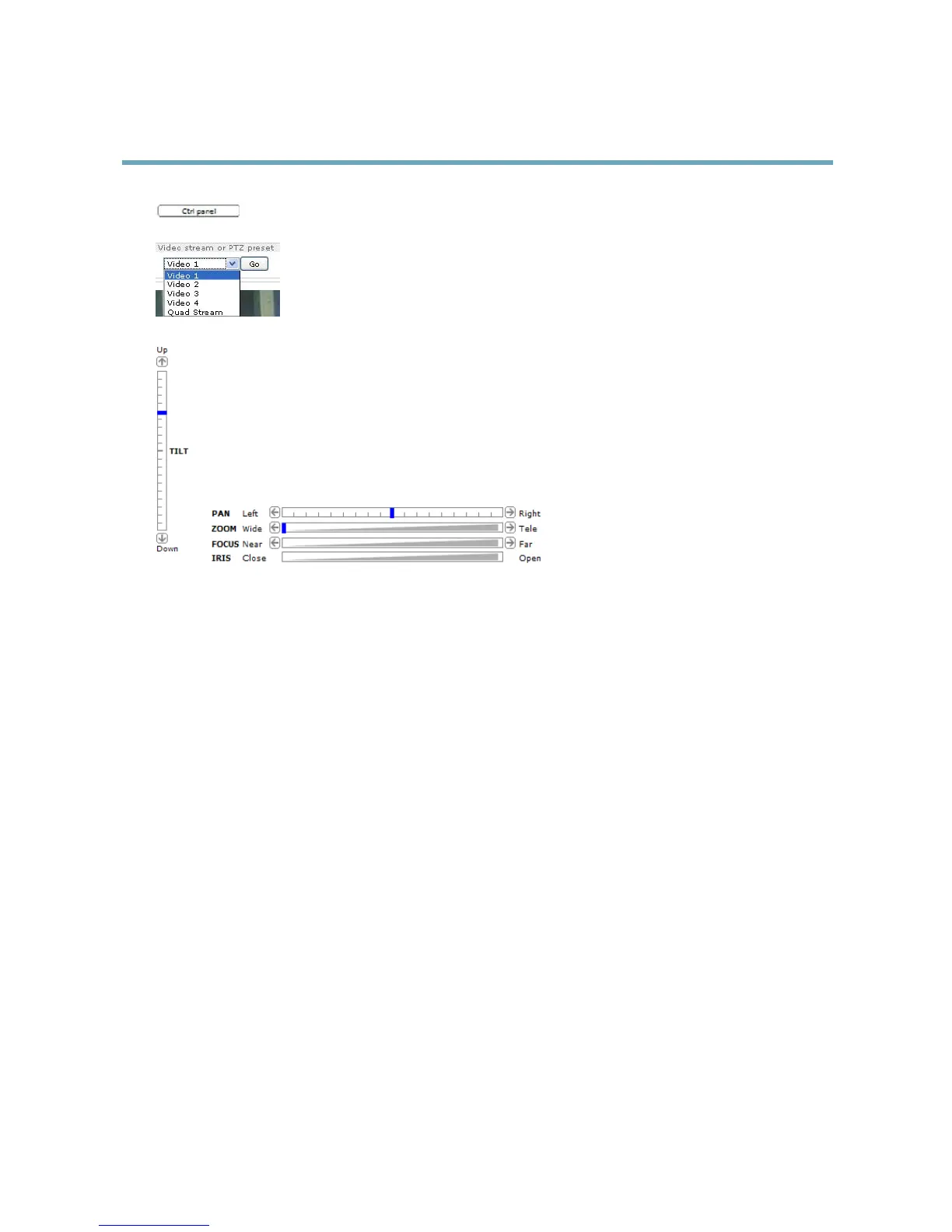
ClicktheCtrlpanelbuttontoopenthePTZcontrolpanelwhichprovidesadditionalPTZcontrols.
User-denedbuttonscanalsoappearintheControlpanel.SeeControls,onpage23.
SelectthevideochanneloraPTZpresetpositiontosteerthecameraviewtothesavedposition.See
PresetPositions,onpage22.
PanandTiltbars–Usethearrowstopanandtiltthecameraview,orclickonapositiononthebartosteerthe
cameraviewtothatposition.
Zoombar–Usethearrowstozoominandout,orclickonapositiononthebartozoomtothatposition.
Focusbar–Usethearrowstofocusthecamera,orclickonapositiononthebartosetthefocusposition.Usingthe
focusbarwilldisabletheproduct’sautofocus.Tore-enable,usethePTZcontrolpanelwhichisopenedbyclicking
theCtrlpanelbutton(seeabove).
Irisbar–Clickonapositionontheirisbartochangethedegreetowhichtheirisisopened.Thiswilldisablethe
product’sautoiris.Tore-enable,usethePTZcontrolpanelwhichisopenedbyclickingtheCtrlpanelbutton(seeabove).
ThePTZcontrolscanbedisabledunderPTZ>Advanced>Controls,seeControls,onpage23.
10



 To Next Page