AXISP1214NetworkCamera
Video
Video
ItispossibletocongurethefollowingvideofeaturesinyourAxisproduct:
•Videostream.Seepage15.
•Streamproles.Seepage16.
•Camerasettings.Seepage17.
•Overlayimage.Seepage17.
•Privacymask.Seepage18.
VideoStream
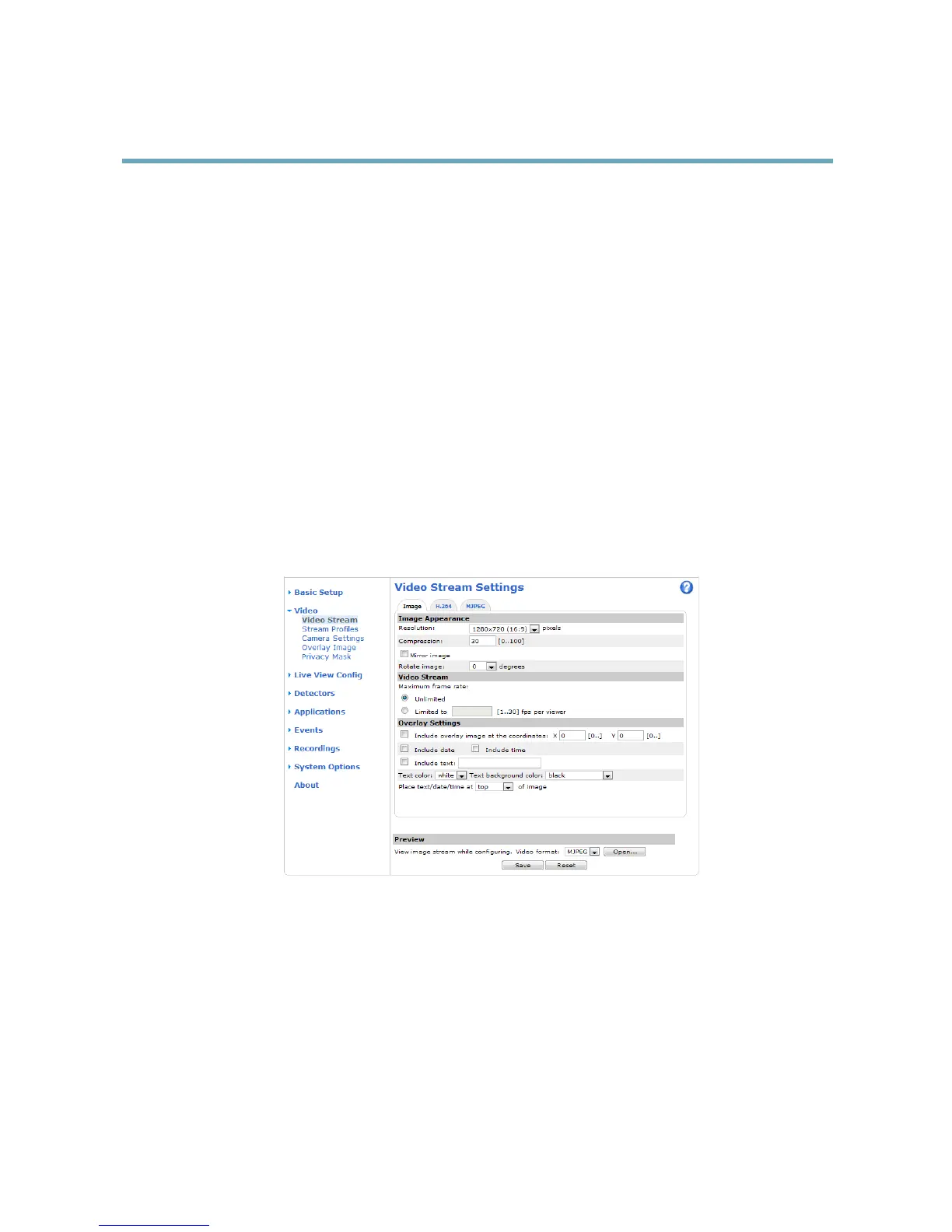
YoucandenethefollowingvideostreamsettingsfromVideo>VideoStream:
•Image.Seepage16.
•H.264.Seepage16.
•MJPEG.Seepage16.
PixelCounter
Thepixelcountershowsthenumberofpixelsinanareaoftheimage.Thepixelcounterisusefulinsituationswherethereisa
requirementthattheimageisacertainsize,forexampleinfacerecognition.
Thepixelcountercanbeaccessedfrom:
•Video>VideoStream.UnderPreview,clickOpenandselecttheShowpixelcounteroptiontoenabletherectangle
intheimage.Usethemousetomoveandresizetherectangle,orenterthenumberofpixelsintheWidthandHeight
eldsandclickApply.
•TheLiveViewpageinInternetExplorerinWindows.Right-clickintheimageandselectPixelcounter.Usethemouse
tomoveandresizetherectangle.
15



 To Next Page