AXISP5635-EPTZMkIIDomeNetworkCamera
RepaintingtheCamera
RepaintingtheCamera
Thetopcovercanberepaintedtomatchtheinstallationenvironment.
ThematerialusedinthecoversisASA+PC.Usepaintsuitableforthismaterial.
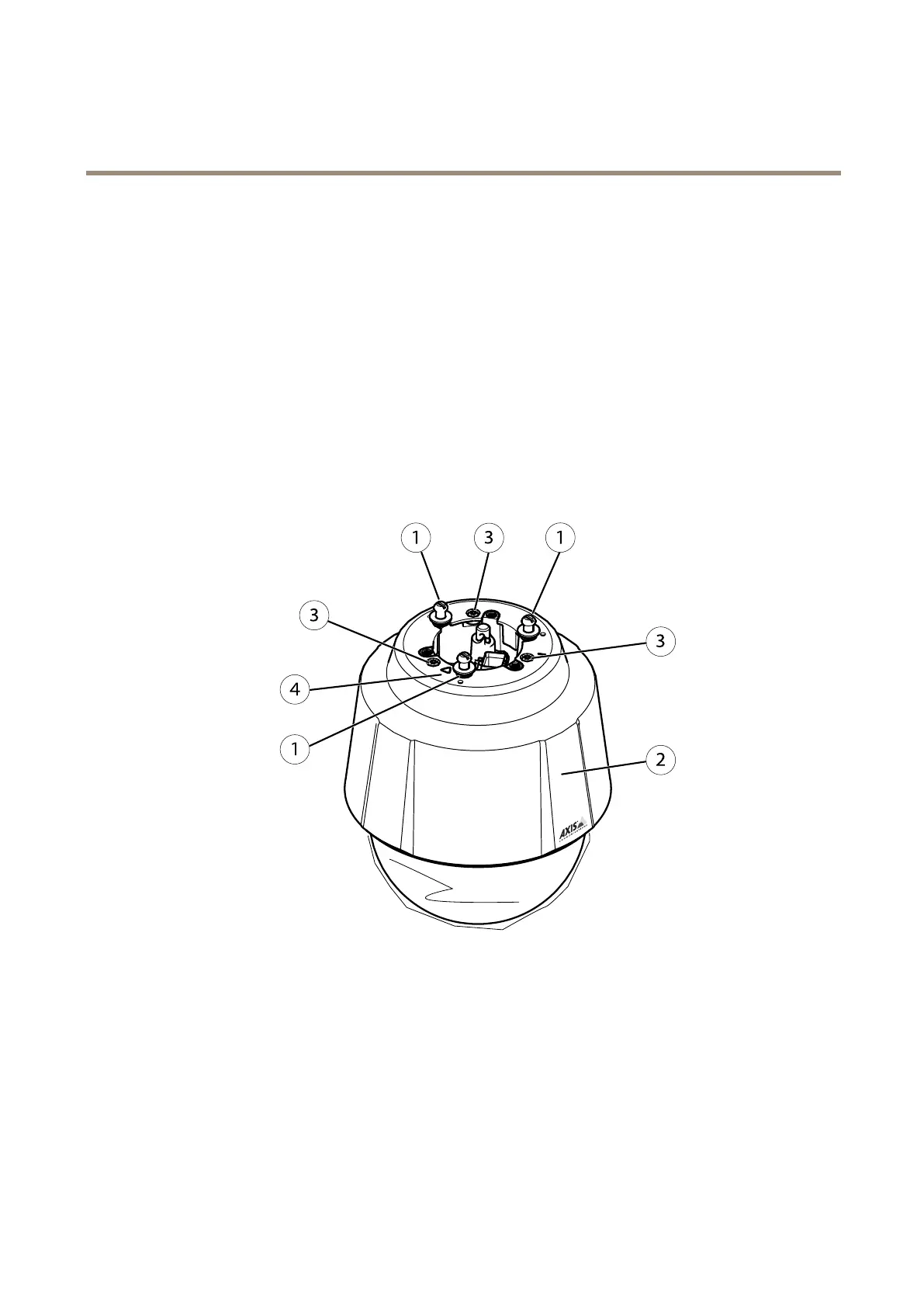
1.Removethethreemountingscrews.
2.Removethethreetopcoverscrews(T20)andremovethetopcover.
3.Repaintthetopcover.
4.Assemblethetopcover.Usethetriangularmarking(4)topositionitcorrectly.
5.Fastenthetopcoverscrews(3)withatorqueof2.5Nm(T20).
6.Fasteneachofthemountingscrews(1)equally,withatorqueof2.5Nmatthepositionsmarkedwithdots.Itisvery
importanttotightenallthescrewscarefullytopreventthecamerafromvibratingduringoperation.
1
Mountingscrews(3)
2
Topcover
3
Topcoverscrews(3)
4
Guidekey
62













 To Next Page