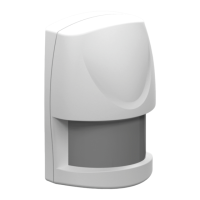
AXIST8341PIRMotionSensor
Troubleshooting
Troubleshooting
Ifyoucan’tndwhatyou’relookingforhere,trythetroubleshootingsectionataxis.com/support
ThetablebelowexplainsthestatusintheZ-WavecontrolleraswellastheLEDindicationonthedevice.
Action/Status
DescriptionLEDindication
NonodeIDTheZ-Wavecontrollercouldnotndthedeviceand
didnotprovideanodeID.
2secondson,2secondsoff,for2
minutes.
1.Pressthetamperswitch3timeswithin1.5
secondstoputthedeviceintoexclusionmode.
2.Within1secondofstep1,pressthetamper
switchagainandholduntiltheLEDisoff(about
5seconds).
FactoryReset
(Thisshouldonlybeused
whenthecontrollerisnot
responding.)
3.NodeIDisexcluded.Thedevicerevertstofactory
defaultstateandwillbeinauto-inclusionmodefor
4minutes.
2secondson,2secondsoff,for2
minutes.
Failureorsuccessinincluding/excludingtheIDcanbeviewedonaZ-Wavecontroller.
Thetablebelowlistssometypicalproblemsencountered:
Symptom
PossiblecauseRecommendation
Cannotperforminclusion
andassociation.
1.Thedeviceisstillconnected,orhas
accidentallybeenincludedinaprevious
network.
2.TheenteredPINcodeisincorrect.
3.Thebatteryhasrunoutofpower.
4.Batterypolarityisreversed.
1.Excludethedevicebefore
includingitagain.
2.Makesureyouhaveentered
thecorrectPINcode
3.Replacethebattery.
4.Retthebatterywiththe
correctpolarity.
Cannotcontrolthe
connectedmodules.
1.Thedeviceisstillconnected,orhas
accidentallybeenincludedinaprevious
network.
2.Thebatteryhasrunoutofpower.
1.Excludethedevicebefore
includingitagain.
2.Replacethebattery.
Thedetectorisnot
functioningproperly.
1.Thedeviceisstillconnected,orhas
accidentallybeenincludedinaprevious
network.
2.Thebatteryhasrunoutofpower.
3.Thedetectorismountedabovearadiator
orheater.
1.Excludethedevicebefore
includingitagain.
2.Replacethebattery.
3.Removethesourceof
interferenceorreposition
thedetector.
Theeventlistisnotworking
properly.
1.Thedeviceisstillconnected,orhas
accidentallybeenincludedinaprevious
network.
2.Thecontroller’srmwareisoutdated.
3.Thebatteryhasrunoutofpower.
1.Excludethedevicebefore
includingitagain.
2.Makesurethecontrollerhas
thelatestrmware.
3.Replacethebattery.
Note
Forbestresults,excludethedevicebeforestartingtheinclusionprocess.Formoredetailsseetheinstallationguide.
12


 To Next Page