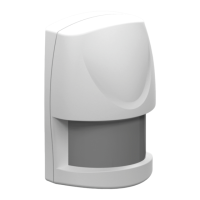
AXIST8341PIRMotionSensor
HowtotesttheZ-Wavedevice
HowtotesttheZ-Wavedevice
Warm-up
Itwilltakethemotionsensorapproximately2minutestowarmupafterthebatteryisinserted.DuringthisperiodtheLEDbehindthe
lenswillturnon.WhentheredLEDturnsoff,thewarm-upprocedureiscompleteandthedeviceisreadytodetect.
•ThiswillnotaffecttheInclusion/Exclusionprocess.
•Afteryouremovethebattery,wait5secondsbeforeyouretit.
Quicktest
1.Ifthetamperswitchisnotpressedafterinclusion,thedevicewillenter“Testmode”,toallowyoutotestthedevice
beforeitismountedonthewall.
2.Ifmovementisdetectedduring“Testmode”,theLEDonthemotionsensorwilllightuponce,indicatingthattheunitis
workingproperly.There-triggertimeisabout5seconds.
3.Toexit“Testmode”andenternormalmode,pressthetamperswitchformorethan10seconds.
4.WhenthePIRistriggeredduringnormalmode,theredLEDwillnotlightup,andre-triggertimeisbasedonasetvalue.
Note
Important!MakesureyoucreateaZ-Wavecontrollereventthatislinkedtothebatterystatussignal.Inthiswayyouwill
getanoticationoraLEDindicationwhenadevicestartstoexperiencelowbatterypower.
6


 To Next Page